Unlock a world of possibilities! Login now and discover the exclusive benefits awaiting you.

- Qlik Community
- :
- All Forums
- :
- QlikView App Dev
- :
- Re: nested if
- Subscribe to RSS Feed
- Mark Topic as New
- Mark Topic as Read
- Float this Topic for Current User
- Bookmark
- Subscribe
- Mute
- Printer Friendly Page

- Mark as New
- Bookmark
- Subscribe
- Mute
- Subscribe to RSS Feed
- Permalink
- Report Inappropriate Content
nested if
Can someone please help me with this nested if condition in the script.
I want to categorize these days into four sub groups.
i.e., >10 , >31, >61, >91
I wrote the if condition but its failing in some cases.
if([Days Past Due] >91, '>91',
if([Days Past Due] ,'>61',
if([Days Past Due] ,'>31',
if([Days Past Due] >10 ,'>10',null())))) as [Days Past Due Range],
- Tags:
- new_to_qlikview

 swuehl
- Mark as New
- Bookmark
- Subscribe
- Mute
- Subscribe to RSS Feed
- Permalink
- Report Inappropriate Content
I think you are missing some comparisons in conditions:
if([Days Past Due] >91, '>91',
if([Days Past Due] >61 ,'>61',
if([Days Past Due] >31 ,'>31',
if([Days Past Due] >10 ,'>10',null())))) as [Days Past Due Range],
swuehl
- Mark as New
- Bookmark
- Subscribe
- Mute
- Subscribe to RSS Feed
- Permalink
- Report Inappropriate Content
Last message sent to moderation:
Check your conditions, you are missing comparisons >61 resp >31 in second and third condition.
- Mark as New
- Bookmark
- Subscribe
- Mute
- Subscribe to RSS Feed
- Permalink
- Report Inappropriate Content
Hi,
Ssorry about the typo, but the requirement is, if the [Days Past Due] value is 32. It should come under the '>10' as well as '>31' bucket. Which won't happen as per the above if condition.

 MarcoWedel
- Mark as New
- Bookmark
- Subscribe
- Mute
- Subscribe to RSS Feed
- Permalink
- Report Inappropriate Content
please create a complete input/output specification instead of opening new threads for the same question.
thanks
regards
Marco
 maxgro
- Mark as New
- Bookmark
- Subscribe
- Mute
- Subscribe to RSS Feed
- Permalink
- Report Inappropriate Content
like this?
or 4 different fields (>10 field, >31 field, etc...)?
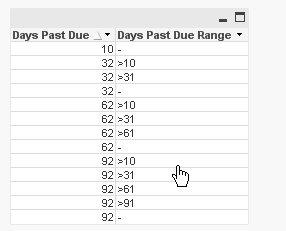
d:
load * inline [
Days Past Due
10,
32,
62,
92
];
t:
load
[Days Past Due],
if([Days Past Due] > 91, '>91') as [Days Past Due Range]
resident d;
load
[Days Past Due],
if([Days Past Due] > 61, '>61') as [Days Past Due Range]
resident d;
load
[Days Past Due],
if([Days Past Due] > 31, '>31') as [Days Past Due Range]
resident d;
load
[Days Past Due],
if([Days Past Due] > 10, '>10') as [Days Past Due Range]
resident d;
load
[Days Past Due],
if([Days Past Due] <= 10, null()) as [Days Past Due Range]
resident d;
DROP Table d;