Unlock a world of possibilities! Login now and discover the exclusive benefits awaiting you.

- Qlik Community
- :
- All Forums
- :
- QlikView App Dev
- :
- number of rows in a straight table_ urgent
- Subscribe to RSS Feed
- Mark Topic as New
- Mark Topic as Read
- Float this Topic for Current User
- Bookmark
- Subscribe
- Mute
- Printer Friendly Page

- Mark as New
- Bookmark
- Subscribe
- Mute
- Subscribe to RSS Feed
- Permalink
- Report Inappropriate Content
number of rows in a straight table_ urgent
Hello Community,
I have a straight table with 9 dimensions and four expressions column.
Out of the 9 dimensions, 3 are calculated dimensions.
I wrote a macro:
sub temp
set obj = ActiveDocument.GetSheetObject("CH873")
ActiveDocument.Variables("vNoOfRows").SetContent obj.GetRowCount, true
end sub
This macro is giving me the current row count.
But my user does not permit the use of macros, hence I will have to write expressions in a text box to display the number or rows.
The expression I wrote is:
count(distinct(dim1 & dim2 & calculated dim 3 & calculated dim 4 & dim 5 & dim 6 & dim 7 & calculated dim 8 & dim 9))
This is not giving me a correct value.
Kindly help me write an expression for the same purpose
Regards,
Vishal
- Mark as New
- Bookmark
- Subscribe
- Mute
- Subscribe to RSS Feed
- Permalink
- Report Inappropriate Content
I had written the expression : NoOfRows(total)
in the caption/header of the table. It showed me 1
Where do you usually write this expression, when it worked for you?
- Mark as New
- Bookmark
- Subscribe
- Mute
- Subscribe to RSS Feed
- Permalink
- Report Inappropriate Content
In the normal expression. For example, i have here 2 dimensions, and I use only the NoOfRows(total) expression:
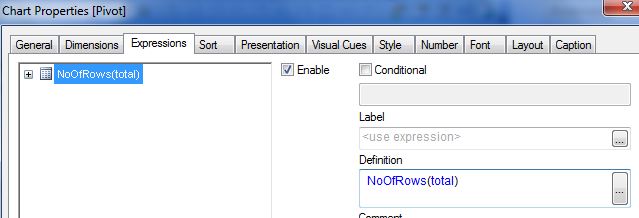
For this result:
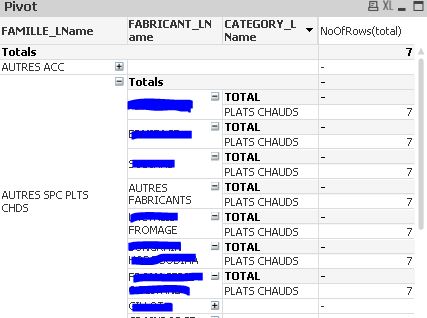
Fabrice
- Mark as New
- Bookmark
- Subscribe
- Mute
- Subscribe to RSS Feed
- Permalink
- Report Inappropriate Content
But I want to use it in a text box and not include it as an expression.
Also, does this count the null values also irrespective of whether we suppress the null values or not?
- Mark as New
- Bookmark
- Subscribe
- Mute
- Subscribe to RSS Feed
- Permalink
- Report Inappropriate Content
NoOfRows(total) counts the number of lines (the null values are removed)
For a textbox, you cannot use it (sorry I did not catch that) because it is an inter record function.
Fabrice
- Mark as New
- Bookmark
- Subscribe
- Mute
- Subscribe to RSS Feed
- Permalink
- Report Inappropriate Content
Thank you anyways Aunez.
I really appreciate your help. Let me try several other things. If I get across anything which appears to be the solution, I will post it right away.
Hey, just one last question, when I used the NoOfRows(total) in the expression it gave the same value for all rows, which I understand.
However I had written a macro to calculate the number of rows :
sub temp
set obj = ActiveDocument.GetSheetObject("CH873")
ActiveDocument.Variables("vNoOfRows").SetContent obj.GetRowCount, true
end sub
Both the methods are returning different value. NoOfRows(total) is giving me a greater number than that of macro.
Can u explain why?
Regards,
Vishal
- Mark as New
- Bookmark
- Subscribe
- Mute
- Subscribe to RSS Feed
- Permalink
- Report Inappropriate Content
It is returning 0 
- Mark as New
- Bookmark
- Subscribe
- Mute
- Subscribe to RSS Feed
- Permalink
- Report Inappropriate Content
Take care:
NoOfrows(total) returns the number of basic lines (last dimension drilled) displayed in the table. So according to the drill, you will NOT get the same result.
Your macro works quite the same : the result differs according to the drill. It counts all the lines of the table, including the total lines (the lines for the dimensions 1, 2, 3 ...) and the header line.
So, I get a result by macro greater than with the function NoOfRows().
Fabrice

 jvitantonio
- Mark as New
- Bookmark
- Subscribe
- Mute
- Subscribe to RSS Feed
- Permalink
- Report Inappropriate Content
Hi Vishal,
Would you mind giving this a try:
=count(aggr(if(sum(Value)>0, sum(Value),Null()), Dim1,Dim2, CalcDim3, CalcDim4,Dim5,Dim6,Dim7, CalcDim8, Dim9)
Change sum(Value) for your expression.
I hope this helps.
JV
BI Experience | A place to share our Business Intelligence experiences
- Mark as New
- Bookmark
- Subscribe
- Mute
- Subscribe to RSS Feed
- Permalink
- Report Inappropriate Content
Thanx Fabrice!
But I guess you understood me wrong. It is the other way round.
The NoofRows(total) is giving a number greater than that of the macro.
Secondly the number is way greater than the number shown by the macro and not just by 1(the total line).
- Mark as New
- Bookmark
- Subscribe
- Mute
- Subscribe to RSS Feed
- Permalink
- Report Inappropriate Content
Hey Q L,
Can I use If statements as my calculated dimension. The reason I ask is when I use 'if 'statement in the expression you suggested it is giving me 0.
But when I am not using an if statement it is returning a value which is not correct probably because I have not been able to include conditional dimension in the expression you suggested.
Thanks!
Vishal