Unlock a world of possibilities! Login now and discover the exclusive benefits awaiting you.

- Qlik Community
- :
- All Forums
- :
- QlikView App Dev
- :
- Re: percentage in pie chart and remove prefix in b...
- Subscribe to RSS Feed
- Mark Topic as New
- Mark Topic as Read
- Float this Topic for Current User
- Bookmark
- Subscribe
- Mute
- Printer Friendly Page

 mandilicious
- Mark as New
- Bookmark
- Subscribe
- Mute
- Subscribe to RSS Feed
- Permalink
- Report Inappropriate Content
percentage in pie chart and remove prefix in bar chart
Hi All
1) Please assist I need omit CBU_BY in my bar graph how do I do that.
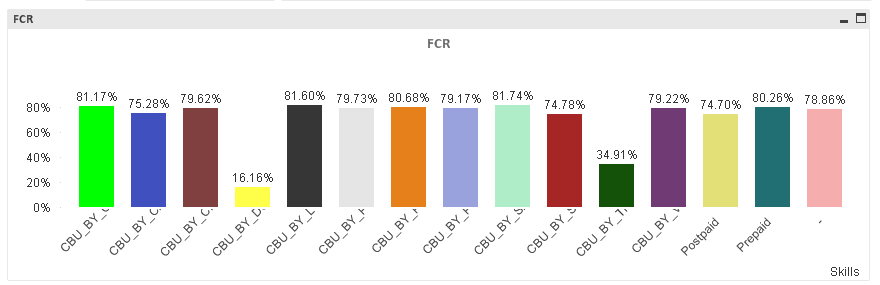
2) I need to display percentage of this number in my pie chart please help
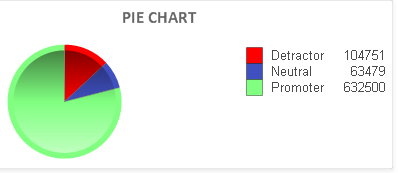
- « Previous Replies
-
- 1
- 2
- Next Replies »
mandilicious
- Mark as New
- Bookmark
- Subscribe
- Mute
- Subscribe to RSS Feed
- Permalink
- Report Inappropriate Content
Hi Arvind654
I am not using any dimension please see my expression(s) for pie chart
sum(Detractor, Neutral and Promoter)
Thanks
mandilicious
- Mark as New
- Bookmark
- Subscribe
- Mute
- Subscribe to RSS Feed
- Permalink
- Report Inappropriate Content
Hi Rumpam
What do you mean by below am confused elaborate please.
Sum(yourFIeld)/Sum(TOTAL yourfield)
Thanks

 MK9885
- Mark as New
- Bookmark
- Subscribe
- Mute
- Subscribe to RSS Feed
- Permalink
- Report Inappropriate Content
You're using sum(Detractor, Neutral and Promoter) as your expression?
Or it was just an example?
To get different % I'd prefer making a single expression but not 3 different expressions.
I do not know if there is a better way to do it.
But can you actually give your expression, not a metaphor example.

- Mark as New
- Bookmark
- Subscribe
- Mute
- Subscribe to RSS Feed
- Permalink
- Report Inappropriate Content
Hi Manti,
Could you please look into it.
I have tried the basic example with data.if you want to show the percentage then in number tab click on show in percent % and in the expression tab you can check the values on data points also mark the relative option.
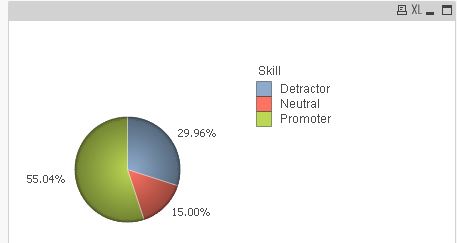
thanks,
YJ
- Mark as New
- Bookmark
- Subscribe
- Mute
- Subscribe to RSS Feed
- Permalink
- Report Inappropriate Content
Befor applying to the Replace function to Claculated dimension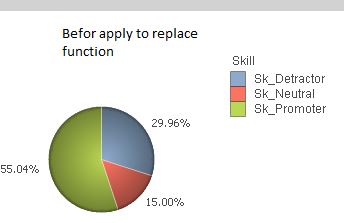
Apply Conditon : =Replace(Skill,'Sk_','') in the calculated dimension in the dimension tab.
thanks,
YJ
mandilicious
- Mark as New
- Bookmark
- Subscribe
- Mute
- Subscribe to RSS Feed
- Permalink
- Report Inappropriate Content
Hi Yogesh
Thank you very much for your respond
I get below when I do as you say.
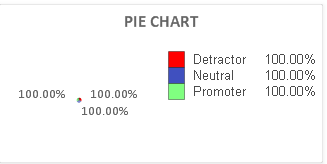
below is my expressions tab
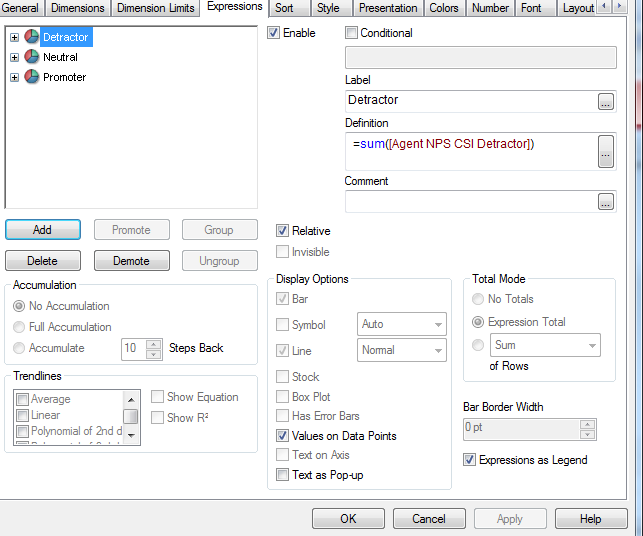
Please attached your solution.
- Mark as New
- Bookmark
- Subscribe
- Mute
- Subscribe to RSS Feed
- Permalink
- Report Inappropriate Content
Hi Manti,
I have used below sample example,
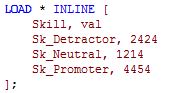
Dimension: Skill
Expression: Sum of Val
- « Previous Replies
-
- 1
- 2
- Next Replies »