Unlock a world of possibilities! Login now and discover the exclusive benefits awaiting you.

- Qlik Community
- :
- All Forums
- :
- QlikView App Dev
- :
- Re: Map plot
- Subscribe to RSS Feed
- Mark Topic as New
- Mark Topic as Read
- Float this Topic for Current User
- Bookmark
- Subscribe
- Mute
- Printer Friendly Page

- Mark as New
- Bookmark
- Subscribe
- Mute
- Subscribe to RSS Feed
- Permalink
- Report Inappropriate Content
pilot
Hi all,
price type sold
based on the printers/laptops range the size on the bubbles in the map should be increased .. i.e if we select low range value in the printers/laptop range filter the value should highight
please require your suggestions. attached are the datasource and app file
Accepted Solutions

.png "Former Employee") JonnyPoole
JonnyPoole
- Mark as New
- Bookmark
- Subscribe
- Mute
- Subscribe to RSS Feed
- Permalink
- Report Inappropriate Content
Also, i noticed your color legend hides colors when selections are made.
To fix that wrap your 'background color' expression with only ( {1} <existing expression> ) as follows. that will ensure the colors are calculated regardless of any user selections
= only( {1}
if(Label= 'Business Partner', Brown(),If(Label= 'Business PC and Print Partner', Red(), if(Label = 'Business PC Partner', LightRed(),
if(Label = 'Business Print Partner',Green(), If(Label = 'CEP Account',Cyan(), If(Label = 'Channel Partner', Black(),
if(Label ='Gold Partner',Blue(),if(Label ='Gold PC and Print Partner',red(), if(Label = 'Gold PC Partner',Yellow(),
if(Label='Gold Print Partner',Blue(), if(Label='Mid-Market Farming Account',Cyan(),if(Label='Mid-Market Hunting Account',Black(),
if(Label='Named Retailer',Green(),if(Label='Other Partner',Black(),if(Label='PC and Print Partner',blue(),
if(Label='PC Partner',red(),if(Label='Platinum Partner',Green(),if(Label='Platinum PC and Print Partner',Cyan(),
if(Label='Platinum_Flag',Yellow(),if(Label='Print Partner',If(Label='Proximity Partner',blue(),
if(Label='Proximity PC and Print Partner',blue(),if(Label='Proximity PC Partner',Brown(),if(Label='Proximity Print Partner',red(),
if(Label='Silver Partner',Green(),if(Label='Silver PC and Print Partner',red(),if(Label='Silver PC Partner',Cyan())))))))))))))))))))))))))))
)
JonnyPoole
- Mark as New
- Bookmark
- Subscribe
- Mute
- Subscribe to RSS Feed
- Permalink
- Report Inappropriate Content
I made some changes. i made the printer range drive the bubble size. what if the 2 ranges are different sizes ... how would you compute the size based on 2 different scales ?
- Mark as New
- Bookmark
- Subscribe
- Mute
- Subscribe to RSS Feed
- Permalink
- Report Inappropriate Content
Hi Jonathan
Thanks for your help
your suggestion is highly helpful.
coming to size ranges.
I need the bubble size to be increased if the range is high , if the range is low the size should be decreased.
if the user clicks on the ranges he would be interested to guess the ranges based on the size of the bubble.
Could you also let me know how to change the map background colour (instead of blue colour, i want black and white)
would be glad to know inputs frm you
JonnyPoole
- Mark as New
- Bookmark
- Subscribe
- Mute
- Subscribe to RSS Feed
- Permalink
- Report Inappropriate Content
Hi wow,
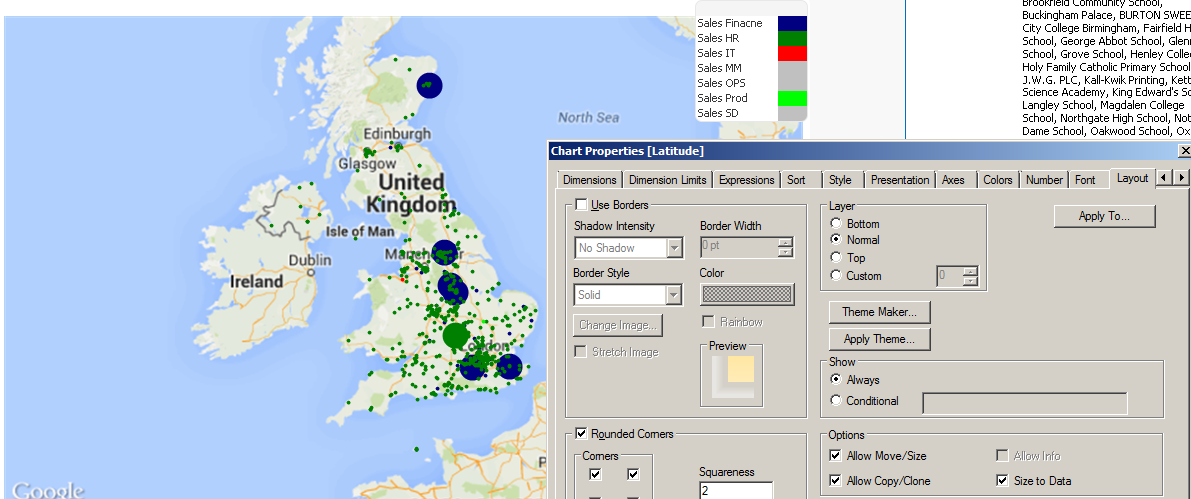
I turned on 'advanced' styling mode in the document properties. This opens up more properties on the layout tab of the chart to turn off the blue border
I also tweaked the bubble size expression (3rd one) to dynamically retrieve the upper range of the number, you'll notice different bubble sizes now. I used some string parsing functions to do that.
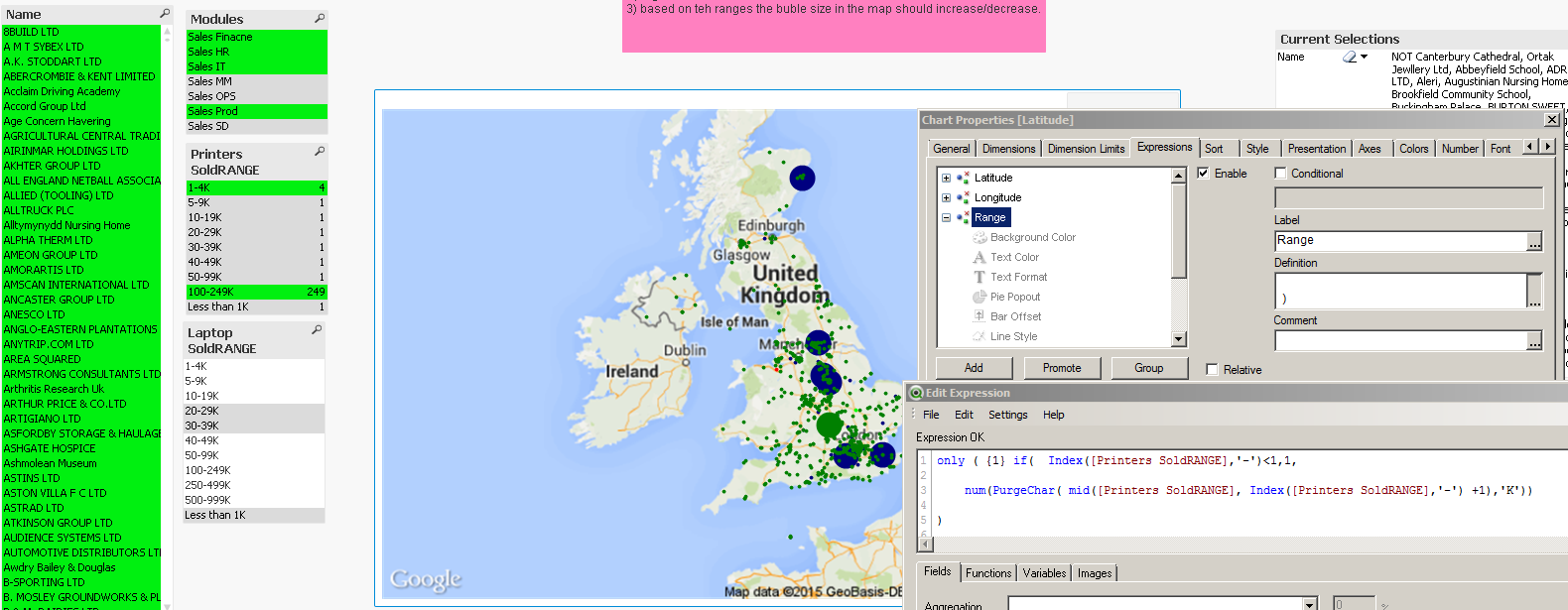
the size is driven off only printers for now.
how would you show the bubble size if i pick a high laptop range and a low printer range ?
- Mark as New
- Bookmark
- Subscribe
- Mute
- Subscribe to RSS Feed
- Permalink
- Report Inappropriate Content
Hi Jonathan
thanks for your time and suggestions.
Could you please help me out on the legend for different colour slection.
- Mark as New
- Bookmark
- Subscribe
- Mute
- Subscribe to RSS Feed
- Permalink
- Report Inappropriate Content
Jonathan
Could you please look help on this? required your suggestions
JonnyPoole
- Mark as New
- Bookmark
- Subscribe
- Mute
- Subscribe to RSS Feed
- Permalink
- Report Inappropriate Content
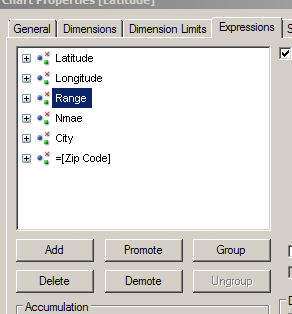
Wow , you need to put the 'Range' expression as the 3rd expression.
To see this more clearly, uncheck the 'advanced' checkbox on the 'expression' tab and it will clearly tell you what each of the expressions are for.

 tschullo
- Mark as New
- Bookmark
- Subscribe
- Mute
- Subscribe to RSS Feed
- Permalink
- Report Inappropriate Content
WOW,
You could use one of your ranges as a bubble size indicator by loading it like I did below.
But you never answered his question as to how you will combine both ranges into one.
When you do, you could used that new combined field as the 3rd expression and it should work for you.
You could also use ApplyMap to assign a specific size (that looks good on the screen) to each Range
UK:
LOAD ID,
Name,
Modules,
Country,
City,
[Zip Code],
Longitude,
Latitude,
[Laptop Sold],
//Num(SubField([Laptop SoldRANGE],'-',1)) as RangeNum,
Dual([Laptop SoldRANGE],Num(SubField([Laptop SoldRANGE],'-',1))) as [Laptop SoldRANGE],
[Printers Sold],
[Printers SoldRANGE]
FROM
[UK_Data.xlsx]
(ooxml, embedded labels, table is Sheet1);
JonnyPoole
- Mark as New
- Bookmark
- Subscribe
- Mute
- Subscribe to RSS Feed
- Permalink
- Report Inappropriate Content
Also, i noticed your color legend hides colors when selections are made.
To fix that wrap your 'background color' expression with only ( {1} <existing expression> ) as follows. that will ensure the colors are calculated regardless of any user selections
= only( {1}
if(Label= 'Business Partner', Brown(),If(Label= 'Business PC and Print Partner', Red(), if(Label = 'Business PC Partner', LightRed(),
if(Label = 'Business Print Partner',Green(), If(Label = 'CEP Account',Cyan(), If(Label = 'Channel Partner', Black(),
if(Label ='Gold Partner',Blue(),if(Label ='Gold PC and Print Partner',red(), if(Label = 'Gold PC Partner',Yellow(),
if(Label='Gold Print Partner',Blue(), if(Label='Mid-Market Farming Account',Cyan(),if(Label='Mid-Market Hunting Account',Black(),
if(Label='Named Retailer',Green(),if(Label='Other Partner',Black(),if(Label='PC and Print Partner',blue(),
if(Label='PC Partner',red(),if(Label='Platinum Partner',Green(),if(Label='Platinum PC and Print Partner',Cyan(),
if(Label='Platinum_Flag',Yellow(),if(Label='Print Partner',If(Label='Proximity Partner',blue(),
if(Label='Proximity PC and Print Partner',blue(),if(Label='Proximity PC Partner',Brown(),if(Label='Proximity Print Partner',red(),
if(Label='Silver Partner',Green(),if(Label='Silver PC and Print Partner',red(),if(Label='Silver PC Partner',Cyan())))))))))))))))))))))))))))
)