Unlock a world of possibilities! Login now and discover the exclusive benefits awaiting you.

- Qlik Community
- :
- All Forums
- :
- QlikView App Dev
- :
- Re: report wise List Box Filters
- Subscribe to RSS Feed
- Mark Topic as New
- Mark Topic as Read
- Float this Topic for Current User
- Bookmark
- Subscribe
- Mute
- Printer Friendly Page

 vinod2086
- Mark as New
- Bookmark
- Subscribe
- Mute
- Subscribe to RSS Feed
- Permalink
- Report Inappropriate Content
report wise List Box Filters
Hello
i have created one report in that report am using 2 sheets. for example i hv created status report i have used two sheets one is for closed and one is for pending status report.
am using straight table i have applied condition it displaying separately that's fine. but when i select the list box by default it displaying all values here i don't want to display for closed report status list box should display only closed, closed by l1 and so on..
same as pending report
| STATUS |
|---|
| closed |
| closed by l1 |
| closed by l2 |
| closed by l3 |
| closed by l4 |
| pending |
| pending from L1 |
| pending from L2 |
is it possible.?
Thanks in advance.
- Tags:
- new_to_qlikview
- « Previous Replies
-
- 1
- 2
- Next Replies »

 awhitfield
- Mark as New
- Bookmark
- Subscribe
- Mute
- Subscribe to RSS Feed
- Permalink
- Report Inappropriate Content
HI Vinod,
see the attached as per Sunil
Andy
vinod2086
- Mark as New
- Bookmark
- Subscribe
- Mute
- Subscribe to RSS Feed
- Permalink
- Report Inappropriate Content
Hi Andrew,
script level its okay i know that.
i don't want like this i want only front end.
i want to apply condition on list box only(instead of creating new list box )
i want to use same list box in multiple purpose in different charts
is there any possible way ?
awhitfield
- Mark as New
- Bookmark
- Subscribe
- Mute
- Subscribe to RSS Feed
- Permalink
- Report Inappropriate Content
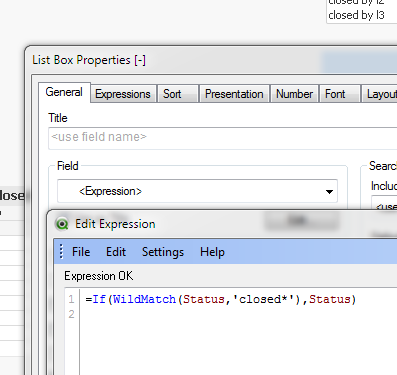
In the example it is done in the front end, using an expression instead of a field on the general tab:
vinod2086
- Mark as New
- Bookmark
- Subscribe
- Mute
- Subscribe to RSS Feed
- Permalink
- Report Inappropriate Content
yes this is what.
Thank you so much andrew.
i had tried same condition in expressions tab that is what am not getting expected output.

 sunilkumarqv
- Mark as New
- Bookmark
- Subscribe
- Mute
- Subscribe to RSS Feed
- Permalink
- Report Inappropriate Content
Hi vinod
u probably not see list box expression which posted earlier

- « Previous Replies
-
- 1
- 2
- Next Replies »