Unlock a world of possibilities! Login now and discover the exclusive benefits awaiting you.

- Qlik Community
- :
- All Forums
- :
- QlikView App Dev
- :
- Re: server
- Subscribe to RSS Feed
- Mark Topic as New
- Mark Topic as Read
- Float this Topic for Current User
- Bookmark
- Subscribe
- Mute
- Printer Friendly Page

- Mark as New
- Bookmark
- Subscribe
- Mute
- Subscribe to RSS Feed
- Permalink
- Report Inappropriate Content
server
After restarting the production it show following error message

- « Previous Replies
-
- 1
- 2
- Next Replies »
- Mark as New
- Bookmark
- Subscribe
- Mute
- Subscribe to RSS Feed
- Permalink
- Report Inappropriate Content
PFA

 vgutkovsky
- Mark as New
- Bookmark
- Subscribe
- Mute
- Subscribe to RSS Feed
- Permalink
- Report Inappropriate Content
Interesting. Well, the first screenshot clearly reveals your problem: your server can't get out to the internet so can't generate the license's LEF. Steps to resolve:
1. From your local desktop machine (not the server) where you presumably have internet access, open QlikView Desktop.
2. Select Help >> License Update
3. There is a hidden button here:
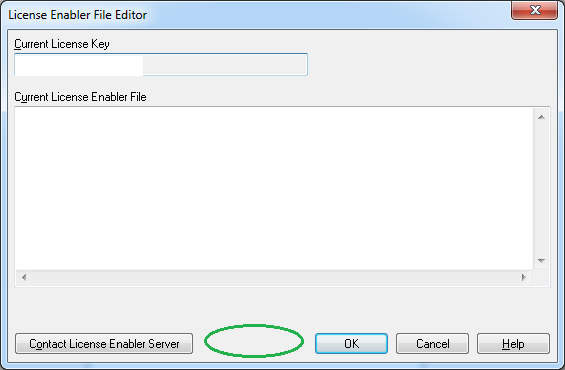
Press Ctrl+Shift and click this button.
4. In the interface that comes up, enter your server license key and press OK.
5. The Current License Enabler File section will populate with the LEF information. Copy this to your clipboard.
6. Open the QMC and go to System >> Licenses > QlikView Server >> QlikView Server License.
7. Enter the following: (a) Serial Number, (b) Control number, (c) Name, and (d) Organization.
8. Paste the contents of your clipboard (from step 5) into the LEF section.
9. Press Apply License.
That should successfully license your server and the QVS should come up.
Again, as a reminder, please don't double post in the future.
Best regards,
Vlad

 ashfaq_haseeb
- Mark as New
- Bookmark
- Subscribe
- Mute
- Subscribe to RSS Feed
- Permalink
- Report Inappropriate Content
Hi,
Simply use the attach url to generate LEF content.
Regard
ASHFAQ
vgutkovsky
- Mark as New
- Bookmark
- Subscribe
- Mute
- Subscribe to RSS Feed
- Permalink
- Report Inappropriate Content
And of course, to increase the knowledge base found on these forums, please always mark correct answers as such.
Regards,
Vlad
- Mark as New
- Bookmark
- Subscribe
- Mute
- Subscribe to RSS Feed
- Permalink
- Report Inappropriate Content
Dear Vlad,
None of the above suggestions are correct
vgutkovsky
- Mark as New
- Bookmark
- Subscribe
- Mute
- Subscribe to RSS Feed
- Permalink
- Report Inappropriate Content
The error in your screenshot can only mean one thing, and the above solution does fix it (as has been verified in multiple environments).If you're still experiencing a problem, you'll need to be more specific since I have to assume that your server does have a value license applied at this point.
Vlad
- « Previous Replies
-
- 1
- 2
- Next Replies »