Unlock a world of possibilities! Login now and discover the exclusive benefits awaiting you.

- Qlik Community
- :
- All Forums
- :
- QlikView App Dev
- :
- set limit to input field
- Subscribe to RSS Feed
- Mark Topic as New
- Mark Topic as Read
- Float this Topic for Current User
- Bookmark
- Subscribe
- Mute
- Printer Friendly Page

 devarasu07
- Mark as New
- Bookmark
- Subscribe
- Mute
- Subscribe to RSS Feed
- Permalink
- Report Inappropriate Content
set limit to input field
Hi All,
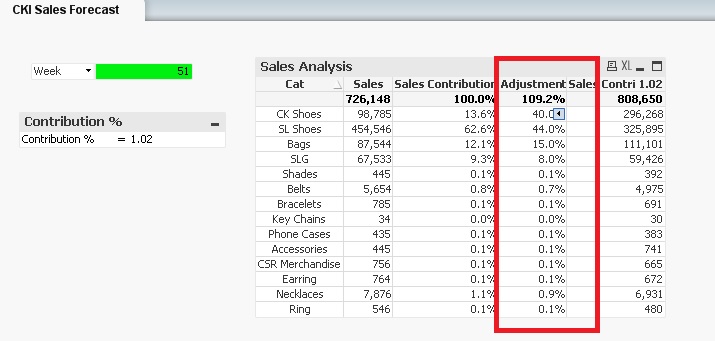
Please refer to the attachment, Is there any way to set limit to input field column ?
below screen shot, refer the highlighted "Adjustment Sales" <100% (it should not allow user to enter more than 100%). do you have any suggestion on this? thanks in advance 

 sunny_talwar
- Mark as New
- Bookmark
- Subscribe
- Mute
- Subscribe to RSS Feed
- Permalink
- Report Inappropriate Content
AFAIK this isn't possible, but I would be curious to see if I can be proven wrong

 tamilarasu
- Mark as New
- Bookmark
- Subscribe
- Mute
- Subscribe to RSS Feed
- Permalink
- Report Inappropriate Content
Hi Devarasu,
You can simply show some warning message like attached screenshot. The textbox popup will appear and alert the user only when they enter Adjustment Sales more than 100%.
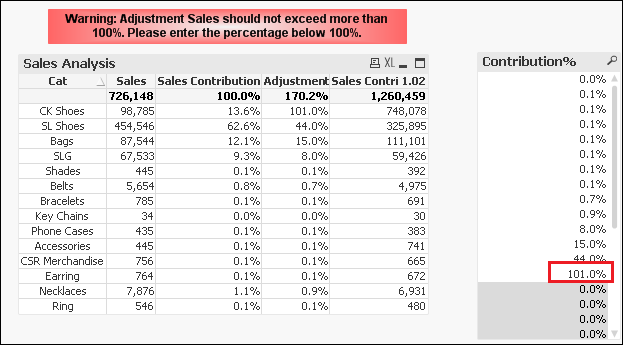
You can also use macro (triggered automatcially when the user enter more than 100%) and change the column value to "Exceeded" or even filter the lines automatically. But it is hard to maintain and slow when you have larger data. So I would suggest you to use textbox popup method since it is simple and easy to understand. See attached file for better understanding.

 jayanttibhe
- Mark as New
- Bookmark
- Subscribe
- Mute
- Subscribe to RSS Feed
- Permalink
- Report Inappropriate Content
On top of it - can also change the text color to white if user value more than your specified number.
Like :=if(InputSum([Contribution%])>1,White())
Thanks
Jayant
 tresesco
- Mark as New
- Bookmark
- Subscribe
- Mute
- Subscribe to RSS Feed
- Permalink
- Report Inappropriate Content
I am not sure if I understood right. May be you can play around with Constraints of the input box (properties) like in attached.

 praveen_prithiv
- Mark as New
- Bookmark
- Subscribe
- Mute
- Subscribe to RSS Feed
- Permalink
- Report Inappropriate Content
Try this
if(InputSum([Contribution%])<100%,[Contribution%])
Praveen Kumar. P
