Unlock a world of possibilities! Login now and discover the exclusive benefits awaiting you.

- Qlik Community
- :
- All Forums
- :
- QlikView App Dev
- :
- Re: sting to number convertion
- Subscribe to RSS Feed
- Mark Topic as New
- Mark Topic as Read
- Float this Topic for Current User
- Bookmark
- Subscribe
- Mute
- Printer Friendly Page

 mambi
mambi
- Mark as New
- Bookmark
- Subscribe
- Mute
- Subscribe to RSS Feed
- Permalink
- Report Inappropriate Content
sting to number convertion
Hi everyone,
in my select list this number appear as a text : 31 920 (left side)
how to convert it to a number in the load script.
Thanks
Accepted Solutions

 Colin-Albert
- Mark as New
- Bookmark
- Subscribe
- Mute
- Subscribe to RSS Feed
- Permalink
- Report Inappropriate Content
Num(replace(number_field, ' ', '')) as number_field
Colin-Albert
- Mark as New
- Bookmark
- Subscribe
- Mute
- Subscribe to RSS Feed
- Permalink
- Report Inappropriate Content
What number does 31 920 represent? 31920, 31, 920?
More details would help you get the right answer.
mambi
- Mark as New
- Bookmark
- Subscribe
- Mute
- Subscribe to RSS Feed
- Permalink
- Report Inappropriate Content
31 920 is 31920 with thousands separator in my excel sheet

 swuehl
- Mark as New
- Bookmark
- Subscribe
- Mute
- Subscribe to RSS Feed
- Permalink
- Report Inappropriate Content
Just set the correct thousand separator as default in your script or use num#() to parse the string in:
num#('31 920',',',' ')
(assuming ',' as your decimal separator, please check the format codes in the Help for more detail)

- Mark as New
- Bookmark
- Subscribe
- Mute
- Subscribe to RSS Feed
- Permalink
- Report Inappropriate Content
There is nothing like string to number conversion because there is only one datatype in QlikView and it's DUAL. In your case I'd just set proper formatting for the field in Document Properties => Number.
It this doesn't work your field can't be interpreted as a numeric value, and you have to do it manually using Num#()
Lukasz
 iktrayanov
- Mark as New
- Bookmark
- Subscribe
- Mute
- Subscribe to RSS Feed
- Permalink
- Report Inappropriate Content
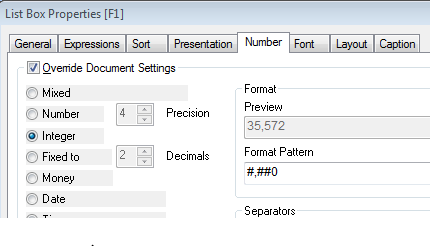
Go to properties and check the Override Document Settings
Colin-Albert
- Mark as New
- Bookmark
- Subscribe
- Mute
- Subscribe to RSS Feed
- Permalink
- Report Inappropriate Content
Num(replace(number_field, ' ', '')) as number_field