Unlock a world of possibilities! Login now and discover the exclusive benefits awaiting you.

- Qlik Community
- :
- All Forums
- :
- QlikView App Dev
- :
- sub total
- Subscribe to RSS Feed
- Mark Topic as New
- Mark Topic as Read
- Float this Topic for Current User
- Bookmark
- Subscribe
- Mute
- Printer Friendly Page

- Mark as New
- Bookmark
- Subscribe
- Mute
- Subscribe to RSS Feed
- Permalink
- Report Inappropriate Content
sub total
Hello
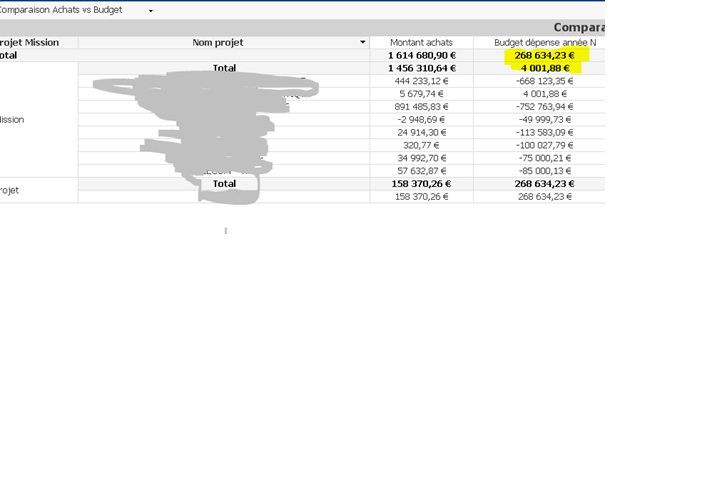
In my exemple, the sub total (4 001.88) are wrong in the column BUDGET DEPENSE N, why ?
Accepted Solutions

 Gysbert_Wassena
- Mark as New
- Bookmark
- Subscribe
- Mute
- Subscribe to RSS Feed
- Permalink
- Report Inappropriate Content
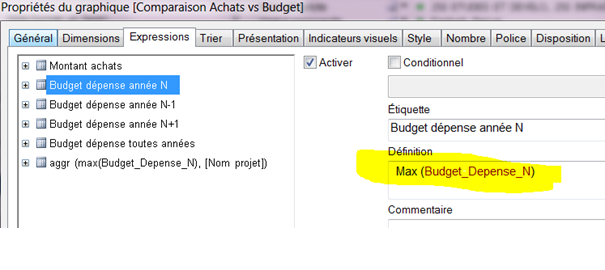
Looks correct to me. The maximum value in that column is 4001,88. If you want a sum of the maximum values as total then you need to use something like sum(aggr(Max(Budget_Depense_N), Dim1, Dim2,...,DimN)). Replace Dim1, Dim2,...,DimN with the field names of the dimensions of your chart.
talk is cheap, supply exceeds demand
Gysbert_Wassena- Mark as New
- Bookmark
- Subscribe
- Mute
- Subscribe to RSS Feed
- Permalink
- Report Inappropriate Content
Looks correct to me. The maximum value in that column is 4001,88. If you want a sum of the maximum values as total then you need to use something like sum(aggr(Max(Budget_Depense_N), Dim1, Dim2,...,DimN)). Replace Dim1, Dim2,...,DimN with the field names of the dimensions of your chart.
talk is cheap, supply exceeds demand
- Mark as New
- Bookmark
- Subscribe
- Mute
- Subscribe to RSS Feed
- Permalink
- Report Inappropriate Content
Thanks and happy Christmas.