Unlock a world of possibilities! Login now and discover the exclusive benefits awaiting you.

- Qlik Community
- :
- All Forums
- :
- QlikView Integrations
- :
- Re: Google Maps - Cluster
- Subscribe to RSS Feed
- Mark Topic as New
- Mark Topic as Read
- Float this Topic for Current User
- Bookmark
- Subscribe
- Mute
- Printer Friendly Page

 Alexander_Thor
- Mark as New
- Bookmark
- Subscribe
- Mute
- Subscribe to RSS Feed
- Permalink
- Report Inappropriate Content
Google Maps - Cluster
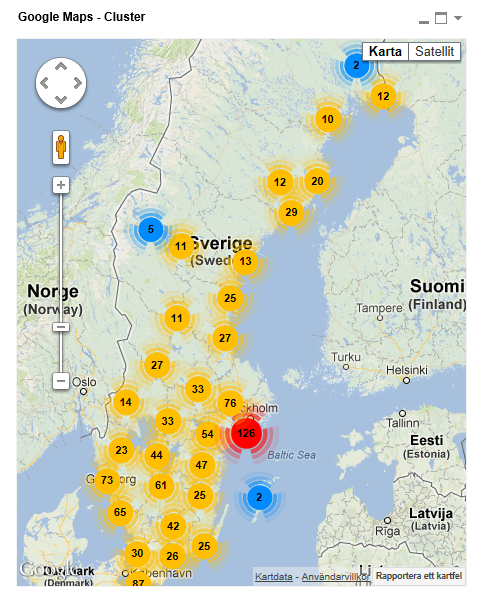
Google Maps Extension with Cluster support.
QlikTech takes no responsibility for any code and QlikTech Support Agreement does not cover issues with this extension.
Please review Googles license agreement before you put this into production.
Introduction
This is a QlikView extension object that integrates Google Maps Javascript API V3 and a third party library called MarkerClusterPlus into QlikView.
Load a set a coordinates into QlikView and visualize them together with this extension. The clustering feature is create when you have alot of data points and needs to group/cluster them together for greater visability and performance.
The maxzoom property defines at what zoom level you want your markers clustered. The grid size property controls how big or small cluster grid size you want.
You can either use the extension 'as is' or use it as a base to further customize it to fit your needs.
Download the extension and view source code at: https://github.com/mindspank/GoogleMaps-Cluster-QV11
If you build something awesome please share it with the community!
Live long and prosper.
2015-02-15
Removed download from post, please grab the latest version from Github instead.
2014-02-03
Various fixes.
2014-01-09
There has been numerous upgrades to the extension.
Now clusters now display the value of your expression and with added support to include more information in pop-up labels.
Example grayscale styled map included.
Possibility to show only a single cluster icon style if you do not want it to scale according to the number of markers in the cluster.
2013-06-17
Added custom marker support. Now you can specify a url for an custom marker. Accepts all major image file types.
- Tags:
- clustering
- extension
- extension_object
- geospatial
- google cluster maps
- google maps
- javascript
- map
- mapping
- qlikview extensions
- qlikview_extensions

- Mark as New
- Bookmark
- Subscribe
- Mute
- Subscribe to RSS Feed
- Permalink
- Report Inappropriate Content
Hello,
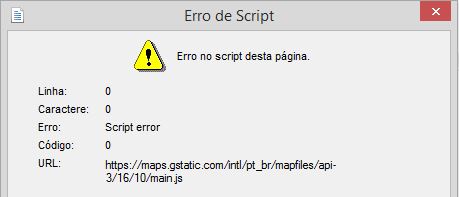
Can u please help me with this error?
I created a QVW, than a I saved and opened it again.
When I open the web view this error window appear.
I don't know what is it!
Alexander_Thor
- Mark as New
- Bookmark
- Subscribe
- Mute
- Subscribe to RSS Feed
- Permalink
- Report Inappropriate Content
Something is causing a script error on Google's end.
Are you running the latest version of the extension?
Judging by the look and feel of the dialog box it seems you are running windows 8 and IE11?
Can you share the qvw file?

 prabhu0505
- Mark as New
- Bookmark
- Subscribe
- Mute
- Subscribe to RSS Feed
- Permalink
- Report Inappropriate Content
Hi Alexander,
While using this extension, do we need to create our own GMap_Key or we can continue with the existing one?
Thanks..
Alexander_Thor
- Mark as New
- Bookmark
- Subscribe
- Mute
- Subscribe to RSS Feed
- Permalink
- Report Inappropriate Content
Well... Google deprecated the use of api keys almost two years ago for Google Maps.
So no you don't need to use a api key since you can't 
They offer a console key which you could use if you want to track your usage but it's not mandatory.
prabhu0505
- Mark as New
- Bookmark
- Subscribe
- Mute
- Subscribe to RSS Feed
- Permalink
- Report Inappropriate Content
Thanks Alex.. Will this extension work on QV 10?
On May 28, 2014 5:11 PM, "Alexander Karlsson" <qcwebmaster@qlik.com>
Alexander_Thor
- Mark as New
- Bookmark
- Subscribe
- Mute
- Subscribe to RSS Feed
- Permalink
- Report Inappropriate Content
It should be functional on QV10 however the properties dialog and such will look like crap.
I would recommend that you upgrade to 11.2 as we will be dropping support for QV10 in November this year.
prabhu0505
- Mark as New
- Bookmark
- Subscribe
- Mute
- Subscribe to RSS Feed
- Permalink
- Report Inappropriate Content
Thanks Alex.. Soon we are doing.
On Thu, May 29, 2014 at 9:50 AM, Alexander Karlsson <
- Mark as New
- Bookmark
- Subscribe
- Mute
- Subscribe to RSS Feed
- Permalink
- Report Inappropriate Content
Hi Ale,
The extension works fine. Thanks a lot for your inputs
I have some questions:
1. How can I fix the camera on Italy avoiding to see the whole globe?
2. What do you mean when you say 'Added Custom Marker Support...'?
3. Could you explain me the meaning Speed Limit to fit in this context and from where you get this info?
Thank you very much indeed for your help.
Alberto
Alexander_Thor
- Mark as New
- Bookmark
- Subscribe
- Mute
- Subscribe to RSS Feed
- Permalink
- Report Inappropriate Content
1. It should automatically zoom to fit the markers you have on screen. If you want it to have a specific zoom and center and running the risk of users missing the data points you would have to edit the extension code on your own. There are examples in this thread on how to do it.
2. You have the possibility to set your own marker icon instead of the standard red google pin if you wanted to.
3. Speed Limit is just a field in the data model of the example qvw. It's just example data.
- Mark as New
- Bookmark
- Subscribe
- Mute
- Subscribe to RSS Feed
- Permalink
- Report Inappropriate Content
Hi Abs
May be this video helpful to you have a look.
Regards
Chandan