Unlock a world of possibilities! Login now and discover the exclusive benefits awaiting you.

- Qlik Community
- :
- All Forums
- :
- QlikView Integrations
- :
- Re: Google Maps - Cluster
- Subscribe to RSS Feed
- Mark Topic as New
- Mark Topic as Read
- Float this Topic for Current User
- Bookmark
- Subscribe
- Mute
- Printer Friendly Page

 Alexander_Thor
- Mark as New
- Bookmark
- Subscribe
- Mute
- Subscribe to RSS Feed
- Permalink
- Report Inappropriate Content
Google Maps - Cluster
Google Maps Extension with Cluster support.
QlikTech takes no responsibility for any code and QlikTech Support Agreement does not cover issues with this extension.
Please review Googles license agreement before you put this into production.
Introduction
This is a QlikView extension object that integrates Google Maps Javascript API V3 and a third party library called MarkerClusterPlus into QlikView.
Load a set a coordinates into QlikView and visualize them together with this extension. The clustering feature is create when you have alot of data points and needs to group/cluster them together for greater visability and performance.
The maxzoom property defines at what zoom level you want your markers clustered. The grid size property controls how big or small cluster grid size you want.
You can either use the extension 'as is' or use it as a base to further customize it to fit your needs.
Download the extension and view source code at: https://github.com/mindspank/GoogleMaps-Cluster-QV11
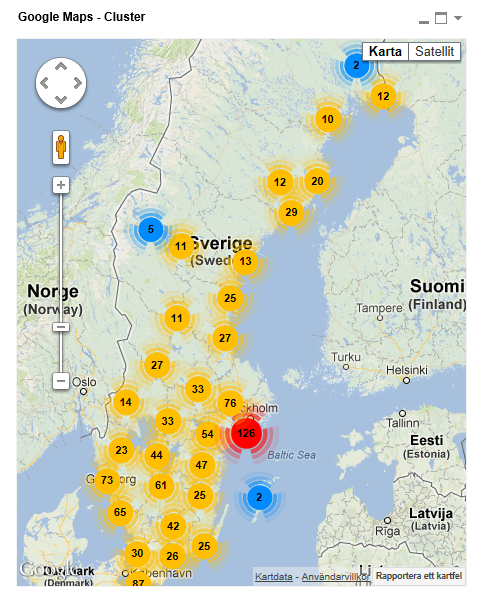
If you build something awesome please share it with the community!
Live long and prosper.
2015-02-15
Removed download from post, please grab the latest version from Github instead.
2014-02-03
Various fixes.
2014-01-09
There has been numerous upgrades to the extension.
Now clusters now display the value of your expression and with added support to include more information in pop-up labels.
Example grayscale styled map included.
Possibility to show only a single cluster icon style if you do not want it to scale according to the number of markers in the cluster.
2013-06-17
Added custom marker support. Now you can specify a url for an custom marker. Accepts all major image file types.
- Tags:
- clustering
- extension
- extension_object
- geospatial
- google cluster maps
- google maps
- javascript
- map
- mapping
- qlikview extensions
- qlikview_extensions

 vijayit43
- Mark as New
- Bookmark
- Subscribe
- Mute
- Subscribe to RSS Feed
- Permalink
- Report Inappropriate Content
please check path C:\ProgramData\QlikTech\QlikViewServer on Extension folder available or not if not available then copy Extension folder and paste above given path C:\Users\[username]\AppData\Local\QlikTech\QlikView hope this help.

- Mark as New
- Bookmark
- Subscribe
- Mute
- Subscribe to RSS Feed
- Permalink
- Report Inappropriate Content
i see my object, and i believe don´t use Extension for him, because i use dynamic image.
For QlikView Server, what´s need for the the dynamic image is show in my browser?
Regards.
- Mark as New
- Bookmark
- Subscribe
- Mute
- Subscribe to RSS Feed
- Permalink
- Report Inappropriate Content
Hi Alexander,
I'm trying to use the google maps cluster extension object. By default it's zoomed in, so all I see is the marker and zoom tool. I don't see the map unless I manually zoom out. I tried changing the corresponding JavaScript to include (say zoom: 10) as part of mapOptions, but it didn't work.
Please advise.
QV Version 11.20.12577.0 SR8 64-bit Edition (x64)
Browsers: Chrome 37.0.2062.124 and Firefox 32.0.3
Thanks,
Bhagya
- Mark as New
- Bookmark
- Subscribe
- Mute
- Subscribe to RSS Feed
- Permalink
- Report Inappropriate Content
After modify many times, i can see map for browser.
I suspect the size map, because, change for 600x600, and nothing filter in customers, the map show me.
And using size 400x400 and nothing filter in customers, don´t see. But, if select some customers, the map is show me.
Thanks for the help.
- Mark as New
- Bookmark
- Subscribe
- Mute
- Subscribe to RSS Feed
- Permalink
- Report Inappropriate Content
Hi Alex, my end users use Citrix, which IE 9 is installed. When they open the app (Ajax) with this cluster extension, the map just shows blank. There is no problem on IE10. Is there any way to fix it?

 alec1982
- Mark as New
- Bookmark
- Subscribe
- Mute
- Subscribe to RSS Feed
- Permalink
- Report Inappropriate Content
hi,
Great app so far. Anyway i can turn on..off clustering? also Where can i locate the code to change the clustering images within the script?
Best,
Alec
- Mark as New
- Bookmark
- Subscribe
- Mute
- Subscribe to RSS Feed
- Permalink
- Report Inappropriate Content
Hi Alex
Thank you for this extension it will make my clients very happy, I do however have one question, in the popup text is it possible to add a line break, I have tried chr(10), chr(13), '%OA' and <b> but none of them are creating the line break as expected.
Thanks in advance for any guidance
Bella
Alexander_Thor
- Mark as New
- Bookmark
- Subscribe
- Mute
- Subscribe to RSS Feed
- Permalink
- Report Inappropriate Content
It uses HTML syntax so do a
for a line break
Kind Regards
Alexander Karlsson
- Mark as New
- Bookmark
- Subscribe
- Mute
- Subscribe to RSS Feed
- Permalink
- Report Inappropriate Content
Any chance of getting the code for that *smiles*
Cheers
Bella
 suzel404
- Mark as New
- Bookmark
- Subscribe
- Mute
- Subscribe to RSS Feed
- Permalink
- Report Inappropriate Content
Hi Alexander,
Great extension.!!
I have one question how can I find back the cluster red, blue and red in my script.js. It was very useful.
Cluster yellow <=10 , Cluster red >=100 , cluster blue <= 100
Thank in advance for you time and patience.