Unlock a world of possibilities! Login now and discover the exclusive benefits awaiting you.

- Qlik Community
- :
- All Forums
- :
- QlikView Integrations
- :
- Re: Google Maps - Heatmap
- Subscribe to RSS Feed
- Mark Topic as New
- Mark Topic as Read
- Float this Topic for Current User
- Bookmark
- Subscribe
- Mute
- Printer Friendly Page

 Alexander_Thor
- Mark as New
- Bookmark
- Subscribe
- Mute
- Subscribe to RSS Feed
- Permalink
- Report Inappropriate Content
Google Maps - Heatmap
Google Maps Extension with Heatmap support.
QlikTech takes no responsibility for any code and QlikTech Support Agreement does not cover issues with this extension.
Please review Googles license agreement before you put this into production.
Big thanks to pablolabbe for contributing to the project.
Download
mindspank/GoogleMaps-Heatmap-QV11 · GitHub
Introduction
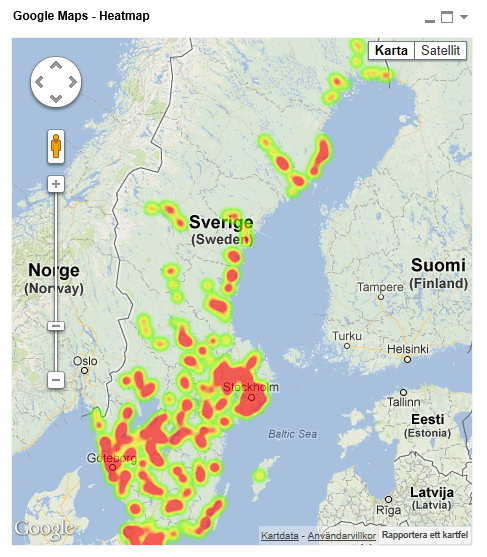
A new addition to the Google Maps family. This extensions will take your data points and produce a heatmap on top of a Google Map.
A good tool easily spot areas with higher intensity of data points. There is no selection support for this extension has there is no markers available at the moment.
You can either use the extension 'as is' or use it as a base to further customize it to fit your needs.
2013-12-14
Finally tracked down the errors when you tried to pass in faulty data.
Less DOM-calls.
2013-06-04
Added a check that QV passes valid data points to Google. If you are passing an invalid data point it will log it to the console in your browser.
Also enabled weighted data points. Now the weight if your data point in the heatmap will correspond to your expression value. If you want equal weight between the points, e.g the original heatmap where the number of data points determined your heat level, set a arbitrary value of =1
If you build something awesome please share it with the community!
Live long and prosper.
- Tags:
- extension
- extension_object
- full-web mapping extension for qlikview and sense
- geospatial
- google map
- heatmap
- heatmaps
- map
- qlikview extensions
- qlikview_extensions
Alexander_Thor
- Mark as New
- Bookmark
- Subscribe
- Mute
- Subscribe to RSS Feed
- Permalink
- Report Inappropriate Content
Hey Daniel,
Google Charts, not Google Maps, has support for basic mapping capabilities.
This is a quick extension I throw together this morning that let's you create heatmaps of the US states.
Either supply the two letter short code or just the state name in plain text and it works, e.g. PA or Pennsylvania.
Is this something you were looking for? If so I'll glady put some work into it and make it more dynamic so you can set your own colors, swap between country/state/continent/metro areas etc etc
As a side note the Google Charts API seems to be completly free for commercial use also so no license lawyers will come knocking on your door if you decide to put it into production.

- Mark as New
- Bookmark
- Subscribe
- Mute
- Subscribe to RSS Feed
- Permalink
- Report Inappropriate Content
Dear All,
Google maps appear on my desktop client but not on the accesspoint.
Can anybody please help me.
Also the heat layer does not work.
I have tried pressing F5 but it does not work.
Qlikview version is 11.2 SR2 and IE8
Please help
Alexander_Thor
- Mark as New
- Bookmark
- Subscribe
- Mute
- Subscribe to RSS Feed
- Permalink
- Report Inappropriate Content
Oh interesting, I did not think it would work in IE8. Anyhow, since you are getting the map to display in the desktop client most likely you have not installed the extension on the server.
Extract the extension to C:\ProgramData\QlikTech\QlikViewServer\Extensions\Objects on the server.
Make sure you have Extensions allowed in the QMC at system -> QlikView Server -> Security -> Allow extensions. You will find the checkbox under Miscellaneous.
There is also an option to change the extensions path under the Folder settings if you would like to use another folder for your server extensions.
- Mark as New
- Bookmark
- Subscribe
- Mute
- Subscribe to RSS Feed
- Permalink
- Report Inappropriate Content
hi there,
could you please post the csv that you use in the example?
i can`t put layers on my map, so I`d like to see how is your data organized so I can understand better how it works.
I can now draw the map, and when choosing the area(a city for example) the maps zooms on it and centralizes, but still no heat layers, I think my problem is with what kind of data I should put in the "measurement", i tried to create a field on my xls file with values, only for example, but it just ignores this value.
thnx for the extension
Alexander_Thor
- Mark as New
- Bookmark
- Subscribe
- Mute
- Subscribe to RSS Feed
- Permalink
- Report Inappropriate Content
If you can try updating your browser to IE9 or above.
I don't have the csv file anymore but it was fairly straight forward, latitude and longitude in a separate fields in a single table.
- Mark as New
- Bookmark
- Subscribe
- Mute
- Subscribe to RSS Feed
- Permalink
- Report Inappropriate Content
I think that`s the pro, everyone is getting it done, and i`m quite sure i`m doing all fine,
thnx for helping ^^
- Mark as New
- Bookmark
- Subscribe
- Mute
- Subscribe to RSS Feed
- Permalink
- Report Inappropriate Content
Hi Alex,
Awesome! It's working pretty well.
I hope Route map feature can be added into GoogleMaps family as well. 
Thanks and best regards,
Chanel
- Mark as New
- Bookmark
- Subscribe
- Mute
- Subscribe to RSS Feed
- Permalink
- Report Inappropriate Content
Same here, I get the Google map but no heat layers. I'm using Desktop Client V. 11.2 SR1 (64 bit) and have IE 8 on a Windows 2008 server.
- Mark as New
- Bookmark
- Subscribe
- Mute
- Subscribe to RSS Feed
- Permalink
- Report Inappropriate Content
I'm wondering if the extension is not quite stable on QV 11.2 SR1. working with it trying to get it to display the heat map layer suddenly I started getting the error "Navigation to the webpage was canceled" while in webview. I finally had to remove my sheet with the extension object on it and start from scratch.
See:
Alexander_Thor
- Mark as New
- Bookmark
- Subscribe
- Mute
- Subscribe to RSS Feed
- Permalink
- Report Inappropriate Content
Hmm, seems strange. I haven't heard of any issues affecting extensions in 11.2 SR1 then again I haven't done any testing on that release.
IE8 might cause problems though...
Kind Regards
Alexander Karlsson