Unlock a world of possibilities! Login now and discover the exclusive benefits awaiting you.

- Qlik Community
- :
- All Forums
- :
- QlikView
- :
- 2 Dimensions in a Single Bar Graph (Trellis/Slider...
- Subscribe to RSS Feed
- Mark Topic as New
- Mark Topic as Read
- Float this Topic for Current User
- Bookmark
- Subscribe
- Mute
- Printer Friendly Page

 dmohanty
- Mark as New
- Bookmark
- Subscribe
- Mute
- Subscribe to RSS Feed
- Permalink
- Report Inappropriate Content
2 Dimensions in a Single Bar Graph (Trellis/Slider?)
Hi All,
I have to show Total Sales by Quarter and Total Sales by Geography, but in a single Bar Graph. I am not sure much, but can it be done using Trellis or somehow a slider to select the Dimension?
Means 1st part of Trellis would show the Total Sales by Quarter and if I scroll or move the slider, I would see Total Sales by Geography.
Hope I am clear on this. Stress would not be on values, but just wanted if we can select a Dimension from Slider or using a Trellis
Can someone please show me by an example?

 javier_florian
- Mark as New
- Bookmark
- Subscribe
- Mute
- Subscribe to RSS Feed
- Permalink
- Report Inappropriate Content
Hi DMohanty,
Can you try with container? You can work simultaneously with different graphs.
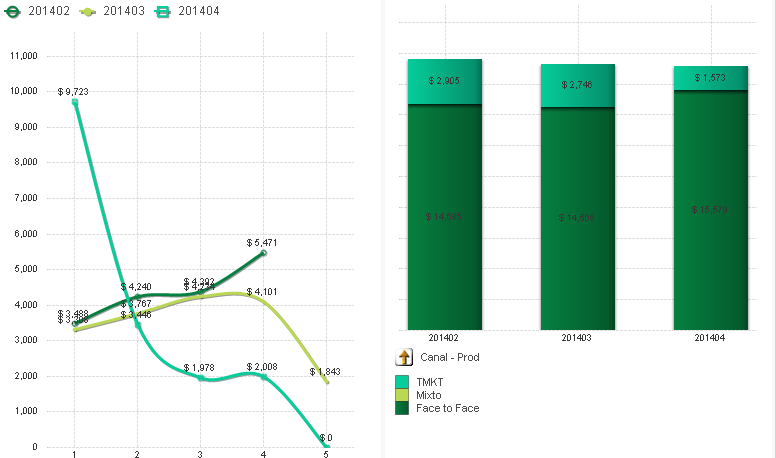
-JFlorian

- Mark as New
- Bookmark
- Subscribe
- Mute
- Subscribe to RSS Feed
- Permalink
- Report Inappropriate Content
You may:
1. use dimension group
2. use 2 graphs and swich them using container or conditional show
3. use data island with values as your column names and then use calculated dimension.
Find attached example.
regards
Darek

 MarcoWedel
- Mark as New
- Bookmark
- Subscribe
- Mute
- Subscribe to RSS Feed
- Permalink
- Report Inappropriate Content
Hi,
you could use this calculated dimension in your chart
=$(=only({<$FieldNo={$(vFieldSelector)},$Table={'tabCities'}>}$Field))
and use a slider to select the FieldNo as described in thread How to identify the first column in a table ?
regards
Marco
MarcoWedel
- Mark as New
- Bookmark
- Subscribe
- Mute
- Subscribe to RSS Feed
- Permalink
- Report Inappropriate Content
Darek's suggestion to use grouped dimensions most likely is the best and easiest way to do this.
regards
Marco
- Mark as New
- Bookmark
- Subscribe
- Mute
- Subscribe to RSS Feed
- Permalink
- Report Inappropriate Content
Marco,
but sometimes island for dimension selection gives you possibility to have some specific expressions (or expressions parts) with it.
Darek