Unlock a world of possibilities! Login now and discover the exclusive benefits awaiting you.

- Qlik Community
- :
- All Forums
- :
- QlikView
- :
- Re: 3d bar graphs
- Subscribe to RSS Feed
- Mark Topic as New
- Mark Topic as Read
- Float this Topic for Current User
- Bookmark
- Subscribe
- Mute
- Printer Friendly Page

- Mark as New
- Bookmark
- Subscribe
- Mute
- Subscribe to RSS Feed
- Permalink
- Report Inappropriate Content
3d bar graphs
Hey guys
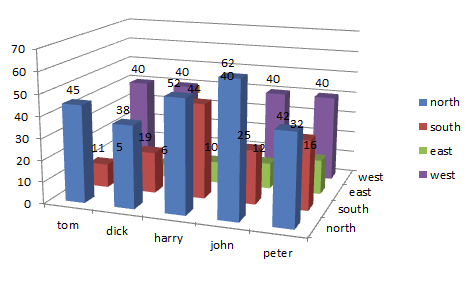
is it possible to create 3d bar graphs like the one in the atached file?
I have tried but failed to find a way.
appriciate any help
- Tags:
- new_to_qlikview
- « Previous Replies
-
- 1
- 2
- Next Replies »
Accepted Solutions

 MayilVahanan
- Mark as New
- Bookmark
- Subscribe
- Mute
- Subscribe to RSS Feed
- Permalink
- Report Inappropriate Content
Hi
Try like this,
Dimension: Name and ValueList('North','South','West','East')
Exp:
If(ValueList('North','South','West','East')='North',Sum(North),if(ValueList('North','South','West','East')='South',Sum(South),
if(ValueList('North','South','West','East')='West',Sum(West),Sum(East))))
Hope it helps
Please close the thread by marking correct answer & give likes if you like the post.


 rajni_batra
- Mark as New
- Bookmark
- Subscribe
- Mute
- Subscribe to RSS Feed
- Permalink
- Report Inappropriate Content
yes this is one of the chart style provided in bar graph under style Tab
Did u try that?
MayilVahanan
- Mark as New
- Bookmark
- Subscribe
- Mute
- Subscribe to RSS Feed
- Permalink
- Report Inappropriate Content
Hi
In bar chart -> properties-> style-> Look fifth or sixth option help you to achieve this..
Please close the thread by marking correct answer & give likes if you like the post.
- Mark as New
- Bookmark
- Subscribe
- Mute
- Subscribe to RSS Feed
- Permalink
- Report Inappropriate Content
I have tried the properties in the bar chart option but it doesnt allow me to do that.
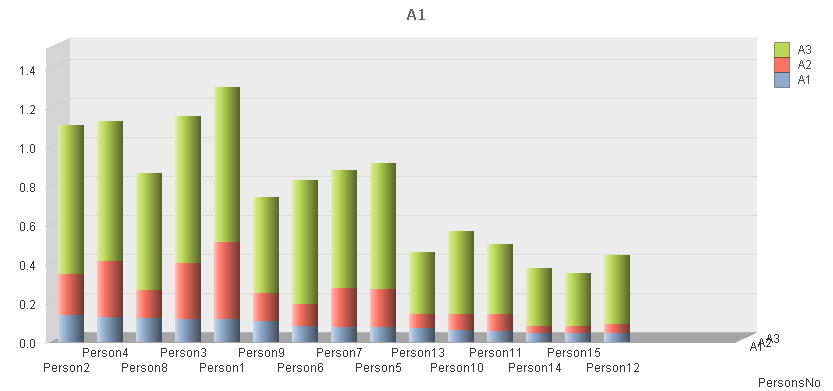
This is how I have arranged my data in the table.
All I can do is present as shown in the attachment.
Really I want to present a format shown in my original post
| PersonsNo | A1 | A2 | A3 |
| Person1 | 12% | 40% | 79% |
| Person2 | 14% | 21% | 77% |
| Person3 | 12% | 29% | 75% |
| Person4 | 13% | 28% | 72% |
| Person5 | 8% | 19% | 65% |
| Person6 | 8% | 11% | 64% |
| Person7 | 8% | 20% | 61% |
| Person8 | 12% | 14% | 60% |
| Person9 | 11% | 15% | 49% |
| Person10 | 6% | 8% | 43% |
| Person11 | 6% | 8% | 36% |
| Person12 | 4% | 5% | 35% |
| Person13 | 7% | 7% | 32% |
| Person14 | 5% | 4% | 30% |
| Person15 | 5% | 3% | 28% |

 whiteline
- Mark as New
- Bookmark
- Subscribe
- Mute
- Subscribe to RSS Feed
- Permalink
- Report Inappropriate Content
You should have at least 2 dimensions.
While in your data there is only one (PersonsNo).
Transform it, so that the An become a dimension.
- Mark as New
- Bookmark
- Subscribe
- Mute
- Subscribe to RSS Feed
- Permalink
- Report Inappropriate Content
When I convert it so An become the dimension then I have no expression to calculate/display.
I simply transformed my table as follows.
Still no joy. What would be the proper way?
| An | Person1 | Person2 | Person3 | Person4 | Person5 |
| A1 | 12% | 14% | 12% | 13% | 8% |
| A2 | 40% | 21% | 29% | 28% | 19% |
| A3 | 79% | 77% | 75% | 72% | 65% |
MayilVahanan
- Mark as New
- Bookmark
- Subscribe
- Mute
- Subscribe to RSS Feed
- Permalink
- Report Inappropriate Content
hi
Do you want something like attached file?
Please close the thread by marking correct answer & give likes if you like the post.
- Mark as New
- Bookmark
- Subscribe
- Mute
- Subscribe to RSS Feed
- Permalink
- Report Inappropriate Content
unfortunately i cant open any external QV files because I am using the personal edition.
can you post a pic please?
MayilVahanan
- Mark as New
- Bookmark
- Subscribe
- Mute
- Subscribe to RSS Feed
- Permalink
- Report Inappropriate Content
Hi
Please check the attached image
Please close the thread by marking correct answer & give likes if you like the post.

- Mark as New
- Bookmark
- Subscribe
- Mute
- Subscribe to RSS Feed
- Permalink
- Report Inappropriate Content
Thanks for the post.
Unfortunately that is not what I want. What I want is attached like this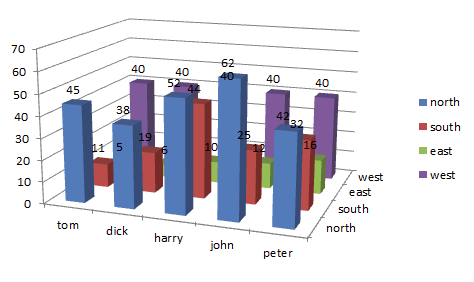
- « Previous Replies
-
- 1
- 2
- Next Replies »