Unlock a world of possibilities! Login now and discover the exclusive benefits awaiting you.

- Qlik Community
- :
- All Forums
- :
- QlikView
- :
- A way to label section dividers in a linear gauge ...
- Subscribe to RSS Feed
- Mark Topic as New
- Mark Topic as Read
- Float this Topic for Current User
- Bookmark
- Subscribe
- Mute
- Printer Friendly Page

- Mark as New
- Bookmark
- Subscribe
- Mute
- Subscribe to RSS Feed
- Permalink
- Report Inappropriate Content
A way to label section dividers in a linear gauge chart
Hey everyone!
I need to know how to label section dividers in my linear gauge chart. Here's a scribbly version of what it should look like with the highlighted parts needing labels. Note that this is a chart within a straight table.
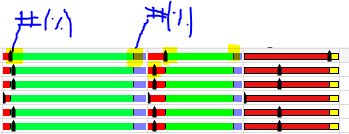
Thanks!
Accepted Solutions

 settu_periasamy
- Mark as New
- Bookmark
- Subscribe
- Mute
- Subscribe to RSS Feed
- Permalink
- Report Inappropriate Content
Hi,
may be like this,
In the chart Properties -> Expression ->
Gauge Settings -> Show Labels on Every -> set 1 (Major Unit)
you can see the change, when you increase the Cell Height
like, Presentation Tab, Wrap Cell Text -> Cell Height -> 4 or 5 lines
settu_periasamy
- Mark as New
- Bookmark
- Subscribe
- Mute
- Subscribe to RSS Feed
- Permalink
- Report Inappropriate Content
Hi,
may be like this,
In the chart Properties -> Expression ->
Gauge Settings -> Show Labels on Every -> set 1 (Major Unit)
you can see the change, when you increase the Cell Height
like, Presentation Tab, Wrap Cell Text -> Cell Height -> 4 or 5 lines