Unlock a world of possibilities! Login now and discover the exclusive benefits awaiting you.

- Qlik Community
- :
- All Forums
- :
- QlikView
- :
- Re: AND operator in set analysis
- Subscribe to RSS Feed
- Mark Topic as New
- Mark Topic as Read
- Float this Topic for Current User
- Bookmark
- Subscribe
- Mute
- Printer Friendly Page

- Mark as New
- Bookmark
- Subscribe
- Mute
- Subscribe to RSS Feed
- Permalink
- Report Inappropriate Content
AND operator in set analysis
Hi all,
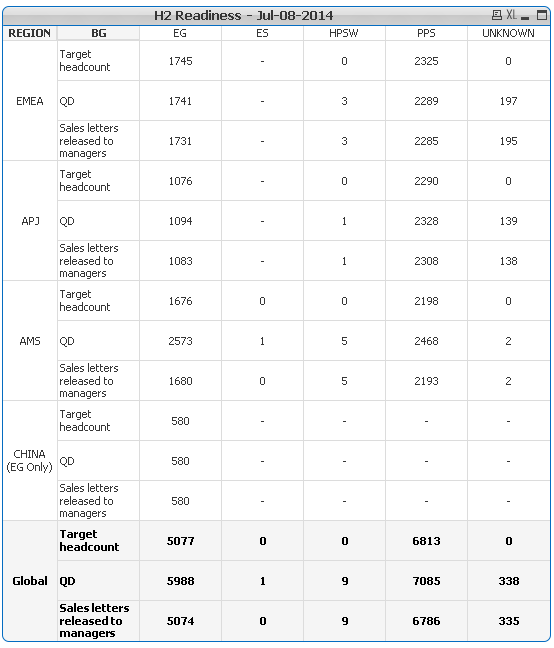
I have a pivot table as in the image below, but there's one exception only for AMS (row dim), when the role = 'Guarantee' (the role is not in the pivot), so I should remove those from the "QD" count. But how do I include that in the set analysis to say "where region<>'AMS' AND role<>'Gaurantee' " without loosing the whole AMS row?
=Count({<[Report Date]={"$(MaxDate)"}>} [StatusID])
- « Previous Replies
-
- 1
- 2
- Next Replies »

 datanibbler
- Mark as New
- Bookmark
- Subscribe
- Mute
- Subscribe to RSS Feed
- Permalink
- Report Inappropriate Content
Hi Oscar,
you need no AND inside a set_expression. Just separate several set_expressions with a comma.
- Mark as New
- Bookmark
- Subscribe
- Mute
- Subscribe to RSS Feed
- Permalink
- Report Inappropriate Content
Hi DataNibbler,
That doesn't work because it will match/remove any coincidence, if for example I write this
=Count({<[Report Date]={"$(MaxDate)"},REGION-={"AMS"},ROLE-={"Guarantee"}>} [StatusID])
In the pivot table, I'll missing any AMS data and all data with "guarantee" role

 stigchel
- Mark as New
- Bookmark
- Subscribe
- Mute
- Subscribe to RSS Feed
- Permalink
- Report Inappropriate Content
You can use the Set Modifier P (possible), which in below example gives a list of possible id's that meet your criteria
=Count({<[Report Date]={"$(MaxDate)"},[Id]=P({1<Region={'<>AMS'},Role={'<>Guarantee'}>} [Id])>} [StatusID])
 gmoraleswit
- Mark as New
- Bookmark
- Subscribe
- Mute
- Subscribe to RSS Feed
- Permalink
- Report Inappropriate Content
Do you have the Guarantee role only in the AMS region? Try this:
=Count({<[Report Date]={"$(MaxDate)"},role-={'Guarantee'}>} [StatusID])
If you have the role in other regions and you want to exclude it only for the AMS region then you might need to use an if in your expression:
if(region = AMS, Count({<[Report Date]={"$(MaxDate)"},role-={'Guarantee'}>} [StatusID]), Count({<[Report Date]={"$(MaxDate)"}>} [StatusID]))
or create a new field in your script:
load
..
if(region=AMS and role='Gaurantee', 0, 1) as flag_validRecord
from...
then in your expression:
Count({<[Report Date]={"$(MaxDate)"},flag_validRecord={1}>} [StatusID])
 jaimeaguilar
- Mark as New
- Bookmark
- Subscribe
- Mute
- Subscribe to RSS Feed
- Permalink
- Report Inappropriate Content
Hi,
maybe like this:
=Count({<[Report Date]={"$(MaxDate)"}, Region-={'AMS'}, Role-={'Guarantee'}>} [StatusID])
use -= to exclude values from set analysis
regards
- Mark as New
- Bookmark
- Subscribe
- Mute
- Subscribe to RSS Feed
- Permalink
- Report Inappropriate Content
Try this and confirm
=Count({<[Report Date]={"$(MaxDate)",Region-='AMS',Role-='Gaurantee'}>} [StatusID])
- Mark as New
- Bookmark
- Subscribe
- Mute
- Subscribe to RSS Feed
- Permalink
- Report Inappropriate Content
Happend what I thought, AMS QD value is 0, it should not

- Mark as New
- Bookmark
- Subscribe
- Mute
- Subscribe to RSS Feed
- Permalink
- Report Inappropriate Content
Thanks Piet but it didn't work, I tried E() instead of P() and I get a very similar result of what I'm looking for, but still is not the answer.
- Mark as New
- Bookmark
- Subscribe
- Mute
- Subscribe to RSS Feed
- Permalink
- Report Inappropriate Content
hi Gabriela, I just wanted to find a way to do it with set analysis 
- « Previous Replies
-
- 1
- 2
- Next Replies »