Unlock a world of possibilities! Login now and discover the exclusive benefits awaiting you.

- Qlik Community
- :
- All Forums
- :
- QlikView
- :
- Accumulative Field
- Subscribe to RSS Feed
- Mark Topic as New
- Mark Topic as Read
- Float this Topic for Current User
- Bookmark
- Subscribe
- Mute
- Printer Friendly Page

 ecabanas
- Mark as New
- Bookmark
- Subscribe
- Mute
- Subscribe to RSS Feed
- Permalink
- Report Inappropriate Content
Accumulative Field
Hi all,
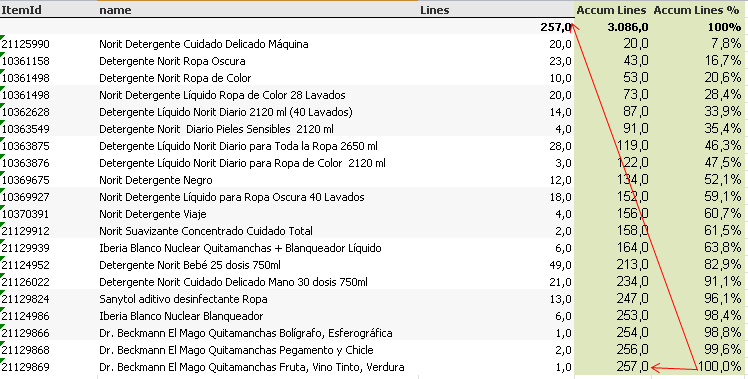
I have a table with the number of lines of each product. = Count(line) Dimension ItemId
I wanna know the accumulative number of lines in number and %
Any suggestion?
Many thanks
- Tags:
- accumulations
Accepted Solutions

 sunny_talwar
- Mark as New
- Bookmark
- Subscribe
- Mute
- Subscribe to RSS Feed
- Permalink
- Report Inappropriate Content
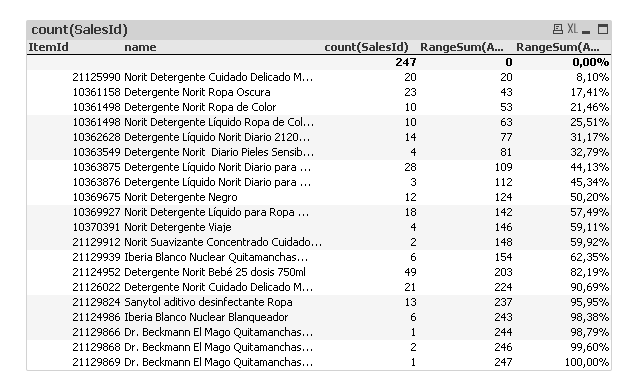
Ended up using expressions to do the accumulation
1) RangeSum(Above(TOTAL Count(SalesId), 0, RowNo(TOTAL)))
2) RangeSum(Above(TOTAL Count(SalesId), 0, RowNo(TOTAL)))/Sum(TOTAL Aggr(Count(SalesId), ItemId, name))
sunny_talwar
- Mark as New
- Bookmark
- Subscribe
- Mute
- Subscribe to RSS Feed
- Permalink
- Report Inappropriate Content
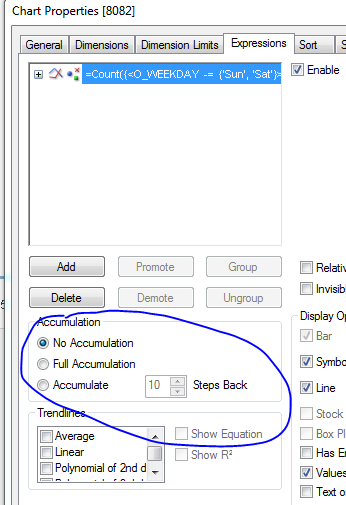
For Accumulation try using Full Accumulation option within the expressions tab:
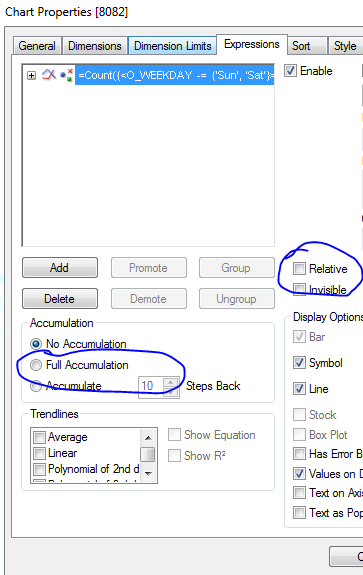
For % Accumulation try full accumulation + Relative checked on expression tab:
ecabanas
- Mark as New
- Bookmark
- Subscribe
- Mute
- Subscribe to RSS Feed
- Permalink
- Report Inappropriate Content
Hi Sunny
I already tryied this but did not work
sunny_talwar
- Mark as New
- Bookmark
- Subscribe
- Mute
- Subscribe to RSS Feed
- Permalink
- Report Inappropriate Content
Would you be able to share a sample?
ecabanas
- Mark as New
- Bookmark
- Subscribe
- Mute
- Subscribe to RSS Feed
- Permalink
- Report Inappropriate Content
Here it is
Many thank's
sunny_talwar
- Mark as New
- Bookmark
- Subscribe
- Mute
- Subscribe to RSS Feed
- Permalink
- Report Inappropriate Content
Ended up using expressions to do the accumulation
1) RangeSum(Above(TOTAL Count(SalesId), 0, RowNo(TOTAL)))
2) RangeSum(Above(TOTAL Count(SalesId), 0, RowNo(TOTAL)))/Sum(TOTAL Aggr(Count(SalesId), ItemId, name))
ecabanas
- Mark as New
- Bookmark
- Subscribe
- Mute
- Subscribe to RSS Feed
- Permalink
- Report Inappropriate Content
WOWWWWWW
Bravo!!!
Many many thank's
