Unlock a world of possibilities! Login now and discover the exclusive benefits awaiting you.

- Qlik Community
- :
- All Forums
- :
- QlikView
- :
- Re: Add 6 weeks
- Subscribe to RSS Feed
- Mark Topic as New
- Mark Topic as Read
- Float this Topic for Current User
- Bookmark
- Subscribe
- Mute
- Printer Friendly Page

 gr_eldred
- Mark as New
- Bookmark
- Subscribe
- Mute
- Subscribe to RSS Feed
- Permalink
- Report Inappropriate Content
Add 6 weeks
I have 52 weeks of the year 2017 in a simple table
I want to add 6 weeks sales.
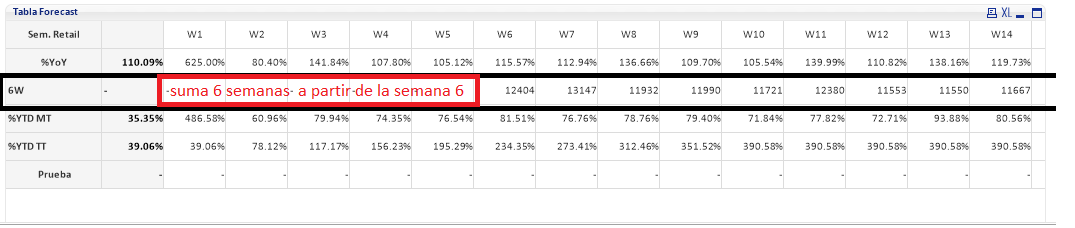
If I arrive at week 6 of the 1 to the 6 is the sum, if I am in week 7 the sum is of week 2 to 7, etc.
Currently we are in week 29
Can somebody help me?

- Mark as New
- Bookmark
- Subscribe
- Mute
- Subscribe to RSS Feed
- Permalink
- Report Inappropriate Content
I assume, You need set analysis to achieve this, May be try this?
Sum({<Week = {">=$(=Max(Week)-6) <=$(=Max(Week))"}>} sales)
gr_eldred
- Mark as New
- Bookmark
- Subscribe
- Mute
- Subscribe to RSS Feed
- Permalink
- Report Inappropriate Content
Hi, thank you for your help here, I'm just bringing the last 6 weeks of information, what I need is that in each week I get the total of the sum of 6 weeks ago.
sum({$<Status-={'C'}, SemamaAñoApple_Numerado = {">=$(=Max(SemamaAñoApple_Numerado)-6)<=$(=Max(SemamaAñoApple_Numerado))" }, Año={$(=only(Año))}>} Cantidad)
Example:
Week 6 must bring the sum of 6 weeks back (week1 + week2 + week3 + week4 + week5 + week6)
Week 7 has to show the sum of 6 weeks ago (week2 + week3 + week4 + week5 + week6 + week7)

 MarcoWedel
- Mark as New
- Bookmark
- Subscribe
- Mute
- Subscribe to RSS Feed
- Permalink
- Report Inappropriate Content
Hi,
you could try with
RangeSum(Above(Sum(Sales),0,6))
and a week dimension in your straight table.
hope this helps
regards
Marco
