Unlock a world of possibilities! Login now and discover the exclusive benefits awaiting you.

- Qlik Community
- :
- All Forums
- :
- QlikView
- :
- Re: Add to Running Total when condition met?
- Subscribe to RSS Feed
- Mark Topic as New
- Mark Topic as Read
- Float this Topic for Current User
- Bookmark
- Subscribe
- Mute
- Printer Friendly Page

- Mark as New
- Bookmark
- Subscribe
- Mute
- Subscribe to RSS Feed
- Permalink
- Report Inappropriate Content
Add to Running Total when condition met?
Hello --
I need to generate a running total. The total will remove values from a static qty. When the running total dips below a certain level, it needs to add a predefined number to the running total to keep it from going negative.
The goal of the running total is to stay above a certain #.
How can this be achieved in Qlik?
Example:
| Running Total | Description |
|---|---|
| 6000 | Starting Qty |
| 5000 | |
| 4000 | |
| 3000 | |
| 2000 | |
| 1000 | Minimum reached - automatically add 1000 |
| 2000 | |
| 1700 | |
| 1300 | |
| 1000 | Minimum reached - automatically add 1000 |
| 2000 | |
| 1900 | |
| 1800 |
- « Previous Replies
-
- 1
- 2
- Next Replies »
Accepted Solutions

 settu_periasamy
- Mark as New
- Bookmark
- Subscribe
- Mute
- Subscribe to RSS Feed
- Permalink
- Report Inappropriate Content
You can try this...
Create a Variable, and use that variable in your expression like Mod(RowNo(),vPassedDays)
PFA for reference.
- Mark as New
- Bookmark
- Subscribe
- Mute
- Subscribe to RSS Feed
- Permalink
- Report Inappropriate Content
Here's the expression I have so far that seems to work - but it does not have a proper starting value so that causes some problems with the overall calculation. How do I add a starting value?
If(Above(Column(1))<=5760, RangeSum((Above(Column(1))-Sum(QTY_REQ))+5760,0,NoOfRows(TOTAL)), RangeSum(Above(Column(1))-Sum(QTY_REQ),0,NoOfRows(TOTAL)))
settu_periasamy
- Mark as New
- Bookmark
- Subscribe
- Mute
- Subscribe to RSS Feed
- Permalink
- Report Inappropriate Content
Hi,
is it possible to post the sample qvw?
- Mark as New
- Bookmark
- Subscribe
- Mute
- Subscribe to RSS Feed
- Permalink
- Report Inappropriate Content
Unfortunately the data is somewhat sensitive.
I will try to create a sample data set and post.
- Mark as New
- Bookmark
- Subscribe
- Mute
- Subscribe to RSS Feed
- Permalink
- Report Inappropriate Content
Attached is a sample of how the data looks in the table.
As I mentioned, my objective is to roll up the QTY_REQ over time, but also add to that rolling total so it stays ABOVE a predefined level. In the sample I am considering 500 to be the low point it should not go under.
Thanks!
- Mark as New
- Bookmark
- Subscribe
- Mute
- Subscribe to RSS Feed
- Permalink
- Report Inappropriate Content
I think I have a potential path that seems to get me close to what I want, but something is still not right with it. Can anyone suggest a better way?
If(isnull(Above(Column(1))),11520,(If(Above(Column(1))<=5760, RangeSum((Above(Column(1))-Sum(QTY_REQ)),0,NoOfRows(TOTAL))+5760, RangeSum(Above(Column(1))-Sum(QTY_REQ),0,NoOfRows(TOTAL)))))
Basically I start the calculation checking if the row above is empty. If it is, start at 11,520. Then it it just keeps going.
However, I can't quite sort the math out exactly on a calculator as to what I expect to get.
settu_periasamy
- Mark as New
- Bookmark
- Subscribe
- Mute
- Subscribe to RSS Feed
- Permalink
- Report Inappropriate Content
Hi,
Can you check your Above function,
The 0,NoOfRows(TOTAL) , should come inner of the Above function right?
if you give the expected output, it would help us to find the solution.
may be try this.
If(isnull(Above(Sum(QTY_REQ))),11520,
If(Above(Sum(QTY_REQ))<=5760,
RangeSum(Above(Sum(QTY_REQ),0,NoOfRows(TOTAL)),-Sum(QTY_REQ),5760),
RangeSum(Above(Sum(QTY_REQ),0,NoOfRows(TOTAL)),-Sum(QTY_REQ))))
- Mark as New
- Bookmark
- Subscribe
- Mute
- Subscribe to RSS Feed
- Permalink
- Report Inappropriate Content
Hi Settu -
Here's my expectation.
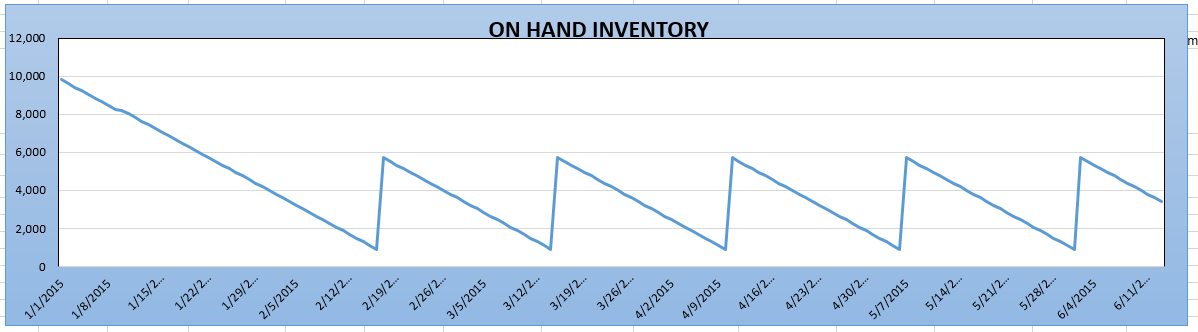
I have a static number in this case that is 11,520. I want the values from my data table to be subtracted in a rolling fashion from 11,520. When the running total reaches less than or equal to 5,760 - I want the running total to automatically add 5,760 back and then continue subtracting. If it reaches 5,760 again - do the same. The end result should be a graph that looks something like this (the image is just an example)
settu_periasamy
- Mark as New
- Bookmark
- Subscribe
- Mute
- Subscribe to RSS Feed
- Permalink
- Report Inappropriate Content
Hi Joe,
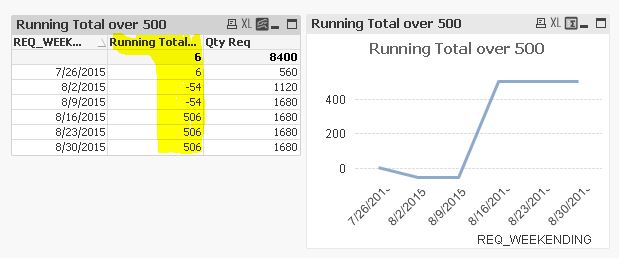
can you provide the expected output based on your provided example?
in the below snapshot, just give the output in yellow color column. it would easy to achieve the solution.
- Mark as New
- Bookmark
- Subscribe
- Mute
- Subscribe to RSS Feed
- Permalink
- Report Inappropriate Content
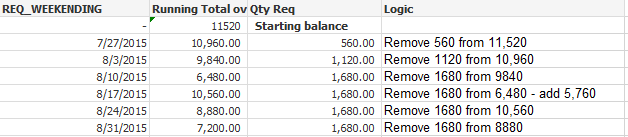
Here's my expectation.
- « Previous Replies
-
- 1
- 2
- Next Replies »