Unlock a world of possibilities! Login now and discover the exclusive benefits awaiting you.

- Qlik Community
- :
- All Forums
- :
- QlikView
- :
- Re: Adjusting Class Ranges
- Subscribe to RSS Feed
- Mark Topic as New
- Mark Topic as Read
- Float this Topic for Current User
- Bookmark
- Subscribe
- Mute
- Printer Friendly Page

- Mark as New
- Bookmark
- Subscribe
- Mute
- Subscribe to RSS Feed
- Permalink
- Report Inappropriate Content
Adjusting Class Ranges
I have the following classes:
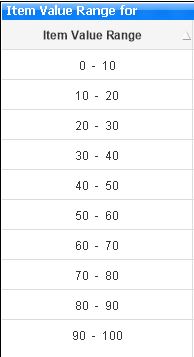
These were calculated using the following script:
=Dual(Replace(Class(IF(Amount>0, Amount),10), '<= x <', ' - '), Class(Amount,10))
Is there a way of changing the class and making them not to overlap like as follows:
| Item Value Range |
|---|
| 0 - 10 |
| 11 -20 |
| 21 -30 |
| 31 - 50 |
Regards
Chris
Accepted Solutions
- Mark as New
- Bookmark
- Subscribe
- Mute
- Subscribe to RSS Feed
- Permalink
- Report Inappropriate Content
I used the following script after Googling and finding a solution from the community posted by one Jonathan Poole. Thanks Jonathan:
=Left(Class(Amount, 10), FindOneOf(Class(Amount, 10), ' ',1))
& ' - ' &
(Num(Mid(Class(Amount,10), FindOneOf(Class(Amount, 10), ' ',4)))-1)
Chris
- Mark as New
- Bookmark
- Subscribe
- Mute
- Subscribe to RSS Feed
- Permalink
- Report Inappropriate Content
I used the following script after Googling and finding a solution from the community posted by one Jonathan Poole. Thanks Jonathan:
=Left(Class(Amount, 10), FindOneOf(Class(Amount, 10), ' ',1))
& ' - ' &
(Num(Mid(Class(Amount,10), FindOneOf(Class(Amount, 10), ' ',4)))-1)
Chris