Unlock a world of possibilities! Login now and discover the exclusive benefits awaiting you.

- Qlik Community
- :
- All Forums
- :
- QlikView
- :
- Re: Advance Transpose Case
- Subscribe to RSS Feed
- Mark Topic as New
- Mark Topic as Read
- Float this Topic for Current User
- Bookmark
- Subscribe
- Mute
- Printer Friendly Page

 dennysetiawan
- Mark as New
- Bookmark
- Subscribe
- Mute
- Subscribe to RSS Feed
- Permalink
- Report Inappropriate Content
Advance Transpose Case
Hi Community,
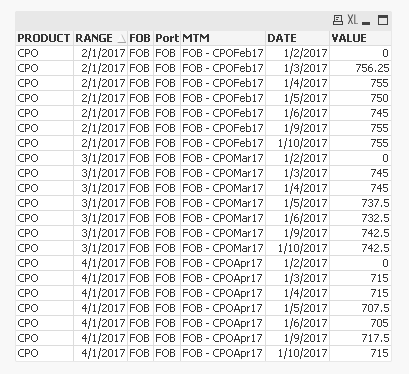
I have a table like this:
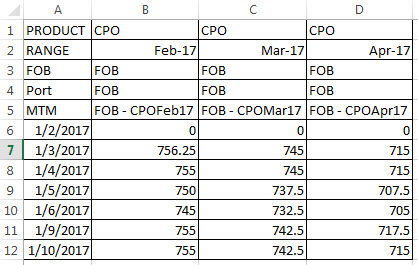
I want to transpose that table, so my expectation output should be like this:
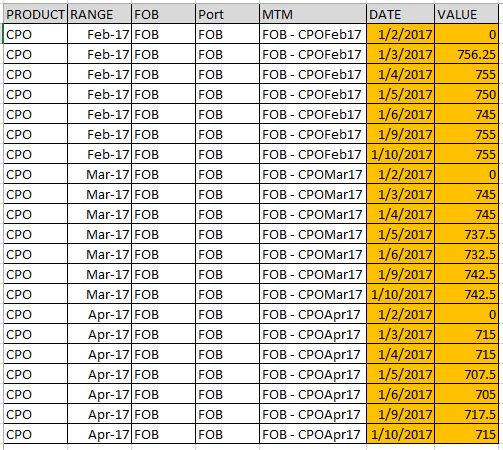
Could you show me the best practice or script solution to have an output like above?
Herewith I attach my source data.
Thank you.

 sunny_talwar
- Mark as New
- Bookmark
- Subscribe
- Mute
- Subscribe to RSS Feed
- Permalink
- Report Inappropriate Content
Try this
Table:
CrossTable(DATE, VALUE, 5)
LOAD PRODUCT,
RANGE,
FOB,
Port,
MTM,
[42737.000000],
[42738.000000],
[42739.000000],
[42740.000000],
[42741.000000],
[42744.000000],
[42745.000000]
FROM
[..\..\Downloads\Qst_MTM.xlsx]
(ooxml, embedded labels, table is Source, filters(
Transpose()
));
FinalTable:
NoConcatenate
LOAD PRODUCT,
Date(RANGE) as RANGE,
FOB,
Port,
MTM,
Date(Num#(DATE)) as DATE,
Num(VALUE) as VALUE
Resident Table;
DROP Table Table;