Unlock a world of possibilities! Login now and discover the exclusive benefits awaiting you.

- Qlik Community
- :
- All Forums
- :
- QlikView
- :
- Re: Aggregate: going crazy!
- Subscribe to RSS Feed
- Mark Topic as New
- Mark Topic as Read
- Float this Topic for Current User
- Bookmark
- Subscribe
- Mute
- Printer Friendly Page

 qlikviewaf
- Mark as New
- Bookmark
- Subscribe
- Mute
- Subscribe to RSS Feed
- Permalink
- Report Inappropriate Content
Aggregate: going crazy!
Hello,
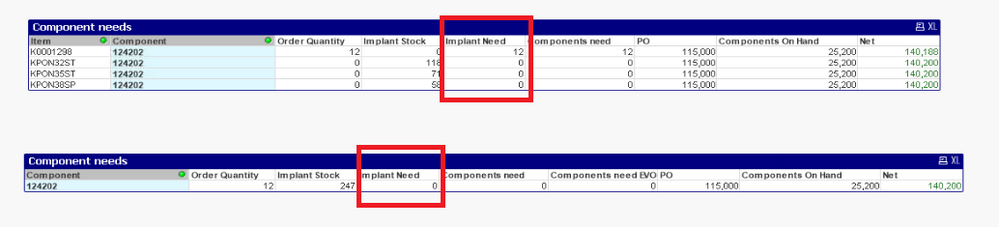
as you can se bellow i created 2 chart - the first one got 2 dimension (Item and Components)
On the second one i removed the Item and i just left the Components.
I have an issue with fIeld Implant Need: i would like to have "12" also as result on the second table.
The field Implant need is calculated as follow: If Order Quantity is > than Implant Stock, then Order Quantity-Implant Stock.
if(sum(ORDERQuantity)-sum(IMPLANTSTOCK)>0,sum(ORDERQuantity)-sum(IMPLANTSTOCK),0)
to have 12 also on the second table - so to have the table working by "Item" - what i should do?
Please help!!
Thank you!!
- Subscribe by Topic:
-
Application Development
-
Layout & Visualizations
-
QlikView App Dev
-
Scripting
Accepted Solutions

 Kushal_Chawda
- Mark as New
- Bookmark
- Subscribe
- Mute
- Subscribe to RSS Feed
- Permalink
- Report Inappropriate Content
@qlikviewaf Your calculation works at Item and Component level, but in second table you don't have Item, so your actual calculation works as if(12-247 >0,...) which will not work as expected, so you need to user aggr function to work your calculation at Item and Component level
sum(aggr(if(sum(ORDERQuantity)-sum(IMPLANTSTOCK)>0,sum(ORDERQuantity)-sum(IMPLANTSTOCK),0), Item, Component))
Kushal_Chawda
- Mark as New
- Bookmark
- Subscribe
- Mute
- Subscribe to RSS Feed
- Permalink
- Report Inappropriate Content
@qlikviewaf Your calculation works at Item and Component level, but in second table you don't have Item, so your actual calculation works as if(12-247 >0,...) which will not work as expected, so you need to user aggr function to work your calculation at Item and Component level
sum(aggr(if(sum(ORDERQuantity)-sum(IMPLANTSTOCK)>0,sum(ORDERQuantity)-sum(IMPLANTSTOCK),0), Item, Component))
