Unlock a world of possibilities! Login now and discover the exclusive benefits awaiting you.

- Qlik Community
- :
- All Forums
- :
- QlikView
- :
- Re: Agr
- Subscribe to RSS Feed
- Mark Topic as New
- Mark Topic as Read
- Float this Topic for Current User
- Bookmark
- Subscribe
- Mute
- Printer Friendly Page

 icaro_povoa
- Mark as New
- Bookmark
- Subscribe
- Mute
- Subscribe to RSS Feed
- Permalink
- Report Inappropriate Content
Agr
Dear all,
I am quite new in Qlik and I am suffering to get an calculation done.
I work with planning , and need to check the accuracy of my production by season & Hybrid in absolut numbers.
Below an example.
I need to Sum variation of each hybrid.
EX: Hybrid 1: (-2+5)=3
Hybrid 2: (+4-5)=-1
Hybrid X.......
The point is that I don´t want to have a table to calculate this number. I wanna use a TextBox to give me the Sum (Absolute Numbers). In the example above equal to 4 on Hybrid 1 + Hybrid 2
| Season | Hybrid | Production Plan | Production Actual | Difference |
| Season 1 | Hybrid 1 | 10 | 8 | -2 |
| Season 1 | Hybrid 2 | 10 | 14 | 4 |
| Season 1 | Hybrid 3 | 20 | 21 | 1 |
| Season 1 | Hybrid 4 | 30 | 4 | -26 |
| Season 1 | Hybrid 5 | 40 | 4 | -36 |
| Season 1 | Hybrid 6 | 46 | 53 | 7 |
| Season 1 | Hybrid 12 | 94 | 94 | 0 |
| Season 2 | Hybrid 1 | 10 | 15 | +5 |
| Season 2 | Hybrid 2 | 15 | 10 | -5 |
| Season 2 | Hybrid 3 | 10 | 20 | 10 |
| Season 2 | Hybrid 4 | 10 | 3 | -7 |
| Season 2 | Hybrid 5 | 40 | 40 | 0 |
| Season 2 | Hybrid 6 | 46 | 46 | 0 |
| Season 2 | Hybrid 16 | 86 | 86 | 0 |
| Season 2 | Hybrid 17 | 94 | 94 | 0 |
Thank you very much for your help.
Accepted Solutions

 sunny_talwar
- Mark as New
- Bookmark
- Subscribe
- Mute
- Subscribe to RSS Feed
- Permalink
- Report Inappropriate Content

 chrismarlow
- Mark as New
- Bookmark
- Subscribe
- Mute
- Subscribe to RSS Feed
- Permalink
- Report Inappropriate Content
Does this work? Aggregating first over Hybrid, then taking the absolute & then the season?
=sum(aggr(sum(fabs(aggr(sum([Production Actual]-[Production Plan]),[Hybrid]))),[Season]))
Regards,
Chris.
sunny_talwar
- Mark as New
- Bookmark
- Subscribe
- Mute
- Subscribe to RSS Feed
- Permalink
- Report Inappropriate Content
May be this in a text box object
Sum(Aggr(fabs(Sum([Production Actual] - [Production Plan])), Hybrid))
sunny_talwar
- Mark as New
- Bookmark
- Subscribe
- Mute
- Subscribe to RSS Feed
- Permalink
- Report Inappropriate Content
Or this
=Sum(Aggr(fabs(Sum(Difference)), Hybrid))
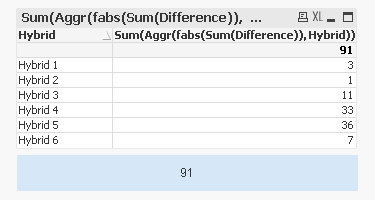
icaro_povoa
- Mark as New
- Bookmark
- Subscribe
- Mute
- Subscribe to RSS Feed
- Permalink
- Report Inappropriate Content
Thank you very much! It worked perfectly!!
Regards
