Unlock a world of possibilities! Login now and discover the exclusive benefits awaiting you.

- Qlik Community
- :
- All Forums
- :
- QlikView
- :
- Re: Alert (email)
- Subscribe to RSS Feed
- Mark Topic as New
- Mark Topic as Read
- Float this Topic for Current User
- Bookmark
- Subscribe
- Mute
- Printer Friendly Page

- Mark as New
- Bookmark
- Subscribe
- Mute
- Subscribe to RSS Feed
- Permalink
- Report Inappropriate Content
Alert (email)
Hi
I am stuggling to get sucess with alerts (QV12 SR1).
I know the server setup is correct as I receive emails when a document fails to reload (proved this morning). I have set up a test document and when I couldn’t get it to work I downloaded Rob Wunderlich’s example (http://qlikviewcookbook.com/recipes/download-info/using-alerts-to-send-numbers-via-email/) and modified that. I set it to reload every couple of minutes on the server and configured so:

Note: I altered the the EmailAlertTo in the load script to my email address (and even tried hard coding it directly in the dialog box).
Silly thing is I have had alerts working in the past; Am I doing something wrong or has a bug been introduced on the latest release?
Many thanks
Oli
Accepted Solutions
- Mark as New
- Bookmark
- Subscribe
- Mute
- Subscribe to RSS Feed
- Permalink
- Report Inappropriate Content
Thanks anyway.
I have been trying various things and can confirm there is no bug in QV12 regarding this; however I think something in my original test document did get screwed up. Although the confiuration in the Alert was correct it wasnt working but creating a fresh test document and reconfiguring the batch mode worked and I received and email as expected.
bit of a waste of time all round...
The desktop settings are not required for server emails.

 stabben23
- Mark as New
- Bookmark
- Subscribe
- Mute
- Subscribe to RSS Feed
- Permalink
- Report Inappropriate Content
Hi you have to config here:
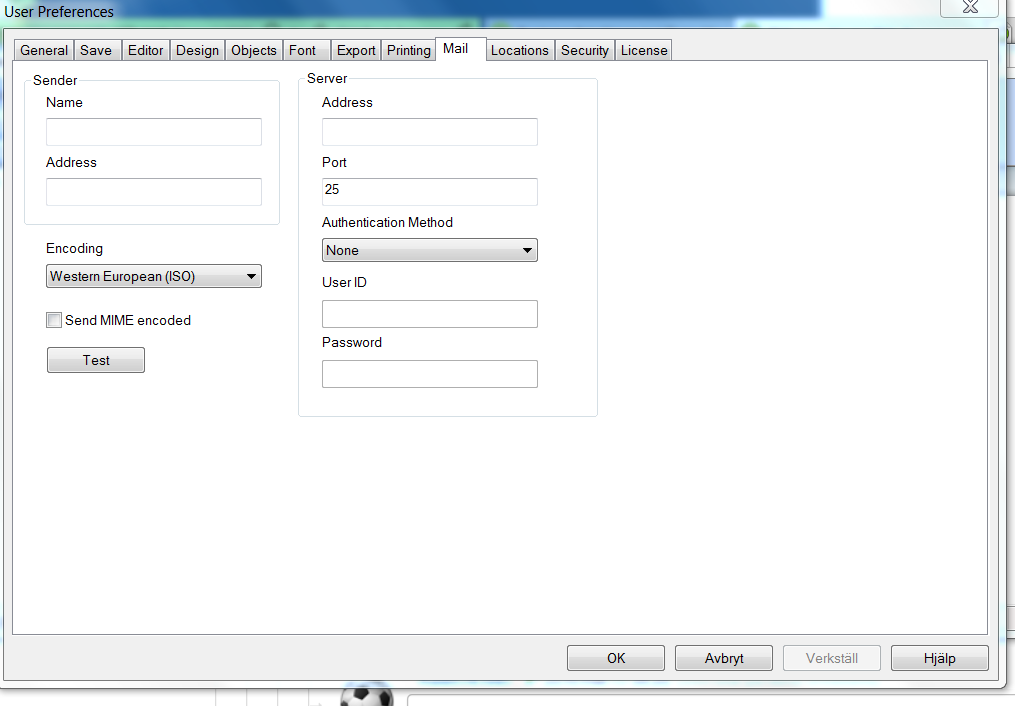
- Mark as New
- Bookmark
- Subscribe
- Mute
- Subscribe to RSS Feed
- Permalink
- Report Inappropriate Content
Hi
Isn't that just for alerts when reloading in the desktop version? I am reloading on the server and I want the server to send the email based on a scheduled reload.
Oli
stabben23
- Mark as New
- Bookmark
- Subscribe
- Mute
- Subscribe to RSS Feed
- Permalink
- Report Inappropriate Content
I'll think you have to config here in both case.
stabben23
- Mark as New
- Bookmark
- Subscribe
- Mute
- Subscribe to RSS Feed
- Permalink
- Report Inappropriate Content
Do you try to email person outside the domain? I got problem when I Upgrade to some late 11.20 Version. Maybe this is a problem in QV12?
- Mark as New
- Bookmark
- Subscribe
- Mute
- Subscribe to RSS Feed
- Permalink
- Report Inappropriate Content
No, currently only trying my email which is part of the domain.
stabben23
- Mark as New
- Bookmark
- Subscribe
- Mute
- Subscribe to RSS Feed
- Permalink
- Report Inappropriate Content
ok, Then try to add Your mailserver settings in user preferences
- Mark as New
- Bookmark
- Subscribe
- Mute
- Subscribe to RSS Feed
- Permalink
- Report Inappropriate Content
Thanks anyway.
I have been trying various things and can confirm there is no bug in QV12 regarding this; however I think something in my original test document did get screwed up. Although the confiuration in the Alert was correct it wasnt working but creating a fresh test document and reconfiguring the batch mode worked and I received and email as expected.
bit of a waste of time all round...
The desktop settings are not required for server emails.