Unlock a world of possibilities! Login now and discover the exclusive benefits awaiting you.

- Qlik Community
- :
- All Forums
- :
- QlikView
- :
- Re: Alphabetical Filter for a List Box
- Subscribe to RSS Feed
- Mark Topic as New
- Mark Topic as Read
- Float this Topic for Current User
- Bookmark
- Subscribe
- Mute
- Printer Friendly Page

- Mark as New
- Bookmark
- Subscribe
- Mute
- Subscribe to RSS Feed
- Permalink
- Report Inappropriate Content
Alphabetical Filter for a List Box
Hello my QV friends. I have a listbox with a long list of names in it. To aid the user of my app, I thought about creating a separate filter to find the list of names that begin with C, for example. Is it possible to create a separate filter for a listbox to narrow the list of options? Thank you.
- Tags:
- qlikview_scripting
Accepted Solutions

 martinpedersen
- Mark as New
- Bookmark
- Subscribe
- Mute
- Subscribe to RSS Feed
- Permalink
- Report Inappropriate Content
Like a trigger or in the script?
If you are looking for a way to group your values into alphabetic lists or something like that, then you could do it in the load script:
DataTable:
Load
YourValue, Left(YourValue, 1) as YourValueGroup From data.qvd (qvd);
Then you could add a two list box with both YourValue and YourValueGroup - or you could set the Listbox with "YourValue" to show only when you have made a selection in "YourValueGroup".
If its something like this you are looking for i could make an example document?
- Mark as New
- Bookmark
- Subscribe
- Mute
- Subscribe to RSS Feed
- Permalink
- Report Inappropriate Content
you can use the search function of the list box typing *c*
regrads,
MT
- Mark as New
- Bookmark
- Subscribe
- Mute
- Subscribe to RSS Feed
- Permalink
- Report Inappropriate Content
Thank you for your reply. I was wondering if there is a way to code this search?
 veidlburkhard
- Mark as New
- Bookmark
- Subscribe
- Mute
- Subscribe to RSS Feed
- Permalink
- Report Inappropriate Content
Hi thnkgreen,
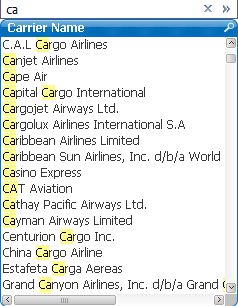
the list box already has a built-in filter. Type in C and it will show you all the fieldvalues with C. See picture below:

 tresB
tresB
- Mark as New
- Bookmark
- Subscribe
- Mute
- Subscribe to RSS Feed
- Permalink
- Report Inappropriate Content
Create a listbox with expression like:
=If(WidlMatch(YourDimension, 'C*'), YourDimension)
martinpedersen
- Mark as New
- Bookmark
- Subscribe
- Mute
- Subscribe to RSS Feed
- Permalink
- Report Inappropriate Content
Like a trigger or in the script?
If you are looking for a way to group your values into alphabetic lists or something like that, then you could do it in the load script:
DataTable:
Load
YourValue, Left(YourValue, 1) as YourValueGroup From data.qvd (qvd);
Then you could add a two list box with both YourValue and YourValueGroup - or you could set the Listbox with "YourValue" to show only when you have made a selection in "YourValueGroup".
If its something like this you are looking for i could make an example document?