Unlock a world of possibilities! Login now and discover the exclusive benefits awaiting you.

- Qlik Community
- :
- All Forums
- :
- QlikView
- :
- Assign value based on count
- Subscribe to RSS Feed
- Mark Topic as New
- Mark Topic as Read
- Float this Topic for Current User
- Bookmark
- Subscribe
- Mute
- Printer Friendly Page

- Mark as New
- Bookmark
- Subscribe
- Mute
- Subscribe to RSS Feed
- Permalink
- Report Inappropriate Content
Assign value based on count
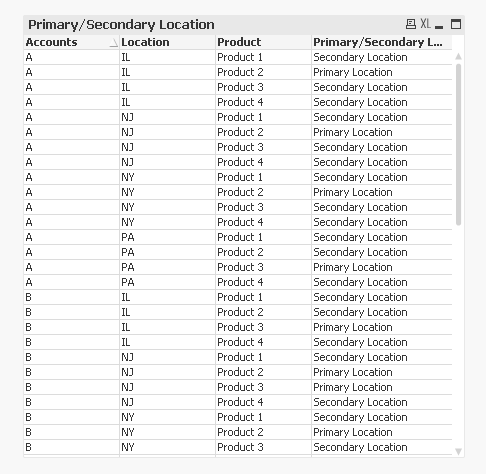
I have 3 dimensions: Accounts Locations Products An Account has multiple Locations, each with varying numbers of Products. I would like to flag the Location at each Account with the highest number of Products with "Primary". Every other Location per Account would have an alternate flag "Secondary" Any ideas?
- Tags:
- new_to_qlikview

 sinanozdemir
- Mark as New
- Bookmark
- Subscribe
- Mute
- Subscribe to RSS Feed
- Permalink
- Report Inappropriate Content
Hi Jonathan,
I don't know your data so I am just guessing that you have numbers in Products dimension. If so, you can use Max(Total <Accounts> Products) function:
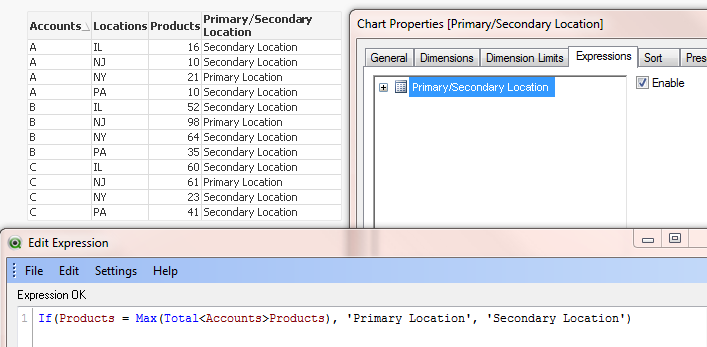
Hope this helps.
- Mark as New
- Bookmark
- Subscribe
- Mute
- Subscribe to RSS Feed
- Permalink
- Report Inappropriate Content
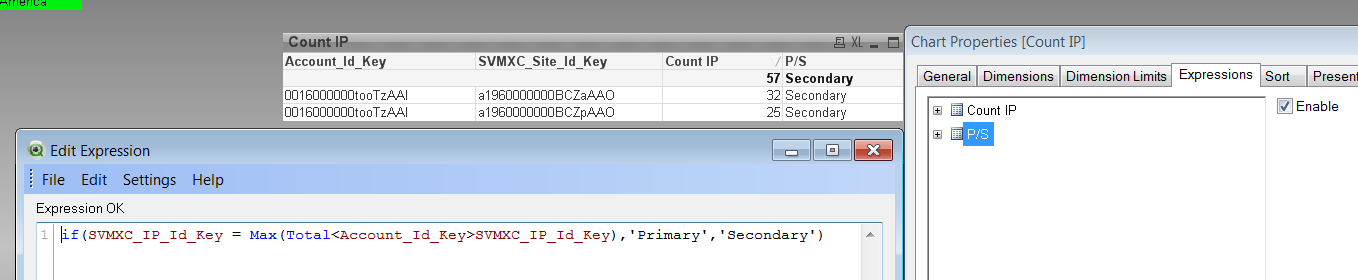
That is very helpful and close but not quite. I think the issue is products are individual records rather than just a number on a record.

 sunny_talwar
- Mark as New
- Bookmark
- Subscribe
- Mute
- Subscribe to RSS Feed
- Permalink
- Report Inappropriate Content
May be this?
=If(Count(Product) = Max(TOTAL <Accounts, Location> Aggr(Count(Product), Accounts, Location, Product)), 'Primary Location', 'Secondary Location')