Unlock a world of possibilities! Login now and discover the exclusive benefits awaiting you.

- Qlik Community
- :
- All Forums
- :
- QlikView
- :
- Re: Average Trendline
- Subscribe to RSS Feed
- Mark Topic as New
- Mark Topic as Read
- Float this Topic for Current User
- Bookmark
- Subscribe
- Mute
- Printer Friendly Page

 mhmmd_srf
- Mark as New
- Bookmark
- Subscribe
- Mute
- Subscribe to RSS Feed
- Permalink
- Report Inappropriate Content
Average Trendline
Hi All,
I have a chart where Bar is showing Dollar valuer per month. And in Line we need show the Trendline Average.
If I use the Trendlines property it is simply dividing by 12. Instead of that I need Sum(Dollar) / Available Month in Current Year.

Is there any other property to do the same.
Thanks,
Sarif
I am attaching the Sample App.

 sunny_talwar
- Mark as New
- Bookmark
- Subscribe
- Mute
- Subscribe to RSS Feed
- Permalink
- Report Inappropriate Content
Try this may be
=If(sum(WIPYieldLoss) > 0, Avg({<CstFiscalYear = {'2017'}>}TOTAL Aggr(If(sum({<CstFiscalYear = {'2017'}>}WIPYieldLoss) > 0, Sum({<CstFiscalYear = {'2017'}>}WIPYieldLoss)), CstFiscalPeriod)))
mhmmd_srf
- Mark as New
- Bookmark
- Subscribe
- Mute
- Subscribe to RSS Feed
- Permalink
- Report Inappropriate Content
Thanks a lot Sunny...it is working..
I need one more small help from you..
Could you please make me understand the syntax.
It would be really helpfull for me.
Thanks,
Sarif
sunny_talwar
- Mark as New
- Bookmark
- Subscribe
- Mute
- Subscribe to RSS Feed
- Permalink
- Report Inappropriate Content
Which expression do you need help with? and also is there a specific thing you don't understand in that expression?
mhmmd_srf
- Mark as New
- Bookmark
- Subscribe
- Mute
- Subscribe to RSS Feed
- Permalink
- Report Inappropriate Content
For Year = 2017 , selection,
In chart it is showing 8 months only. Then how PY is making division by 12 and Cy is making division by 8?
This is major confusion.
Thanks,
Sarif
sunny_talwar
- Mark as New
- Bookmark
- Subscribe
- Mute
- Subscribe to RSS Feed
- Permalink
- Report Inappropriate Content
Because PY is for previous years where there are 12 entries... and CY only have 8 entries... I guess Avg of 8 numbers will be Sum/8 and Avg of 12 will be Sum/12, isn't it?
mhmmd_srf
- Mark as New
- Bookmark
- Subscribe
- Mute
- Subscribe to RSS Feed
- Permalink
- Report Inappropriate Content
okk.. but one thing... if I select :
Year = 2017 and Group Major = Not Available:

Then chart is showing 7 Months. And how the line is behaving?
For CY, it is neither dividing by 7 nor 8,
For PY, it is neither dividing by 12 nor 7.
I am not getting the behaviour..
Please check.
Thanks,
Sarif
sunny_talwar
- Mark as New
- Bookmark
- Subscribe
- Mute
- Subscribe to RSS Feed
- Permalink
- Report Inappropriate Content
Dividing by 6 because there are 6 bars... 6 numbers.... Sum/6 
Month 4 is missing

mhmmd_srf
- Mark as New
- Bookmark
- Subscribe
- Mute
- Subscribe to RSS Feed
- Permalink
- Report Inappropriate Content
Okk.. I understand for CY. Could you please let me know the behaviour of PY?
Please help.
Thanks,
Sarif
sunny_talwar
- Mark as New
- Bookmark
- Subscribe
- Mute
- Subscribe to RSS Feed
- Permalink
- Report Inappropriate Content
There seems to be 9 months using this
=Count( DISTINCT{<CstFiscalYear = {'2016'}>}CstFiscalPeriod)
So, 6871552.9059/9 = 763505.88
Changed the PY Expression to this
=If(sum(WIPYieldLoss) > 0, Avg({<CstFiscalYear = {'2016'}>}TOTAL Aggr(Sum({<CstFiscalYear = {'2016'}>}WIPYieldLoss), CstFiscalPeriod)))
mhmmd_srf
- Mark as New
- Bookmark
- Subscribe
- Mute
- Subscribe to RSS Feed
- Permalink
- Report Inappropriate Content
Here is my question, why 9 months.
If we select 2016 and Not Available, I can see there are 7 months.
Co
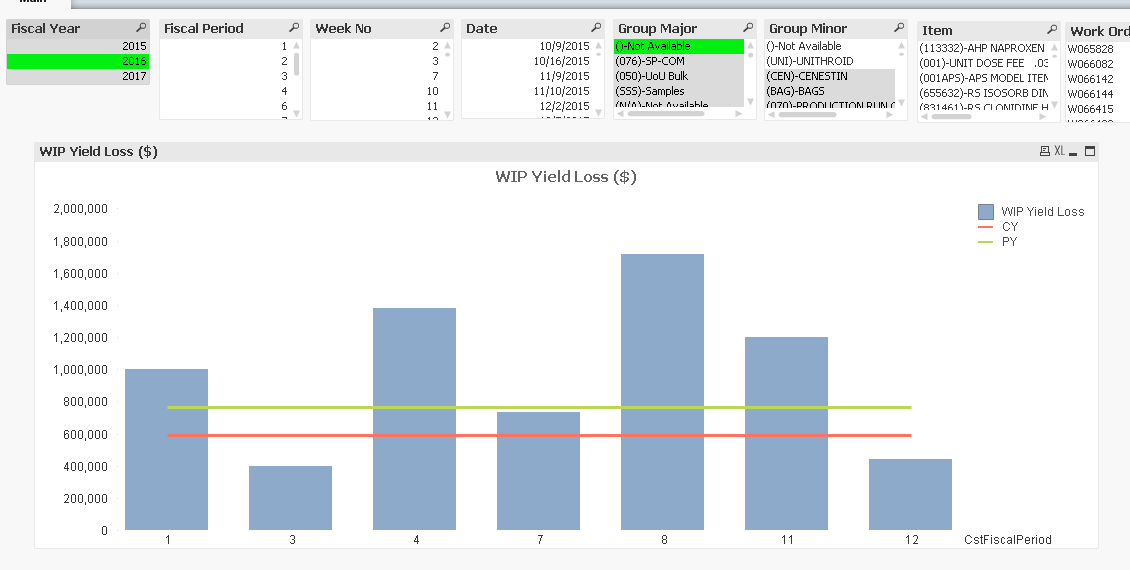
Could you please check once?
Thanks,
Sarif
