Unlock a world of possibilities! Login now and discover the exclusive benefits awaiting you.

- Qlik Community
- :
- All Forums
- :
- QlikView
- :
- Re: Average Using Top 10 Ranked Items
- Subscribe to RSS Feed
- Mark Topic as New
- Mark Topic as Read
- Float this Topic for Current User
- Bookmark
- Subscribe
- Mute
- Printer Friendly Page

 raynac
- Mark as New
- Bookmark
- Subscribe
- Mute
- Subscribe to RSS Feed
- Permalink
- Report Inappropriate Content
Average Using Top 10 Ranked Items
I am having an issue where I have been asked to build a chart that shows the top 10 revenue producing guest types in my database, and I have added a column that ranks them. Which was simple.
However, I am now trying to add an Average Daily Rate (which is a calculation of room only revenue over nights). The issue is that, even though I have said not to include non-top-10 items when then chart draws, if I use Expression Total mode on the Expressions tab, that average is not accurate and appears to still based on all records in the selection/database. ADR here should be 195.97; this ADR of 195.11 includes the remaining records not shown.
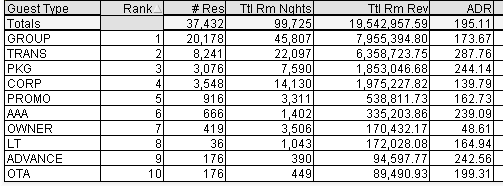
I can't sum or average rows all the individual ADRs using the Sum (Or Average) of Rows Mode on the Expressions tab:
1) Sum adds them up, which is obviously not what I am after and
2) Regarding Average, it needs to be (Sum(total revenue)/sum(total room nights)) not Avg(ADR)
I have tried Set Analysis in the formula:
=SUM({<[Guest Type]={"=Rank(sum(column(1))<11"}>}column(5)/Column(4))
Column(1) is a somewhat complex calculation of the total revenue that's being used for the ranking, then column(5) is the room revenue and column(4) contains the nights. It's producing all 0s.That was something I saw in a post here somewhere but for me, it's just not working for me.
Can anyone see what I am doing wrong? Or is there a simpler way/setting to get the ADR to do what I need it to?
Thank you for any help you can provide!
- « Previous Replies
-
- 1
- 2
- Next Replies »

 Chamini2020
- Mark as New
- Bookmark
- Subscribe
- Mute
- Subscribe to RSS Feed
- Permalink
- Report Inappropriate Content
I m quite new to qlik sense. .
in my data set basically follwoing in fields given
ACcount ID , Client ID, Fiscal date, transaction date , booking date, reservation status, no of room night, no of available rooms , property name, category .. etc.
cant i calcuate, ARR by simply sum(revenue) /Sum(no of room nights)
Thanks

- « Previous Replies
-
- 1
- 2
- Next Replies »