Unlock a world of possibilities! Login now and discover the exclusive benefits awaiting you.

- Qlik Community
- :
- All Forums
- :
- QlikView
- :
- Re: Average excluding selection
- Subscribe to RSS Feed
- Mark Topic as New
- Mark Topic as Read
- Float this Topic for Current User
- Bookmark
- Subscribe
- Mute
- Printer Friendly Page

 canmarroig
- Mark as New
- Bookmark
- Subscribe
- Mute
- Subscribe to RSS Feed
- Permalink
- Report Inappropriate Content
Average excluding selection
Hi, this is my data set
A B $
20 black 200
20 red 1000
30 white 10
70 blue 200
80 blue 300
90 blue 100
93 black 50
95 red 100
..........
i've a bar chart with my $ and i need to calculate avg of $ using A and B as dimension. No problem
Sales department (who hates me) asks to add a futher field with an avg for all A field with the same B field and if i select A=70 my average must be calculate without selected (80 blue + 90 blue).
Help me pls, tks
- « Previous Replies
-
- 1
- 2
- Next Replies »
Accepted Solutions

 sunny_talwar
- Mark as New
- Bookmark
- Subscribe
- Mute
- Subscribe to RSS Feed
- Permalink
- Report Inappropriate Content
May be one of the two:

1) Avg({<A, B = p(B)>} Dol)
2) Avg({<A = e(A), B = p(B)>} Dol)
sunny_talwar
- Mark as New
- Bookmark
- Subscribe
- Mute
- Subscribe to RSS Feed
- Permalink
- Report Inappropriate Content
May be this:
Avg({<A, B = p(B)>}$)

 t_chetirbok
- Mark as New
- Bookmark
- Subscribe
- Mute
- Subscribe to RSS Feed
- Permalink
- Report Inappropriate Content
hi!
if you select A=70, then result must be like this?

canmarroig
- Mark as New
- Bookmark
- Subscribe
- Mute
- Subscribe to RSS Feed
- Permalink
- Report Inappropriate Content
No Tatsiana, my result must be:
80 blue
90 blue
t_chetirbok
- Mark as New
- Bookmark
- Subscribe
- Mute
- Subscribe to RSS Feed
- Permalink
- Report Inappropriate Content
I think Sunny ' s result is correct, isn't it?

canmarroig
- Mark as New
- Bookmark
- Subscribe
- Mute
- Subscribe to RSS Feed
- Permalink
- Report Inappropriate Content
Perhaps this: Avg({<A=e(A), B=p(B)>}$) but I've always to select an A dimension to obtain result.
sunny_talwar
- Mark as New
- Bookmark
- Subscribe
- Mute
- Subscribe to RSS Feed
- Permalink
- Report Inappropriate Content
May be one of the two:
1) Avg({<A, B = p(B)>} Dol)
2) Avg({<A = e(A), B = p(B)>} Dol)

 tresB
tresB
- Mark as New
- Bookmark
- Subscribe
- Mute
- Subscribe to RSS Feed
- Permalink
- Report Inappropriate Content
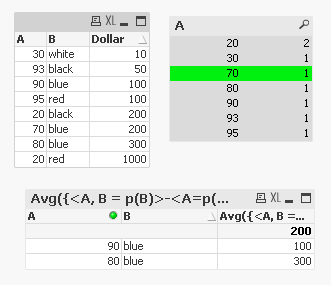
Like this?
sunny_talwar
- Mark as New
- Bookmark
- Subscribe
- Mute
- Subscribe to RSS Feed
- Permalink
- Report Inappropriate Content
tresesco what expression are you using?
tresB
- Mark as New
- Bookmark
- Subscribe
- Mute
- Subscribe to RSS Feed
- Permalink
- Report Inappropriate Content
Avg({<A, B = p(B)>-<A=p(A)>}Dollar)
Equivalent to yours. 

- « Previous Replies
-
- 1
- 2
- Next Replies »