Unlock a world of possibilities! Login now and discover the exclusive benefits awaiting you.

- Qlik Community
- :
- All Forums
- :
- QlikView
- :
- Re: Background Colour (Based on Group)
- Subscribe to RSS Feed
- Mark Topic as New
- Mark Topic as Read
- Float this Topic for Current User
- Bookmark
- Subscribe
- Mute
- Printer Friendly Page

- Mark as New
- Bookmark
- Subscribe
- Mute
- Subscribe to RSS Feed
- Permalink
- Report Inappropriate Content
Background Colour (Based on Group)
Hi there,
I have a Pivot Table with a few dimensions, i want to be able to change the background colour of the expression based on which group it falls into under the last dimension, so in pseudo code
if leg (Dimension) = 'Transferred in' then colour1
if leg = 'Primary' then colour2
else colour3
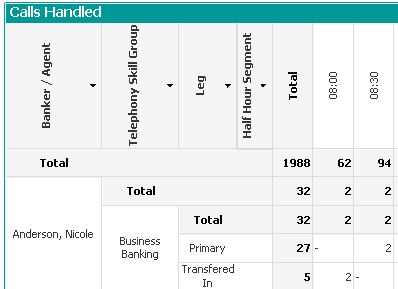
Thanks

 qlikmsg4u
- Mark as New
- Bookmark
- Subscribe
- Mute
- Subscribe to RSS Feed
- Permalink
- Report Inappropriate Content
Try like this
Expression > Background Color
=If(Leg='Transfered In',RGB(111,111,111),IF(Leg='Primary',RGB(222,222,222),RGB(150,150,150)))
Replace RGB with your colors.
- Mark as New
- Bookmark
- Subscribe
- Mute
- Subscribe to RSS Feed
- Permalink
- Report Inappropriate Content
Try like below,
if(wildmatch(Leg,'Transfered In'),green(),if(wildmatch(Leg,'Primary'),red()))

 Joaquin_Lazaro
- Mark as New
- Bookmark
- Subscribe
- Mute
- Subscribe to RSS Feed
- Permalink
- Report Inappropriate Content
Hi Stephen2014
You can also do this in Expression > Background Color
If (dimensionallity() = 0, blue(), if (dimensionallity() = 1, green(), if (dimensionallity() = 2, yellow(), red() )))
dimensionallity = 0 is the most left level, you can create a expresion with = dimensionallity() to check the correct level.
Hope this helps you
Joaquín
- Mark as New
- Bookmark
- Subscribe
- Mute
- Subscribe to RSS Feed
- Permalink
- Report Inappropriate Content
Hi Joaquin,
Thanks for this, i actually got it right using a combination of Dimensionality() and wildmatch()
Joaquin_Lazaro
- Mark as New
- Bookmark
- Subscribe
- Mute
- Subscribe to RSS Feed
- Permalink
- Report Inappropriate Content
I'm glad for this, then mark one answer as 'Correct answer' and other as 'Helpfull answer' to close the post.
Regards
Joaquín