Unlock a world of possibilities! Login now and discover the exclusive benefits awaiting you.

- Qlik Community
- :
- All Forums
- :
- QlikView
- :
- Re: Background & font Color depending on condition
- Subscribe to RSS Feed
- Mark Topic as New
- Mark Topic as Read
- Float this Topic for Current User
- Bookmark
- Subscribe
- Mute
- Printer Friendly Page

- Mark as New
- Bookmark
- Subscribe
- Mute
- Subscribe to RSS Feed
- Permalink
- Report Inappropriate Content
Background & font Color depending on condition
Hi Community,
how can i set up a List Box or Table Box, so that rows have a different background & font color depending on a condition?
For example in case of the background i tried it with List/Table Box > Properties > Presentation > Background > Color >
Formula = If(SALE_COUNTRY='AT', Red(), White())
As a result only when i choose AT the style i changing, and then for the whole object.
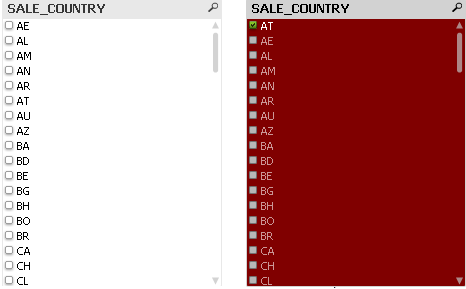
But i need another behavior, so that only the matched Country is styled, all the time (When country is selected and not)
Such a behaviour is working with a Table Diagram.
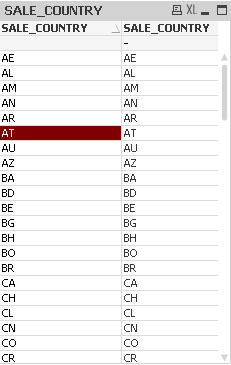
How can i achieve such a behaviour also in other object types?

 senarath
- Mark as New
- Bookmark
- Subscribe
- Mute
- Subscribe to RSS Feed
- Permalink
- Report Inappropriate Content
Hi,
I doubt you could do this in a list box. List box back ground is applied as a whole. If you add a expression to a list box, expression back ground can be set conditional.
This is possible as long as you use either a Dim or expression.
thanx
- Mark as New
- Bookmark
- Subscribe
- Mute
- Subscribe to RSS Feed
- Permalink
- Report Inappropriate Content
Hi,
expressions of List boxes can not be styled in detail (for example background).
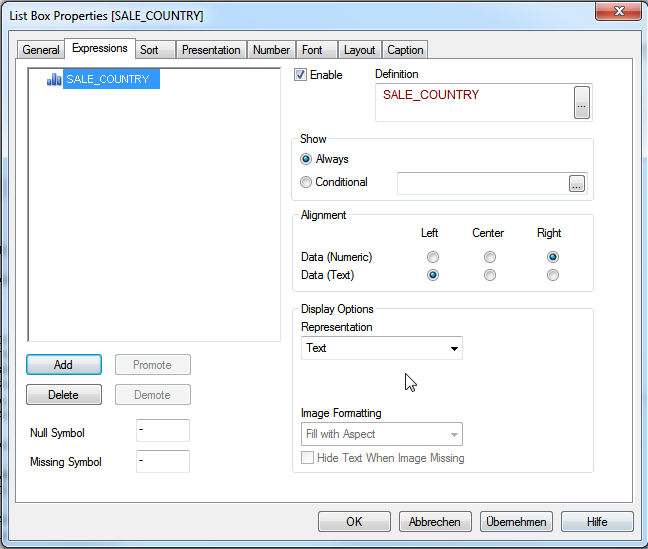
In my initial post i mentioned already that using table box for that is also not working.
Anyone else an idea?