Unlock a world of possibilities! Login now and discover the exclusive benefits awaiting you.

- Qlik Community
- :
- All Forums
- :
- QlikView
- :
- Balance Amount & Overdue Amount ? Help Required
- Subscribe to RSS Feed
- Mark Topic as New
- Mark Topic as Read
- Float this Topic for Current User
- Bookmark
- Subscribe
- Mute
- Printer Friendly Page

- Mark as New
- Bookmark
- Subscribe
- Mute
- Subscribe to RSS Feed
- Permalink
- Report Inappropriate Content
Balance Amount & Overdue Amount ? Help Required
HI All,
I Need to get Get Outstanding amount & Over due amount Based on OST_DUE_DT as per the Transaction..
I am getting Overdue amount & Balance Amount is comming correct but in Single Record for every Cust code in Qlikview ..
For 100793 I am getting in 2 Records and also I am getting wrong Over due Amount...
Help me on this...
Please find the attached .QVW & Excel File &Give me the Solution...
Regards,
Helen

 MK_QSL
- Mark as New
- Bookmark
- Subscribe
- Mute
- Subscribe to RSS Feed
- Permalink
- Report Inappropriate Content
Don't understood your exact requirement from explanation but you can use below as an overdue amount
=IF(if(OST_DRCR_FLAG ='C', Sum(OST_FC_ADJ_AMT)-sum(OST_FC_ORG_AMT),Sum(OST_FC_ORG_AMT)-sum(OST_FC_ADJ_AMT))<0,0,if(OST_DRCR_FLAG ='C', Sum(OST_FC_ADJ_AMT)-sum(OST_FC_ORG_AMT),Sum(OST_FC_ORG_AMT)-sum(OST_FC_ADJ_AMT)))
- Mark as New
- Bookmark
- Subscribe
- Mute
- Subscribe to RSS Feed
- Permalink
- Report Inappropriate Content
HI Manish,
I am not getting Correct Output..
My Requirement was that:
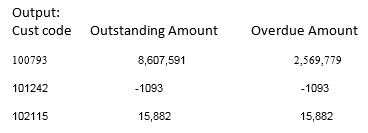
I need to get Outstanding amount on basis of Sum(OST_FC_ORG_AMT - OST_FC_ADJ_AMT) based on OST_DRCR_FLAG (Credit means +Ve value, Debit means -Ve) I want to get Total the amount on the basis of Credit & Debit as per the Excel I have shared..
In a single Record Row in QlikView which i shared the Output Screen shot ..
Overdue amount means that Based on Each & every transaction (OST_DOC_NO) is having Some Due date,
If due date is < Today, then Zero will be added to Overdueamount,
If due date is > Today then total Outstanding is to be added to Over due Amount based on Each every OST_DOC_NO...
Finally Each & Every Cust Code has no. of Transactions, as on Today i need calculate all the transactions made by a customer...
So that I Can get OutStanding Amount & OverDueAmount as on Today ...
Please help me..
Thanks,
Helen