Unlock a world of possibilities! Login now and discover the exclusive benefits awaiting you.

Announcements
Want to see what's currently in public preview? We've pulled it all together in one place. Check it out here
- Qlik Community
- :
- All Forums
- :
- QlikView
- :
- Re: Bar Char Question.
Options
- Subscribe to RSS Feed
- Mark Topic as New
- Mark Topic as Read
- Float this Topic for Current User
- Bookmark
- Subscribe
- Mute
- Printer Friendly Page
Turn on suggestions
Auto-suggest helps you quickly narrow down your search results by suggesting possible matches as you type.
Showing results for

 MuraliPrasath
Creator III
2015-08-20
03:19 AM
- Mark as New
- Bookmark
- Subscribe
- Mute
- Subscribe to RSS Feed
- Permalink
- Report Inappropriate Content
Bar Char Question.
Hi,
I have lenghty dimension names. How to wrap the lines?
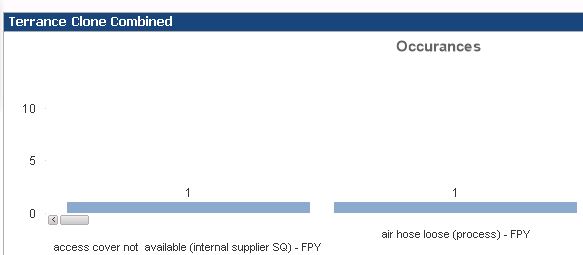
I looking wrap text like this.
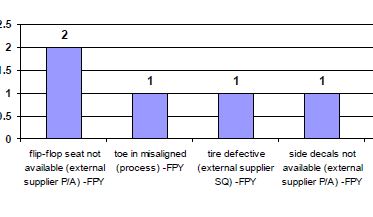
How to achieve this?
917 Views
2 Replies

 vikasmahajan
MVP
2015-08-20
03:32 AM
- Mark as New
- Bookmark
- Subscribe
- Mute
- Subscribe to RSS Feed
- Permalink
- Report Inappropriate Content
Go to Chart properties ->Presentation->legend Setting-> Wrap Text -> Tick
HTH
Vikas
Hope this resolve your issue.
If the issue is solved please mark the answer with Accept as Solution & like it.
If you want to go quickly, go alone. If you want to go far, go together.
If the issue is solved please mark the answer with Accept as Solution & like it.
If you want to go quickly, go alone. If you want to go far, go together.

753 Views
 daniel_kusiak
Creator II
2015-08-20
03:36 AM
- Mark as New
- Bookmark
- Subscribe
- Mute
- Subscribe to RSS Feed
- Permalink
- Report Inappropriate Content
Hi, try using
=Replace(your_dimension,' ',chr(13))
or
=subfield(your_dimension,' ',1) & chr(13) & chr(10) & subfield(your_dimension,' ',2)
as Calculated Dimension
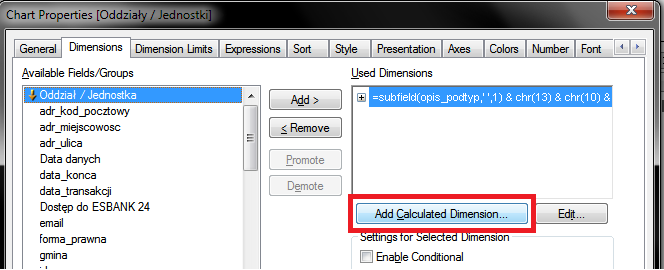
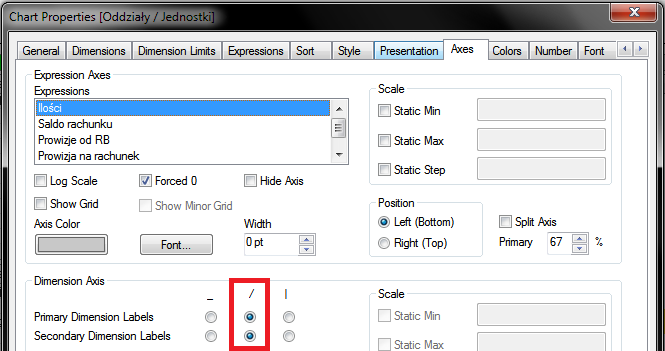
After that you can also set Dimension Axis like this:
753 Views
