Unlock a world of possibilities! Login now and discover the exclusive benefits awaiting you.

- Qlik Community
- :
- All Forums
- :
- QlikView
- :
- Re: Bar Chart - Axis Scale
- Subscribe to RSS Feed
- Mark Topic as New
- Mark Topic as Read
- Float this Topic for Current User
- Bookmark
- Subscribe
- Mute
- Printer Friendly Page

- Mark as New
- Bookmark
- Subscribe
- Mute
- Subscribe to RSS Feed
- Permalink
- Report Inappropriate Content
Bar Chart - Axis Scale
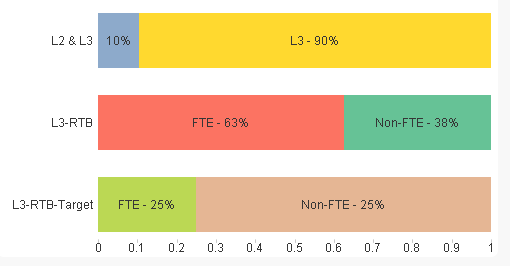
I have a situation.
I'm using Dual in the expression to show the data with Text.
But, the scale is not converted into %.
Can you please advise, how to convert the scale in %? Thanks.
- « Previous Replies
-
- 1
- 2
- Next Replies »
Accepted Solutions

 sunny_talwar
- Mark as New
- Bookmark
- Subscribe
- Mute
- Subscribe to RSS Feed
- Permalink
- Report Inappropriate Content
sunny_talwar
- Mark as New
- Bookmark
- Subscribe
- Mute
- Subscribe to RSS Feed
- Permalink
- Report Inappropriate Content
Add another expression ahead of all other expression and give it value 0 and try using % format for the expression on the numbers tab and see if that helps

 trdandamudi
- Mark as New
- Bookmark
- Subscribe
- Mute
- Subscribe to RSS Feed
- Permalink
- Report Inappropriate Content
For your Expression under properties--> Number: Select Integer and then put a check mark for "Show in Percent(%).
See the attached screen shot. Hope this helps,
 sunny_talwar
- Mark as New
- Bookmark
- Subscribe
- Mute
- Subscribe to RSS Feed
- Permalink
- Report Inappropriate Content
So far it isn't working, but I am trying 
sunny_talwar
- Mark as New
- Bookmark
- Subscribe
- Mute
- Subscribe to RSS Feed
- Permalink
- Report Inappropriate Content
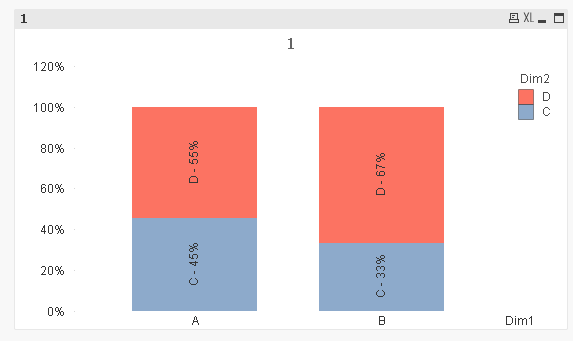
Got it, try the attached
- Mark as New
- Bookmark
- Subscribe
- Mute
- Subscribe to RSS Feed
- Permalink
- Report Inappropriate Content
Hi Thirumala,
Thanks for your response.
As I said, I'm using Dual in the expression to display Text. If I change the properties to integer, the display will be turned to numeric, which I dont want to do it. Hope you understand.
- Mark as New
- Bookmark
- Subscribe
- Mute
- Subscribe to RSS Feed
- Permalink
- Report Inappropriate Content
Thanks sunindia.
I will get back to you tomorrow after implementing your idea. Actually I was using synthetic dimension (ValueList).
Let me try it tomorrow. Thanks.
sunny_talwar
- Mark as New
- Bookmark
- Subscribe
- Mute
- Subscribe to RSS Feed
- Permalink
- Report Inappropriate Content
Ya sure thing. I think this should work with a synthetic dimension as well. Are both the dimensions synthetic?
- Mark as New
- Bookmark
- Subscribe
- Mute
- Subscribe to RSS Feed
- Permalink
- Report Inappropriate Content
Hi sunindia,
I have only one dimension and two expressions. I have used stack-style to combine both the expressions.
In your case, I just noticed two dimension.
sunny_talwar
- Mark as New
- Bookmark
- Subscribe
- Mute
- Subscribe to RSS Feed
- Permalink
- Report Inappropriate Content
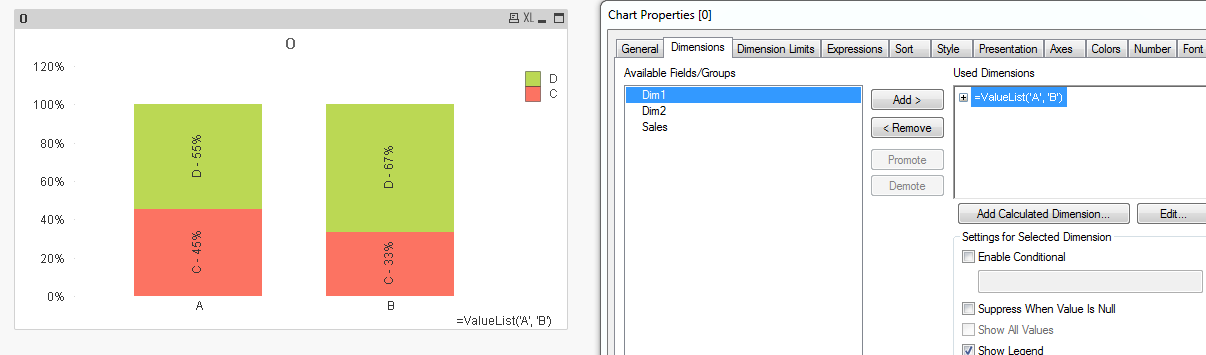
Axis fixed with ValueList dimension:

- « Previous Replies
-
- 1
- 2
- Next Replies »