Unlock a world of possibilities! Login now and discover the exclusive benefits awaiting you.

- Qlik Community
- :
- All Forums
- :
- QlikView
- :
- Re: Bar Chart Data in %
- Subscribe to RSS Feed
- Mark Topic as New
- Mark Topic as Read
- Float this Topic for Current User
- Bookmark
- Subscribe
- Mute
- Printer Friendly Page

- Mark as New
- Bookmark
- Subscribe
- Mute
- Subscribe to RSS Feed
- Permalink
- Report Inappropriate Content
Bar Chart Data in %
Hello,
I have two dimensions, country, and type of business.
I am trying to show data as percentage.
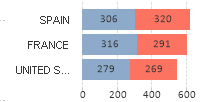
I would like to have for Spain, for one part 51% and the other 49%.
I have tried clicking on relative, however it is giving me the percentage not by country but of the total.
i hope you can help me.
Accepted Solutions

 sunny_talwar
- Mark as New
- Bookmark
- Subscribe
- Mute
- Subscribe to RSS Feed
- Permalink
- Report Inappropriate Content
You had this as expression?
Count(TOTAL {$<SEGMENT={'PLANE'}>}SHARE)
or this
Count({$<SEGMENT={'PLANE'}>}SHARE)
May be try this
Count({$<SEGMENT={'PLANE'}>}SHARE)/Count(TOTAL <Country> {$<SEGMENT={'PLANE'}>}SHARE)
sunny_talwar
- Mark as New
- Bookmark
- Subscribe
- Mute
- Subscribe to RSS Feed
- Permalink
- Report Inappropriate Content
Try this
Sum(Measure)/Sum(TOTAL <Country> Measure)
- Mark as New
- Bookmark
- Subscribe
- Mute
- Subscribe to RSS Feed
- Permalink
- Report Inappropriate Content
hello,
Originally, i have this expression, COUNT(total{$<SEGMENT={'PLANE'}>}SHARE).
doing what you told me it is not working however i think that is more that i haven´t written well the expression.
COUNT(total{$<SEGMENT={'PLANE'}>}SHARE).
/
COUNT(total{$<SEGMENT={'PLANE'},COUNTRY>}SHARE).
sunny_talwar
- Mark as New
- Bookmark
- Subscribe
- Mute
- Subscribe to RSS Feed
- Permalink
- Report Inappropriate Content
You had this as expression?
Count(TOTAL {$<SEGMENT={'PLANE'}>}SHARE)
or this
Count({$<SEGMENT={'PLANE'}>}SHARE)
May be try this
Count({$<SEGMENT={'PLANE'}>}SHARE)/Count(TOTAL <Country> {$<SEGMENT={'PLANE'}>}SHARE)
- Mark as New
- Bookmark
- Subscribe
- Mute
- Subscribe to RSS Feed
- Permalink
- Report Inappropriate Content
It worked perfectly