Unlock a world of possibilities! Login now and discover the exclusive benefits awaiting you.

- Qlik Community
- :
- All Forums
- :
- QlikView
- :
- Bar Chart GANNT
- Subscribe to RSS Feed
- Mark Topic as New
- Mark Topic as Read
- Float this Topic for Current User
- Bookmark
- Subscribe
- Mute
- Printer Friendly Page

- Mark as New
- Bookmark
- Subscribe
- Mute
- Subscribe to RSS Feed
- Permalink
- Report Inappropriate Content
Bar Chart GANNT
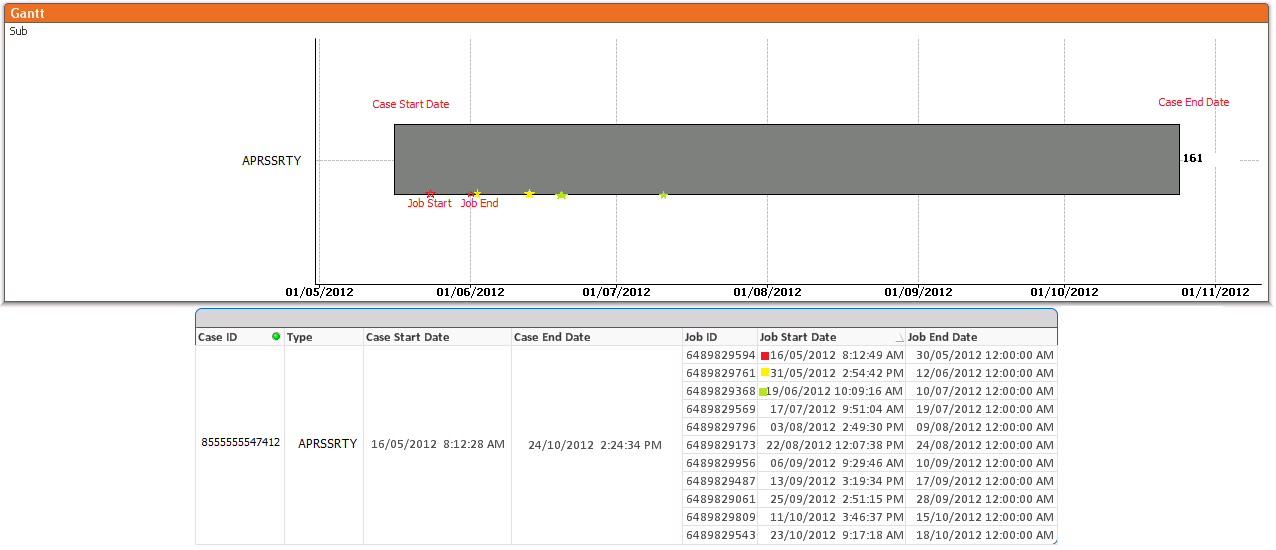
I am making a bar chart GANNT, I have a case with their start date and end date. That case has jobs between your start date and end date, every job has start date and end date. Jobs are between the start date and end date of the case.
How to mark these dates on the bar work?
Attached image of a case

 vgutkovsky
- Mark as New
- Bookmark
- Subscribe
- Mute
- Subscribe to RSS Feed
- Permalink
- Report Inappropriate Content
Gabriel, if you're interested in a true Gantt chart, you can built one natively with QlikView (see http://community.qlik.com/blogs/qlikviewdesignblog/2012/06/01/recipe-for-gantt-chart) or use a pre-made extension (http://community.qlik.com/docs/DOC-3427). However, if you're just interested in making symbols on a regular horizontal bar chart, you can create a Combo chart. The symbols can be created by selecting Symbol under Expressions >> Display Options, and deselecting Bar and Line.
Hope this helps.
Vlad