Unlock a world of possibilities! Login now and discover the exclusive benefits awaiting you.

- Qlik Community
- :
- All Forums
- :
- QlikView
- :
- Re: BarChart
- Subscribe to RSS Feed
- Mark Topic as New
- Mark Topic as Read
- Float this Topic for Current User
- Bookmark
- Subscribe
- Mute
- Printer Friendly Page

 NavinReddy
- Mark as New
- Bookmark
- Subscribe
- Mute
- Subscribe to RSS Feed
- Permalink
- Report Inappropriate Content
BarChart
Dear All,
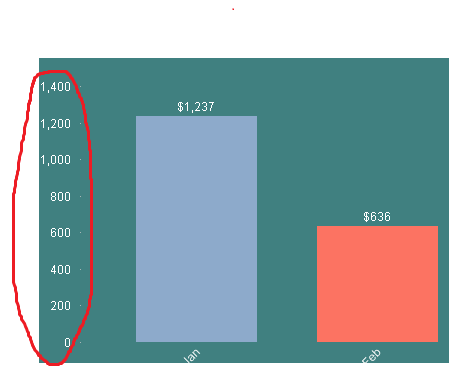
I want to show Y -Axis doller format
$1,400
$1,200
$1,000
like the format i need to be show how can i do this could you please some one guide me
And Bar width also how can i dicrease
please give me an idea
Thanks In Avance
Niranjan
 mikecrengland
- Mark as New
- Bookmark
- Subscribe
- Mute
- Subscribe to RSS Feed
- Permalink
- Report Inappropriate Content
Hi Niranjan -
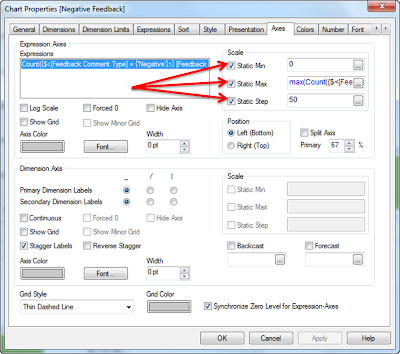
Unless something has changed, there's not a good answer. you need to format for money and use Static Min, Max and Step, and then that only works if something is filtered. Once you clear filters, the $ goes away.
Mike
www.fortunecookiebi.com
NavinReddy
- Mark as New
- Bookmark
- Subscribe
- Mute
- Subscribe to RSS Feed
- Permalink
- Report Inappropriate Content
Hi Mike,
Its not working for me i trying the same way
is there any another way
Regards,
Niranjan
mikecrengland
- Mark as New
- Bookmark
- Subscribe
- Mute
- Subscribe to RSS Feed
- Permalink
- Report Inappropriate Content
Odd... I just tried it again and it worked. Could you attached your document with some sample data?
 veidlburkhard
- Mark as New
- Bookmark
- Subscribe
- Mute
- Subscribe to RSS Feed
- Permalink
- Report Inappropriate Content
Hi Niru,
i) Money sign: in the 'Number' tab you can define a money sign (dollar) for the y axis. See below an example: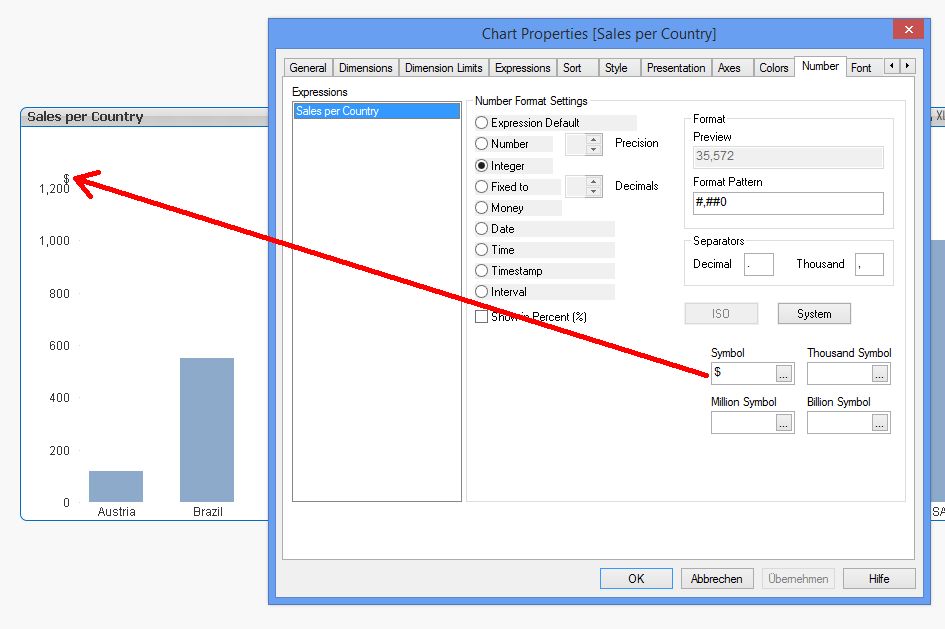
ii) Size of the bars: Go on 'Presentation' tab and adjust the 'Cluster Distance' accordingly. This allows you to arrange the size of your bars:
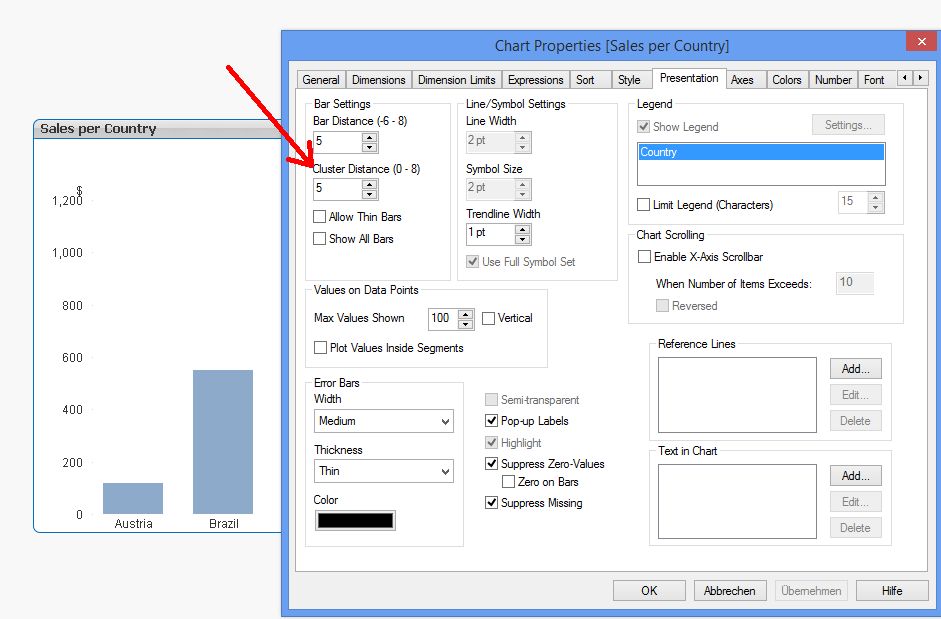
Hope this helps.
Burkhard
NavinReddy
- Mark as New
- Bookmark
- Subscribe
- Mute
- Subscribe to RSS Feed
- Permalink
- Report Inappropriate Content
Thank you guys .....
NavinReddy
- Mark as New
- Bookmark
- Subscribe
- Mute
- Subscribe to RSS Feed
- Permalink
- Report Inappropriate Content
Hi Mike,
How can i dicrease my bar width
Best Regards,
Niranjan
mikecrengland
- Mark as New
- Bookmark
- Subscribe
- Mute
- Subscribe to RSS Feed
- Permalink
- Report Inappropriate Content
The only way that I know of is like Burkhard mentioned... to increase the cluster distance. The bar width will change with the width of the chart.
