Unlock a world of possibilities! Login now and discover the exclusive benefits awaiting you.

- Qlik Community
- :
- All Forums
- :
- QlikView
- :
- Barchart
- Subscribe to RSS Feed
- Mark Topic as New
- Mark Topic as Read
- Float this Topic for Current User
- Bookmark
- Subscribe
- Mute
- Printer Friendly Page

 rathnam_qv
- Mark as New
- Bookmark
- Subscribe
- Mute
- Subscribe to RSS Feed
- Permalink
- Report Inappropriate Content
Barchart
Hi all,
i have a barchart...it contains values on y-axis as in the attached file....
i need to display each value preceded with $ (Ex: $100000,$80000..)
can any one help ....
Thanks in advance!!!
Smiley

- « Previous Replies
-
- 1
- 2
- Next Replies »

 orital81
- Mark as New
- Bookmark
- Subscribe
- Mute
- Subscribe to RSS Feed
- Permalink
- Report Inappropriate Content
Hi Smiley
Attached another qvw, this time I added $ to every possible place (-:
Header Expression, Expression Value, Dimention, Chart Header... just choose.
Hope that helped.
orital81
- Mark as New
- Bookmark
- Subscribe
- Mute
- Subscribe to RSS Feed
- Permalink
- Report Inappropriate Content
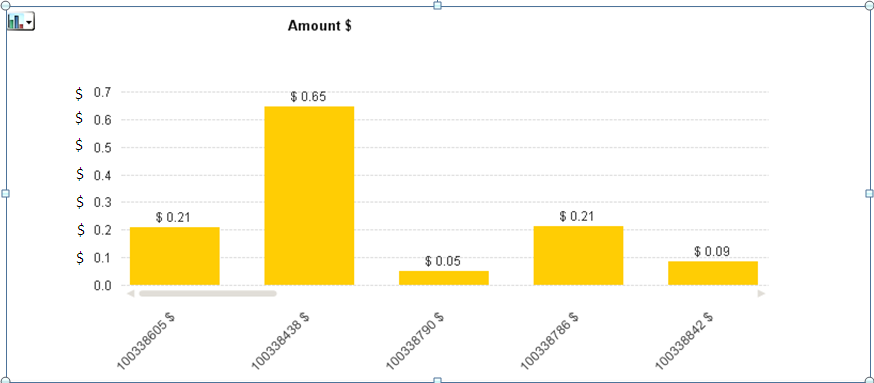
Opps, I think now I understand what you need, did you mean that you want $ on each value in Y scale?
Like in the attached printscreen

 narender123
- Mark as New
- Bookmark
- Subscribe
- Mute
- Subscribe to RSS Feed
- Permalink
- Report Inappropriate Content
Hi Ori,
How to do this as shown in your screen shot??
orital81
- Mark as New
- Bookmark
- Subscribe
- Mute
- Subscribe to RSS Feed
- Permalink
- Report Inappropriate Content
Hi Narender, unfortunately I couldn't perform it with QV, this is just a printscreen I added in order to clarify if this is what was requested. I think Y scale cannot get any sign except for %.
rathnam_qv
- Mark as New
- Bookmark
- Subscribe
- Mute
- Subscribe to RSS Feed
- Permalink
- Report Inappropriate Content
Ya Ori, Exactly
now tel me how can i achieve that
Regards
Smiley
orital81
- Mark as New
- Bookmark
- Subscribe
- Mute
- Subscribe to RSS Feed
- Permalink
- Report Inappropriate Content
Hi Smily, as I wrote to Narender;
unfortunately I couldn't perform it with QV, this is just a printscreen I added in order to clarify if this is what you requested. I think Y scale cannot get any sign except for %.
I suggest to add $ in the Symbol at Number Tab (as suggested by bika_2010).
This will add $ in the top of Y scale but not beside each number.
I think that is the best possible match for your request although it's not exactly what you requested.

- « Previous Replies
-
- 1
- 2
- Next Replies »