Unlock a world of possibilities! Login now and discover the exclusive benefits awaiting you.

- Qlik Community
- :
- All Forums
- :
- QlikView
- :
- Between value Selection (<= and >=)
- Subscribe to RSS Feed
- Mark Topic as New
- Mark Topic as Read
- Float this Topic for Current User
- Bookmark
- Subscribe
- Mute
- Printer Friendly Page

 settu_periasamy
- Mark as New
- Bookmark
- Subscribe
- Mute
- Subscribe to RSS Feed
- Permalink
- Report Inappropriate Content
Between value Selection (<= and >=)
Hi All,
This is regarding the between value for the data. when i give the condition using the Advanced search, it's selected the extra data.
find the below screen shot and sample data. In the below screen shot i given the condition between >=70002014000 <=70002014014. But in the BDN field, it's selected till 70002014017.
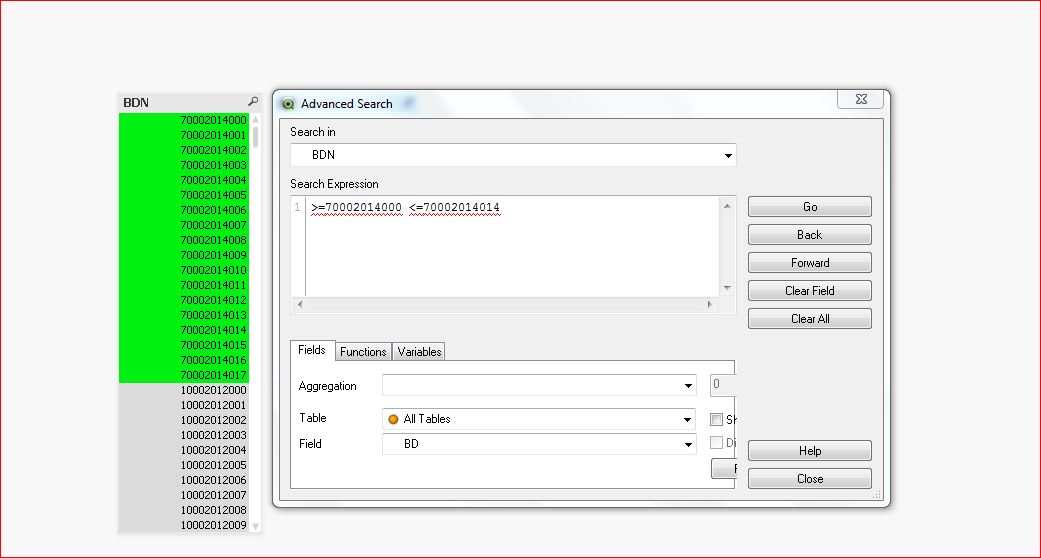
find the below sample data.
- « Previous Replies
- Next Replies »
Accepted Solutions

 ashfaq_haseeb
- Mark as New
- Bookmark
- Subscribe
- Mute
- Subscribe to RSS Feed
- Permalink
- Report Inappropriate Content
This is very old version.
I would definitely recommend to upgrade to latest version.
Hope it helps
Regards
ASHFAQ

 danieloberbilli
- Mark as New
- Bookmark
- Subscribe
- Mute
- Subscribe to RSS Feed
- Permalink
- Report Inappropriate Content
I think you only missed one zero as your max-value is actually smaller than your min value
70002014014 instead of 7002014014
settu_periasamy
- Mark as New
- Bookmark
- Subscribe
- Mute
- Subscribe to RSS Feed
- Permalink
- Report Inappropriate Content
Hi Daniel,
that was typo mistake. In the screen shot it is entered correctly. i corrected on that. Could you please check the sample application. and look on the screen shot?
danieloberbilli
- Mark as New
- Bookmark
- Subscribe
- Mute
- Subscribe to RSS Feed
- Permalink
- Report Inappropriate Content
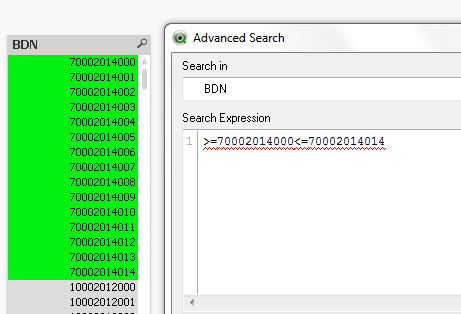
I think it works fine: or am I missing something?

- Mark as New
- Bookmark
- Subscribe
- Mute
- Subscribe to RSS Feed
- Permalink
- Report Inappropriate Content
put , in middle
settu_periasamy
- Mark as New
- Bookmark
- Subscribe
- Mute
- Subscribe to RSS Feed
- Permalink
- Report Inappropriate Content
Hi Daniel,
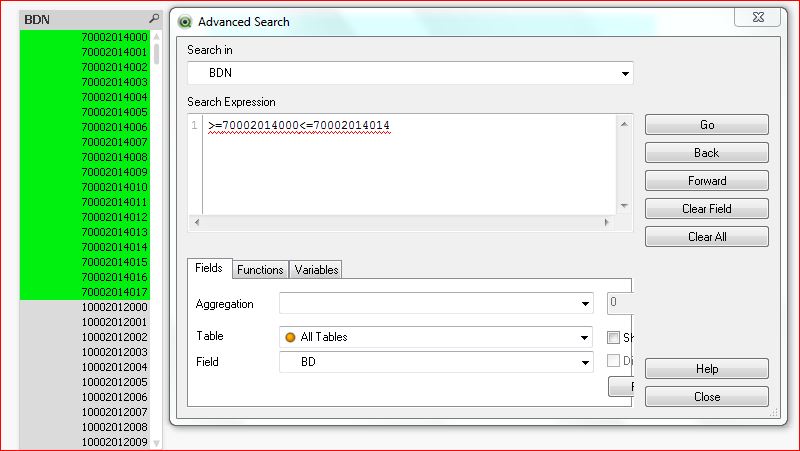
This is what exactly i need. But for me, the same expression shows extra data. see the below screen shot for me.
danieloberbilli
- Mark as New
- Bookmark
- Subscribe
- Mute
- Subscribe to RSS Feed
- Permalink
- Report Inappropriate Content
I have no idea what could be the reason for that - try to Clear your selection, do it again and hit the Go-button of Advanced Search...maybe you had first a typo and didn't hit the go-button again?
settu_periasamy
- Mark as New
- Bookmark
- Subscribe
- Mute
- Subscribe to RSS Feed
- Permalink
- Report Inappropriate Content
I tried the same. but not get the result. is there any limit for the number value?
 aveeeeeee7en
- Mark as New
- Bookmark
- Subscribe
- Mute
- Subscribe to RSS Feed
- Permalink
- Report Inappropriate Content
Hi Settu
Use Button Search and write Expression:
='>=$(=70002014000)' & '<$(=70002014015)'
Snapshot:
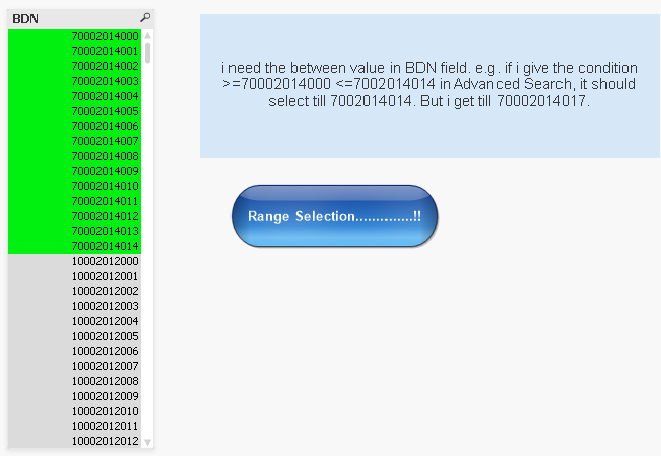
Also, See the Attachment.
Regards
Av7eN
danieloberbilli
- Mark as New
- Bookmark
- Subscribe
- Mute
- Subscribe to RSS Feed
- Permalink
- Report Inappropriate Content
could it be that you copied and paste the search expression and there is maybe a (hidden) layout symbol that comes sometimes if trying to copy&paste stuff from word/excel/powerpoint. If so - try to type it again
- « Previous Replies
- Next Replies »