Unlock a world of possibilities! Login now and discover the exclusive benefits awaiting you.

Announcements
Talend Cloud AWS EU Scheduled Outage: Starting Tues 26 May 21:00 CEST with expected completion Wed 27 May 01:00 CEST
- Qlik Community
- :
- All Forums
- :
- QlikView
- :
- Re: Bolding text in table
Options
- Subscribe to RSS Feed
- Mark Topic as New
- Mark Topic as Read
- Float this Topic for Current User
- Bookmark
- Subscribe
- Mute
- Printer Friendly Page
Turn on suggestions
Auto-suggest helps you quickly narrow down your search results by suggesting possible matches as you type.
Showing results for

Not applicable
2016-03-01
08:12 AM
- Mark as New
- Bookmark
- Subscribe
- Mute
- Subscribe to RSS Feed
- Permalink
- Report Inappropriate Content
Bolding text in table
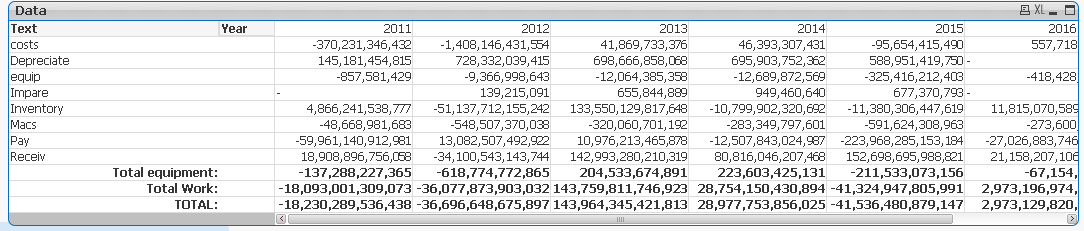
How do i bold the 3 Total Row Text in this pivot table. Find attached
2,969 Views
1 Solution
Accepted Solutions

 sunny_talwar
MVP
2016-03-01
08:16 AM
- Mark as New
- Bookmark
- Subscribe
- Mute
- Subscribe to RSS Feed
- Permalink
- Report Inappropriate Content
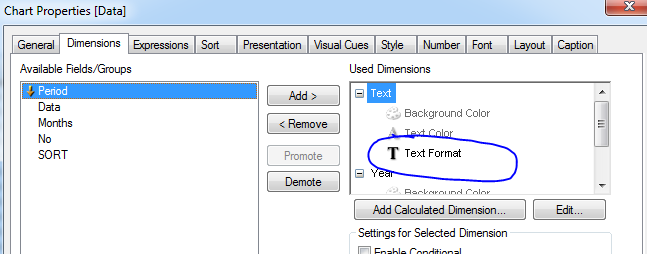
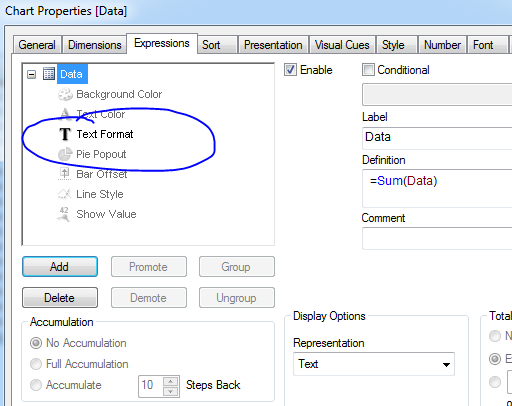
Add the following expression for Text Format for all your expressions and dimensions:
=If(WildMatch(Upper(Text), '*TOTAL*'), '<b>')
4 Replies
sunny_talwar
MVP
2016-03-01
08:16 AM
- Mark as New
- Bookmark
- Subscribe
- Mute
- Subscribe to RSS Feed
- Permalink
- Report Inappropriate Content
Add the following expression for Text Format for all your expressions and dimensions:
=If(WildMatch(Upper(Text), '*TOTAL*'), '<b>')
Anonymous
Not applicable
2016-03-01
08:16 AM
Author
- Mark as New
- Bookmark
- Subscribe
- Mute
- Subscribe to RSS Feed
- Permalink
- Report Inappropriate Content
like this?
 avinashelite
MVP
2016-03-01
08:16 AM
- Mark as New
- Bookmark
- Subscribe
- Mute
- Subscribe to RSS Feed
- Permalink
- Report Inappropriate Content
2,312 Views
Anonymous
Not applicable
2016-03-01
08:18 AM
Author
- Mark as New
- Bookmark
- Subscribe
- Mute
- Subscribe to RSS Feed
- Permalink
- Report Inappropriate Content
Select Design Grip from Menu -> Then Right Click on Any Column Cell -> Custom Format Cells -> Formatting as per your requirement