Unlock a world of possibilities! Login now and discover the exclusive benefits awaiting you.

- Qlik Community
- :
- All Forums
- :
- QlikView
- :
- Re: Breakpoint in debug option of script editor
Options
- Subscribe to RSS Feed
- Mark Topic as New
- Mark Topic as Read
- Float this Topic for Current User
- Bookmark
- Subscribe
- Mute
- Printer Friendly Page
Turn on suggestions
Auto-suggest helps you quickly narrow down your search results by suggesting possible matches as you type.
Showing results for

Anonymous
Not applicable
2015-05-12
10:41 AM
- Mark as New
- Bookmark
- Subscribe
- Mute
- Subscribe to RSS Feed
- Permalink
- Report Inappropriate Content
Breakpoint in debug option of script editor
Ho,
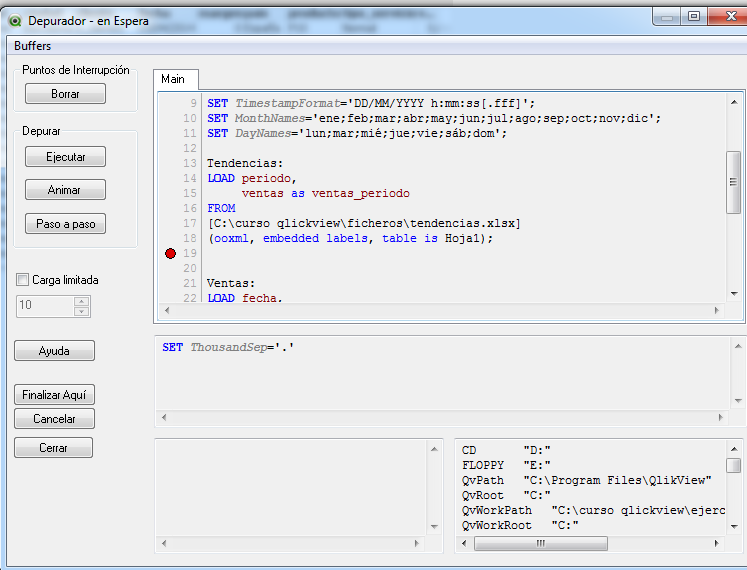
I am tying to use then breakpoint option in debug mode of script editor and I don't understand well this option...
I think a breakpoint is a point to define in your script to stop de execution. That is 'execute until breakpoint'
But in my case I define a breakpiont, but Qlickview makes the whole execution.
Can anybody help me?
- Tags:
- new_to_qlikview
1,971 Views
2 Replies

 jsanchezh
Partner - Creator
2015-05-12
10:57 AM
- Mark as New
- Bookmark
- Subscribe
- Mute
- Subscribe to RSS Feed
- Permalink
- Report Inappropriate Content
You have to place the breakpoint on a line where a statement begins. For example the same line as "Ventas:" Anycase, try "Paso a Paso" to see where are the lines it may stop the execution
I hope it helps
 awhitfield
Partner - Champion
2015-05-12
11:02 AM
- Mark as New
- Bookmark
- Subscribe
- Mute
- Subscribe to RSS Feed
- Permalink
- Report Inappropriate Content
Hi Juan,
you can't set a breakpoint against a 'blank line', select line 21 'Ventas' in your example 
Andy
1,537 Views