Unlock a world of possibilities! Login now and discover the exclusive benefits awaiting you.

- Qlik Community
- :
- All Forums
- :
- QlikView
- :
- Re: Browser Timeout
- Subscribe to RSS Feed
- Mark Topic as New
- Mark Topic as Read
- Float this Topic for Current User
- Bookmark
- Subscribe
- Mute
- Printer Friendly Page

- Mark as New
- Bookmark
- Subscribe
- Mute
- Subscribe to RSS Feed
- Permalink
- Report Inappropriate Content
Browser Timeout
Hi,
We have a "problem" with Internet Explorer, and that is - it seems as if IE has build in timeout of 1 minute.
Since a computation on server lasts more than 1 minute, the IE breaks connection to server, and the results are not delieverd to an end-user.
We tested this with other browsers as well - and the results ARE being delivered.
Since IE is a default browser in our company, we are trying to find a way how to increase a timeout in IE.
In "Internet Options" we haven't find this setting. Furthermore, we have also found similar settings on Server (QV). After changing this parameters, we have established that they do not change the timeout.
Did anyone previously have this problem? Can you please help me resolve it?
UPDATE: ok - it seems we have the same problem with Google Chrome. - so I changed the title.
Thanks!
D.
- « Previous Replies
- Next Replies »
- Mark as New
- Bookmark
- Subscribe
- Mute
- Subscribe to RSS Feed
- Permalink
- Report Inappropriate Content
Not sure how that could help me...
Because the purpose of the application is to show a map.
we retrieve google map (image) and lay on top of it a scatter chart.
It is functioning ok when we set the criteria in a way that takes only small subset of data.
However, when we try to test it and select the entire dataset - to show the data on a COUNTRY level, we get the mentioned message - it is also clear that the computation needs time (most likely more than 1 minute).
Now, we come to the problem - because of some setting, QV automatically stops it after 1 minute.
Resolution would be to increase this timeout...
Therefore, I doubt cleaning cache and similar could help us...

 Luis_Cortizo
- Mark as New
- Bookmark
- Subscribe
- Mute
- Subscribe to RSS Feed
- Permalink
- Report Inappropriate Content
On a default QlikView installation, your session time should be set to 1800 seconds (you cand find your configuration on the QMC under Server => Performance), but again in a default installation the maximun amount of time that the QVS will be working with a single chart would be 60 seconds:
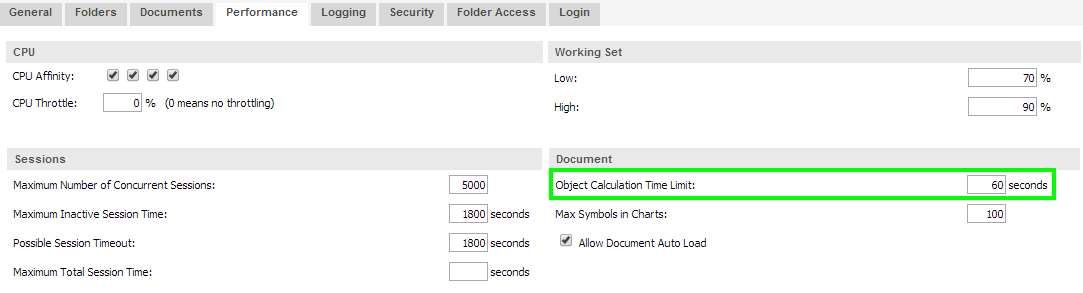
Of course you can adjust this parameter but you would be changing the global object calculation time limit for the whole server allowing several objects to consume resources at the same time.
Wouldn't it be a possibility to preselect a value on that tab or to hide the chart unless one single value (city for instance) has been selected?.
Hope it helps.
Best regards.

 vincent_ardiet
- Mark as New
- Bookmark
- Subscribe
- Mute
- Subscribe to RSS Feed
- Permalink
- Report Inappropriate Content
Of course, cleaning the cache would not help you :-), I was just taking an example with our empty cross tables.
You're clearly not in this situation.
So, maybe have you done this test, but, if you remove the map, or if you remove the scatter chart, does it change something?
In the QEMC settings you can set a timeout for the calculation of objects (600sec by default) but, if you reach this time limit QV will not display your object but not disconnect the user.
It looks more as a bug linked to one of the object on the page.
Luis_Cortizo
- Mark as New
- Bookmark
- Subscribe
- Mute
- Subscribe to RSS Feed
- Permalink
- Report Inappropriate Content
Still, once the country "view" has been calculated it would be stored in cache so the next time you need the whole map it should be pretty near to instantaneous 
- « Previous Replies
- Next Replies »