Unlock a world of possibilities! Login now and discover the exclusive benefits awaiting you.

- Qlik Community
- :
- All Forums
- :
- QlikView
- :
- Bubble Chart Color Issue!!!!!!!!!! Please help exp...
- Subscribe to RSS Feed
- Mark Topic as New
- Mark Topic as Read
- Float this Topic for Current User
- Bookmark
- Subscribe
- Mute
- Printer Friendly Page

- Mark as New
- Bookmark
- Subscribe
- Mute
- Subscribe to RSS Feed
- Permalink
- Report Inappropriate Content
Bubble Chart Color Issue!!!!!!!!!! Please help experts
Good morning experts,
I have created a bubble chart. The issue i am having is that i cannot find the proper way to color these bubbles according to what is selected in my list box. For Example: If i check Assigned on my list box, i want the bubbles corresponding to what i selected to turn green. And if I check Cancelled, i want all the cancelled jobs in the bubble to turn red, and so on.
Please help experts

 krishnacbe
- Mark as New
- Bookmark
- Subscribe
- Mute
- Subscribe to RSS Feed
- Permalink
- Report Inappropriate Content
Hi
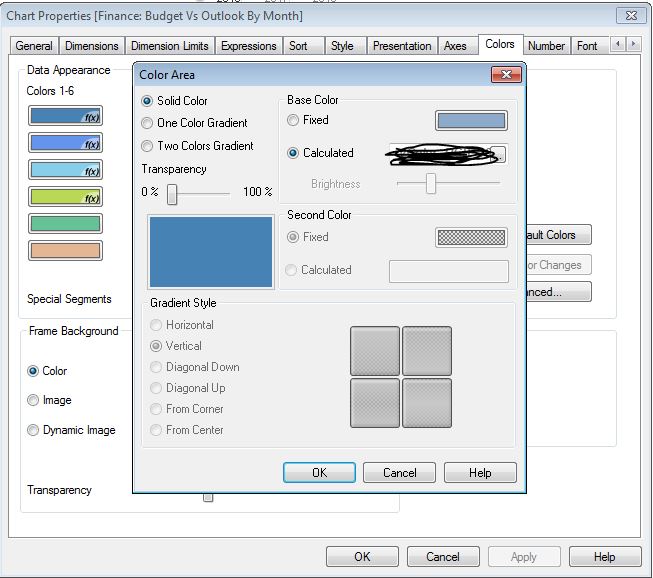
Write your color expression in Colors Tab -> Data Appearance -> Colors -> Calculated box.

 vishsaggi
- Mark as New
- Bookmark
- Subscribe
- Mute
- Subscribe to RSS Feed
- Permalink
- Report Inappropriate Content
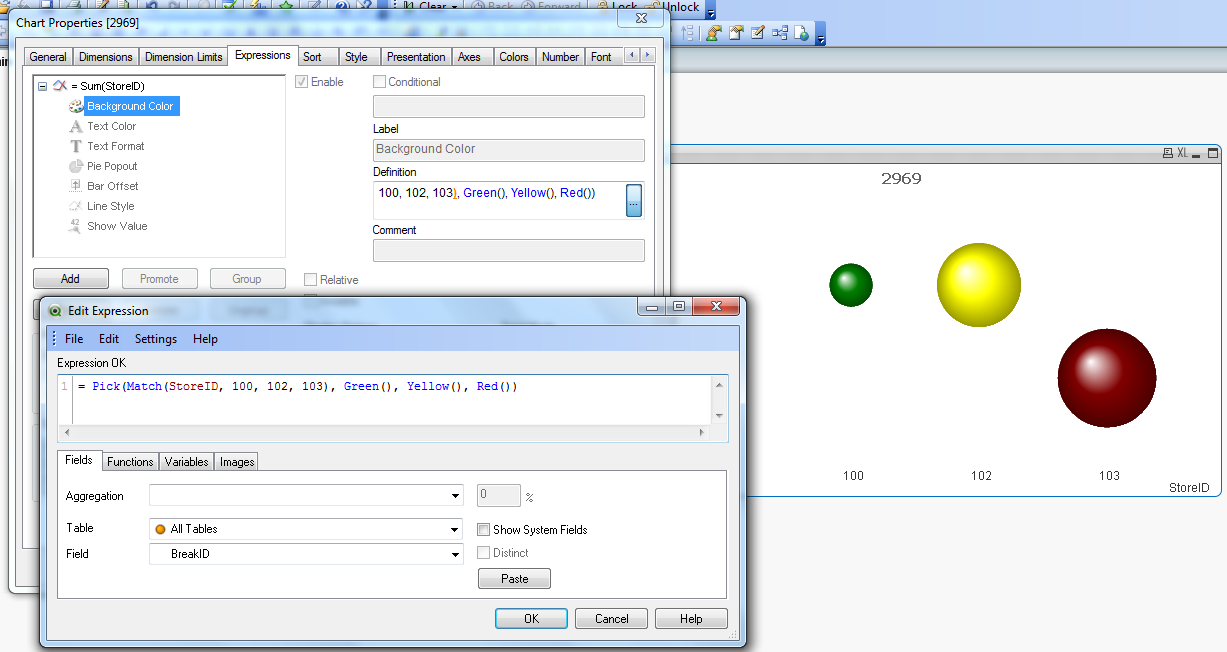
Did you try this expression in your expression like:
When you click on small + sigh in the expression -> in the background color
= Pick(Match(Listboxname, 'Assigned', 'Cancelled'), Green(), LightRed())
- Mark as New
- Bookmark
- Subscribe
- Mute
- Subscribe to RSS Feed
- Permalink
- Report Inappropriate Content
Can you show a example please if you dont mind. I am new to Qlikview
krishnacbe
- Mark as New
- Bookmark
- Subscribe
- Mute
- Subscribe to RSS Feed
- Permalink
- Report Inappropriate Content
Add the expression in the Calculated box. you need to add in all the Colors (1-6) , (7-12) & (13 - 18)
As suggested by Vish you can use the expression
=Pick(Match(Listboxname, 'Assigned', 'Cancelled'), Green(), LightRed())
vishsaggi
- Mark as New
- Bookmark
- Subscribe
- Mute
- Subscribe to RSS Feed
- Permalink
- Report Inappropriate Content
In the expression tab of your bubble chart like :