Unlock a world of possibilities! Login now and discover the exclusive benefits awaiting you.

- Qlik Community
- :
- All Forums
- :
- QlikView
- :
- Re: Burn down chart
- Subscribe to RSS Feed
- Mark Topic as New
- Mark Topic as Read
- Float this Topic for Current User
- Bookmark
- Subscribe
- Mute
- Printer Friendly Page

 karin_nevo
- Mark as New
- Bookmark
- Subscribe
- Mute
- Subscribe to RSS Feed
- Permalink
- Report Inappropriate Content
Burn down chart
Hi,
I am creating a burn down chart using the following expression:
sum(total Hours)-RangeSum(Above(TOTAL Sum(Hours), 0, RowNo(TOTAL))).
and Quarter as dimension
I am getting the required result, but I want the chart to display also the sum of hours (sum Total Hours) for all periods.
For example, in TableCapture.PNG, the total appears in the expression column (1382).
I want the same total to appear as starting point in ChartCapture.PNG . Is it possible?
I tried to use "Show Total" in dimension limit but it didn't work
Thanks,
Karin

 Nicole-Smith
- Mark as New
- Bookmark
- Subscribe
- Mute
- Subscribe to RSS Feed
- Permalink
- Report Inappropriate Content
So you just want to show the number on the chart but not linked to your dimensions/expressions?
You can add the expression as text here:
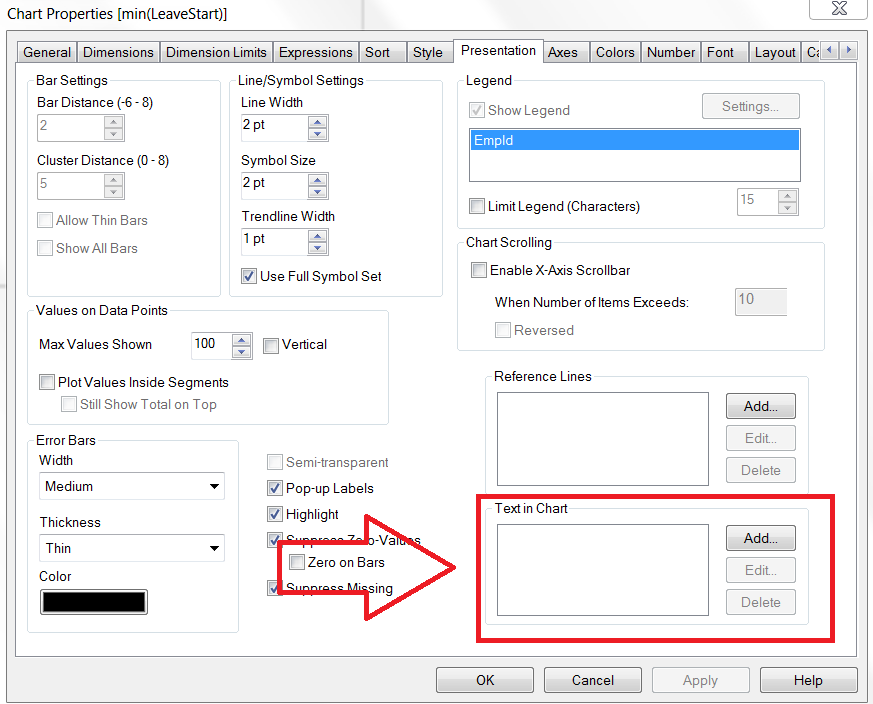


You can move it to where you want it by holding down CTRL+SHIFT (a red border should show around it), and then you can click and drag it to where you want it (while still holding down CTRL+SHIFT).
