Unlock a world of possibilities! Login now and discover the exclusive benefits awaiting you.

- Qlik Community
- :
- All Forums
- :
- QlikView
- :
- Button Selection not working
- Subscribe to RSS Feed
- Mark Topic as New
- Mark Topic as Read
- Float this Topic for Current User
- Bookmark
- Subscribe
- Mute
- Printer Friendly Page

- Mark as New
- Bookmark
- Subscribe
- Mute
- Subscribe to RSS Feed
- Permalink
- Report Inappropriate Content
Button Selection not working
Hi All,
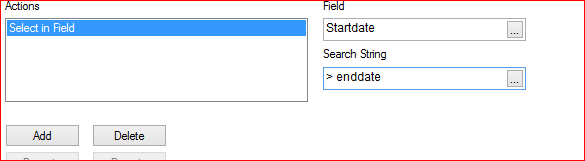
I have a issues regarding creating a button which when clicked only shows data where a field is greater than another field.
like:
field 1 is startdate
field 2 is enddate
And would like to create action in Button Select in Field where field is startdate and Search String is > enddate.
This is not working is it not possible to use fields in the Search String?
Or am I doing something wrong.
Thanks in advance.
Ruud.

 rupamjyotidas
- Mark as New
- Bookmark
- Subscribe
- Mute
- Subscribe to RSS Feed
- Permalink
- Report Inappropriate Content
='>=' & enddate
- Mark as New
- Bookmark
- Subscribe
- Mute
- Subscribe to RSS Feed
- Permalink
- Report Inappropriate Content
Hi Rupam,
Thanks for the quick reply. I have tried your solution but somehow it does nothing when I click the button.


- Mark as New
- Bookmark
- Subscribe
- Mute
- Subscribe to RSS Feed
- Permalink
- Report Inappropriate Content
Hello, Would you able to provide sample application
And, Here how Qlikview understand whether which date will consider from enddate.
 Sergey_Shuklin
- Mark as New
- Bookmark
- Subscribe
- Mute
- Subscribe to RSS Feed
- Permalink
- Report Inappropriate Content
Hello, Ruud!
Available solutions:
1. If you don't want to make changes in the script so you'll have to get somehow a string which will contain recent dates divided by "|". For instance "(01.02.2017|01.04.2017|01.05.2017)" and so on - this is the line of dates that satisfy the condition "startdate > enddate".
You can try to use this string as condition: ='('&Concat(if(startdate>enddate,startdate),'|')&')'
2. If you able to edit the script then you can easily add a support column (mark) which will follow the condition "startdate > enddate" and set 1/0 if it's true or false. After that you can create a simple condition in your button like "Search in mark field value equal 1".
- Mark as New
- Bookmark
- Subscribe
- Mute
- Subscribe to RSS Feed
- Permalink
- Report Inappropriate Content
Hi Sergey,
Ok, that makes sense in SQL I would prefer way 2, and I have tried and works perfectly.
Thanks for the great but easy solution and tip.
Regards Ruud