Unlock a world of possibilities! Login now and discover the exclusive benefits awaiting you.

- Qlik Community
- :
- All Forums
- :
- QlikView
- :
- CHART ERROR MESSAGE
- Subscribe to RSS Feed
- Mark Topic as New
- Mark Topic as Read
- Float this Topic for Current User
- Bookmark
- Subscribe
- Mute
- Printer Friendly Page

 abhaysingh
- Mark as New
- Bookmark
- Subscribe
- Mute
- Subscribe to RSS Feed
- Permalink
- Report Inappropriate Content
CHART ERROR MESSAGE
How to show error message in a chart ,
ex-- want to show it when one expression is not applicable and others are application
- Tags:
- new_to_qlikview

 ashfaq_haseeb
- Mark as New
- Bookmark
- Subscribe
- Mute
- Subscribe to RSS Feed
- Permalink
- Report Inappropriate Content
Hi,
Go to chart Properties --> General --> Write Calculate condition and add message required message in erorConditions.
Regards
ASHFAQ
abhaysingh
- Mark as New
- Bookmark
- Subscribe
- Mute
- Subscribe to RSS Feed
- Permalink
- Report Inappropriate Content
I my analysis there are four expressions out of which 3 are true and 1 is false, for that false analysis I want to show NA..
how can I???
ashfaq_haseeb
- Mark as New
- Bookmark
- Subscribe
- Mute
- Subscribe to RSS Feed
- Permalink
- Report Inappropriate Content
Can you attach sample application.
Regards
ASHFAQ

 karthickv
- Mark as New
- Bookmark
- Subscribe
- Mute
- Subscribe to RSS Feed
- Permalink
- Report Inappropriate Content
Hi Abhay,
Go to General Tab in Chart Properties. Write a Calculation Condition and add required message in Error Messages --> Calculation Condition Unfulfilled.
PFA.
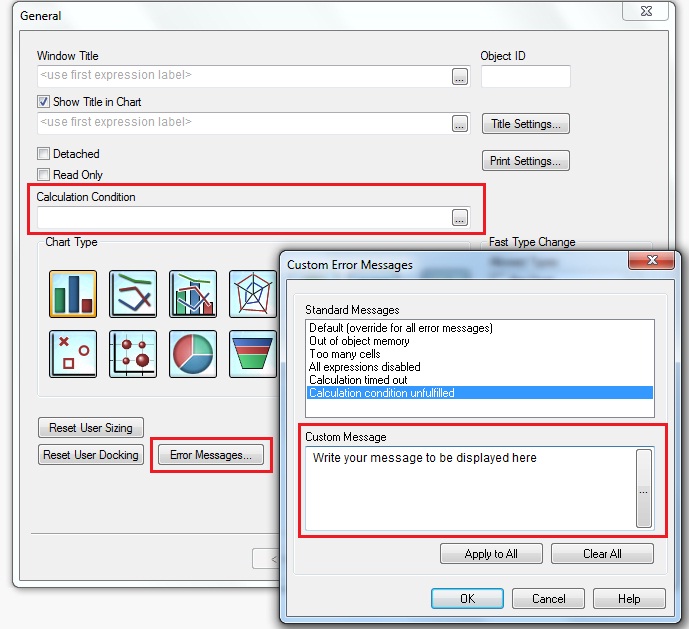
Regards,
Karthick V.

 sujeetsingh
- Mark as New
- Bookmark
- Subscribe
- Mute
- Subscribe to RSS Feed
- Permalink
- Report Inappropriate Content
Karth has explained the right way to do it.
