Unlock a world of possibilities! Login now and discover the exclusive benefits awaiting you.

- Qlik Community
- :
- All Forums
- :
- QlikView
- :
- Calculate KPI
- Subscribe to RSS Feed
- Mark Topic as New
- Mark Topic as Read
- Float this Topic for Current User
- Bookmark
- Subscribe
- Mute
- Printer Friendly Page

- Mark as New
- Bookmark
- Subscribe
- Mute
- Subscribe to RSS Feed
- Permalink
- Report Inappropriate Content
Calculate KPI
hi guys,
I have a little problem with KPI calculation.
I've this situation:
| Date | employees | revenue |
|---|---|---|
01/01/2017 | 5 | 120000 |
| 01/02/2017 | 5 | 125400 |
| 01/03/2017 | 5 | 150000 |
| 01/04/2017 | 5 | 140000 |
| 01/05/2017 | 5 | 132500 |
I have to calculate revenue / employees like :
sum(revenue) / employees
that is:
667900 / 5
But on qlikview if I write:
= sum(revenue) / employees
I get back " - " symbol
so I try:
= sum(revenue) / sum(employees)
this works but the result is incorrect because the values are:
667900 / 25
How can I do?
This is an example and the original table have more values than this.
Thanks
- « Previous Replies
-
- 1
- 2
- Next Replies »
- Mark as New
- Bookmark
- Subscribe
- Mute
- Subscribe to RSS Feed
- Permalink
- Report Inappropriate Content
every moth the system receves a file like this
| id | date | employees | revenue | n.call | etc.... |
|---|
and there are many lines.
The number of employees is a constants, but I have very different values, because I have many different id.
I need to calculate sum(revenue) / employees
where the number of employees isn't a sum(employees), but only a single value.
Do you understand now my problem?

- Mark as New
- Bookmark
- Subscribe
- Mute
- Subscribe to RSS Feed
- Permalink
- Report Inappropriate Content
Still not sure, Even thought what you tried is
sum(revenue) / 5
So, If you need to constant even selection happened
sum(revenue) / Count({1}employees)
- Mark as New
- Bookmark
- Subscribe
- Mute
- Subscribe to RSS Feed
- Permalink
- Report Inappropriate Content
Hi, Try it, please
sum(revenue) / sum(Distinct employees)
Regards.

 MarcoWedel
- Mark as New
- Bookmark
- Subscribe
- Mute
- Subscribe to RSS Feed
- Permalink
- Report Inappropriate Content
Hi,
your expression doesn't show this behaviour with your sample data:
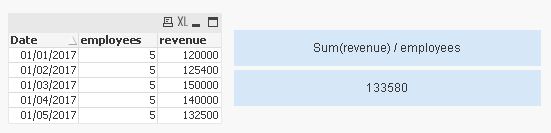
Instead I guess that you have changing employee numbers in your real data that causes the implicit only() aggregation of your expression to return null.
See also:
One solution to calculate this cumulated revenue per employee might be simply:
=Sum(revenue / employees)
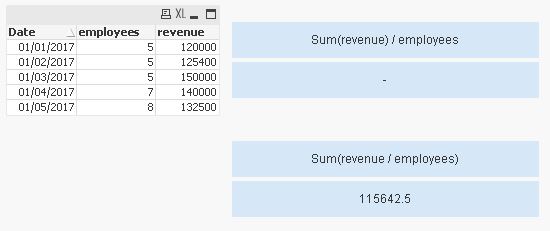

hope this helps
regards
Marco
- « Previous Replies
-
- 1
- 2
- Next Replies »