Unlock a world of possibilities! Login now and discover the exclusive benefits awaiting you.

- Qlik Community
- :
- All Forums
- :
- QlikView
- :
- Re: Calculate StockInHand
- Subscribe to RSS Feed
- Mark Topic as New
- Mark Topic as Read
- Float this Topic for Current User
- Bookmark
- Subscribe
- Mute
- Printer Friendly Page

- Mark as New
- Bookmark
- Subscribe
- Mute
- Subscribe to RSS Feed
- Permalink
- Report Inappropriate Content
Calculate StockInHand
Hi,
Can any one please help me, on "how to calculate Stock In Hand".
Below table is from excel.
| date | StockIN | StockOUT | StockINH | LogicExplanation |
| 01/01/15 | 100 | 15 | 85 | 100 - 15 = 85 |
| 01/02/15 | 10 | 45 | 50 | 85 + 10 - 45 = 50 |
| 01/03/15 | 1 | 11 | 40 | 50 + 1 - 11 = 40 |
| 01/04/15 | 25 | 35 | 30 | 40 + 25 - 35 = 30 |
| 01/05/15 | 20 | 10 | 40 | 30 + 20 - 10 = 40 |
How to get the values in "StockINH" using qlikview.
I'm using personal edition, please tell me the procedure to achieve.
Thanks In Advance.
Regards,
Pavan.
- « Previous Replies
-
- 1
- 2
- Next Replies »
Accepted Solutions

 rubenmarin
- Mark as New
- Bookmark
- Subscribe
- Mute
- Subscribe to RSS Feed
- Permalink
- Report Inappropriate Content
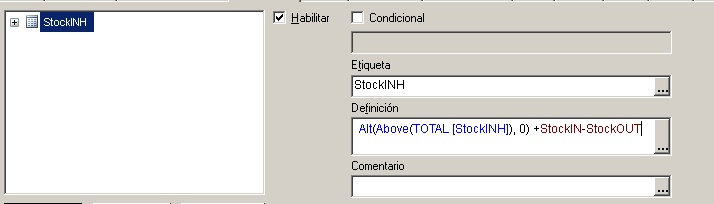
That's not supposed to be a field name, it's a expression name, if you name your expression "StockINH", it will work. If you named it different you need to set your expression name:
Expression: Alt(Above(TOTAL [ExpressionName]), 0) +StockIN-StockOUT
rubenmarin
- Mark as New
- Bookmark
- Subscribe
- Mute
- Subscribe to RSS Feed
- Permalink
- Report Inappropriate Content
Hi Pavan, in StockINH expression you can use:
Alt(Above(TOTAL [StockINH]), 0) + StockIN - StockOUT

 arulsettu
- Mark as New
- Bookmark
- Subscribe
- Mute
- Subscribe to RSS Feed
- Permalink
- Report Inappropriate Content
hi
try this
sum(StockIN)-sum(StockOUT)
- Mark as New
- Bookmark
- Subscribe
- Mute
- Subscribe to RSS Feed
- Permalink
- Report Inappropriate Content
Hi Ruben,
Thanks for your quick response.
Out of 5 columns, only first 3(date, StockIN, StockOUT) are in excel, last 2, I have created for your reference.
I need to achieve StockINH, for that last column is the logic.
Regards,
Pavan.
arulsettu
- Mark as New
- Bookmark
- Subscribe
- Mute
- Subscribe to RSS Feed
- Permalink
- Report Inappropriate Content
create a straight table and date as dimension use above code in script
rubenmarin
- Mark as New
- Bookmark
- Subscribe
- Mute
- Subscribe to RSS Feed
- Permalink
- Report Inappropriate Content
Yes, I know that, please check attachment.
rubenmarin
- Mark as New
- Bookmark
- Subscribe
- Mute
- Subscribe to RSS Feed
- Permalink
- Report Inappropriate Content
OK, you have personal edition... what I did:
Script:
LOAD Date(date) as date, StockIN, StockOUT;
LOAD * INLINE [
date,StockIN,StockOUT
01/01/15,100,15
01/02/15,10,45
01/03/15,1,11
01/04/15,25,35
01/05/15,20,10
];
Graph:
Dimensions: date,StockIN,StockOUT
Expression StockINH: Alt(Above(TOTAL [StockINH]), 0) +StockIN-StockOUT
- Mark as New
- Bookmark
- Subscribe
- Mute
- Subscribe to RSS Feed
- Permalink
- Report Inappropriate Content
Hi Ruben,
I don't have stockINH column in excel, it is showing error.
Please let me know where I'm doing wrong, please help me out.

Regards,
Pavan.
rubenmarin
- Mark as New
- Bookmark
- Subscribe
- Mute
- Subscribe to RSS Feed
- Permalink
- Report Inappropriate Content
That's not supposed to be a field name, it's a expression name, if you name your expression "StockINH", it will work. If you named it different you need to set your expression name:
Expression: Alt(Above(TOTAL [ExpressionName]), 0) +StockIN-StockOUT
- Mark as New
- Bookmark
- Subscribe
- Mute
- Subscribe to RSS Feed
- Permalink
- Report Inappropriate Content
Hi Ruben,
Thanks a ton for your shift help.
You really deserve it.
Thank you so much.
Regards,
Pavan.
- « Previous Replies
-
- 1
- 2
- Next Replies »