Unlock a world of possibilities! Login now and discover the exclusive benefits awaiting you.

- Qlik Community
- :
- All Forums
- :
- QlikView
- :
- Calculate delay from a single row
- Subscribe to RSS Feed
- Mark Topic as New
- Mark Topic as Read
- Float this Topic for Current User
- Bookmark
- Subscribe
- Mute
- Printer Friendly Page

- Mark as New
- Bookmark
- Subscribe
- Mute
- Subscribe to RSS Feed
- Permalink
- Report Inappropriate Content
Calculate delay from a single row
Hello,
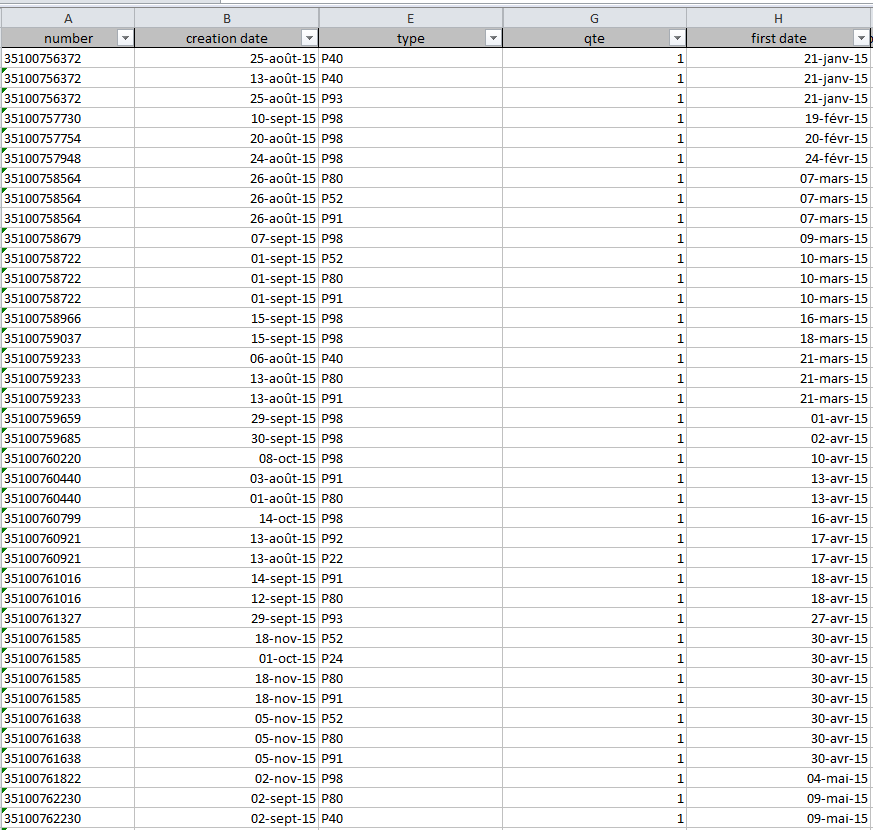
I have to determine the delay between 2 type, but these date are in the same row named creation date.
For example I have to know the delay between P40 and P91 or above. For this I use the NetWorkDays function and it work well when I'm working with the delay from the first date to the creation date. I wrote this :
Avg(NetWorkDays([first_date],if(type='P91' or type='P92'or type='P93'or type='P98',[creation date])))
Here I want the average delay from the first date to the finalisation of a contract which correpond to P91 and above from the creation date. And it's work fine
the problem is when I only use the creation date to determine the delay between P40 and P91 and above it doesn't work because I'm working in the same row.
Avg(NetWorkDays(if(type='P40',[creation date]),if(type='P91' or type='P92'or type='P93'or type='P98',[creation date])))
This display any data. If someone have some idea how it can work, that would be great 
Thank you
Accepted Solutions

 swuehl
- Mark as New
- Bookmark
- Subscribe
- Mute
- Subscribe to RSS Feed
- Permalink
- Report Inappropriate Content
Maybe something like
=Avg(
Aggr(
NetWorkDays( Max({<type={'P40'}>} [creation date]) , Min( {<type ={'P91','P92','P93','P98'}>} [creation date]) )
,number)
)
So, for each number, look for the max P40 creation date and calculate networkdays to min creation date with either {'P91','P92','P93','P98'}.
Then calculate the avg number of networkdays delay across numbers.
Adapt accordingly.
Hope this helps,
Stefan

 sunny_talwar
- Mark as New
- Bookmark
- Subscribe
- Mute
- Subscribe to RSS Feed
- Permalink
- Report Inappropriate Content
It would be much easier to help if you can provide a sample. Looking at an image and trying to decipher the expression is quite challenging.
Read some of the information which can help you get your questions answered quickly.
QlikCommunity Tip: How to get answers to your post?
Preparing examples for Upload - Reduction and Data Scrambling
Best,
Sunny
swuehl
- Mark as New
- Bookmark
- Subscribe
- Mute
- Subscribe to RSS Feed
- Permalink
- Report Inappropriate Content
Maybe something like
=Avg(
Aggr(
NetWorkDays( Max({<type={'P40'}>} [creation date]) , Min( {<type ={'P91','P92','P93','P98'}>} [creation date]) )
,number)
)
So, for each number, look for the max P40 creation date and calculate networkdays to min creation date with either {'P91','P92','P93','P98'}.
Then calculate the avg number of networkdays delay across numbers.
Adapt accordingly.
Hope this helps,
Stefan
- Mark as New
- Bookmark
- Subscribe
- Mute
- Subscribe to RSS Feed
- Permalink
- Report Inappropriate Content
Thank you !
It worked fine, the aggr function was the answer