Unlock a world of possibilities! Login now and discover the exclusive benefits awaiting you.

- Qlik Community
- :
- All Forums
- :
- QlikView
- :
- Re: Calculate %
- Subscribe to RSS Feed
- Mark Topic as New
- Mark Topic as Read
- Float this Topic for Current User
- Bookmark
- Subscribe
- Mute
- Printer Friendly Page

 vanderson009
- Mark as New
- Bookmark
- Subscribe
- Mute
- Subscribe to RSS Feed
- Permalink
- Report Inappropriate Content
Calculate %
I have below formatted data and i want to percentage that are based on year.

Example - ProductA contribution in 2016 is 20 and percentage of contribution would be 33.33 % for that year.
Thanks,
Villyee.
- « Previous Replies
-
- 1
- 2
- Next Replies »
Accepted Solutions

 isingh30
- Mark as New
- Bookmark
- Subscribe
- Mute
- Subscribe to RSS Feed
- Permalink
- Report Inappropriate Content
 adityaakshaya
- Mark as New
- Bookmark
- Subscribe
- Mute
- Subscribe to RSS Feed
- Permalink
- Report Inappropriate Content
Hi Villyee,
A quick question, are you looking to calculate the % within script or front end?
vanderson009
- Mark as New
- Bookmark
- Subscribe
- Mute
- Subscribe to RSS Feed
- Permalink
- Report Inappropriate Content
I am trying it at object level, means at front end lwvel.

 fvelascog72
- Mark as New
- Bookmark
- Subscribe
- Mute
- Subscribe to RSS Feed
- Permalink
- Report Inappropriate Content
Hi,
Try with Sum(Sales)/Sum(TOTAL<Year> Sales)
Saludos
isingh30
- Mark as New
- Bookmark
- Subscribe
- Mute
- Subscribe to RSS Feed
- Permalink
- Report Inappropriate Content
Sum(Sales)/Sum(TOTAL<Year> Sales/100 )
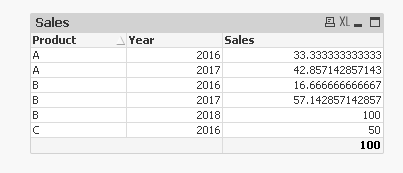
 vvira1316
- Mark as New
- Bookmark
- Subscribe
- Mute
- Subscribe to RSS Feed
- Permalink
- Report Inappropriate Content
I've got following
=Sum(Sales)/Aggr(Sum({<Year>} Sales), Year)
but I'm missing rows
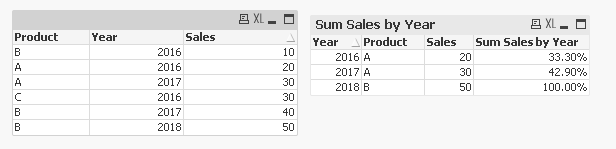
Sunny stalwar1 or others can help here.

 sunny_talwar
- Mark as New
- Bookmark
- Subscribe
- Mute
- Subscribe to RSS Feed
- Permalink
- Report Inappropriate Content
May be this
=Sum(Sales)/Aggr(NODISTINCT Sum({<Year>} Sales), Year)
vvira1316
- Mark as New
- Bookmark
- Subscribe
- Mute
- Subscribe to RSS Feed
- Permalink
- Report Inappropriate Content
Yeah, that is correct. But the simple one mentioned by Ishtdeep will work.
I was having challenge as below
=Sum(Sales)/Sum( Total {<Year>} Sales) The curly braces for year were causing whole set sum. I didn't realize that curly braces for year were not required only angular were needed
sunny_talwar
- Mark as New
- Bookmark
- Subscribe
- Mute
- Subscribe to RSS Feed
- Permalink
- Report Inappropriate Content
Yup 
sunny_talwar
- Mark as New
- Bookmark
- Subscribe
- Mute
- Subscribe to RSS Feed
- Permalink
- Report Inappropriate Content
Actually fvelascog72 was the first one to propose it and personally I would not multiply by 100 , but rather use number tab to show the expression as percentage

- « Previous Replies
-
- 1
- 2
- Next Replies »